
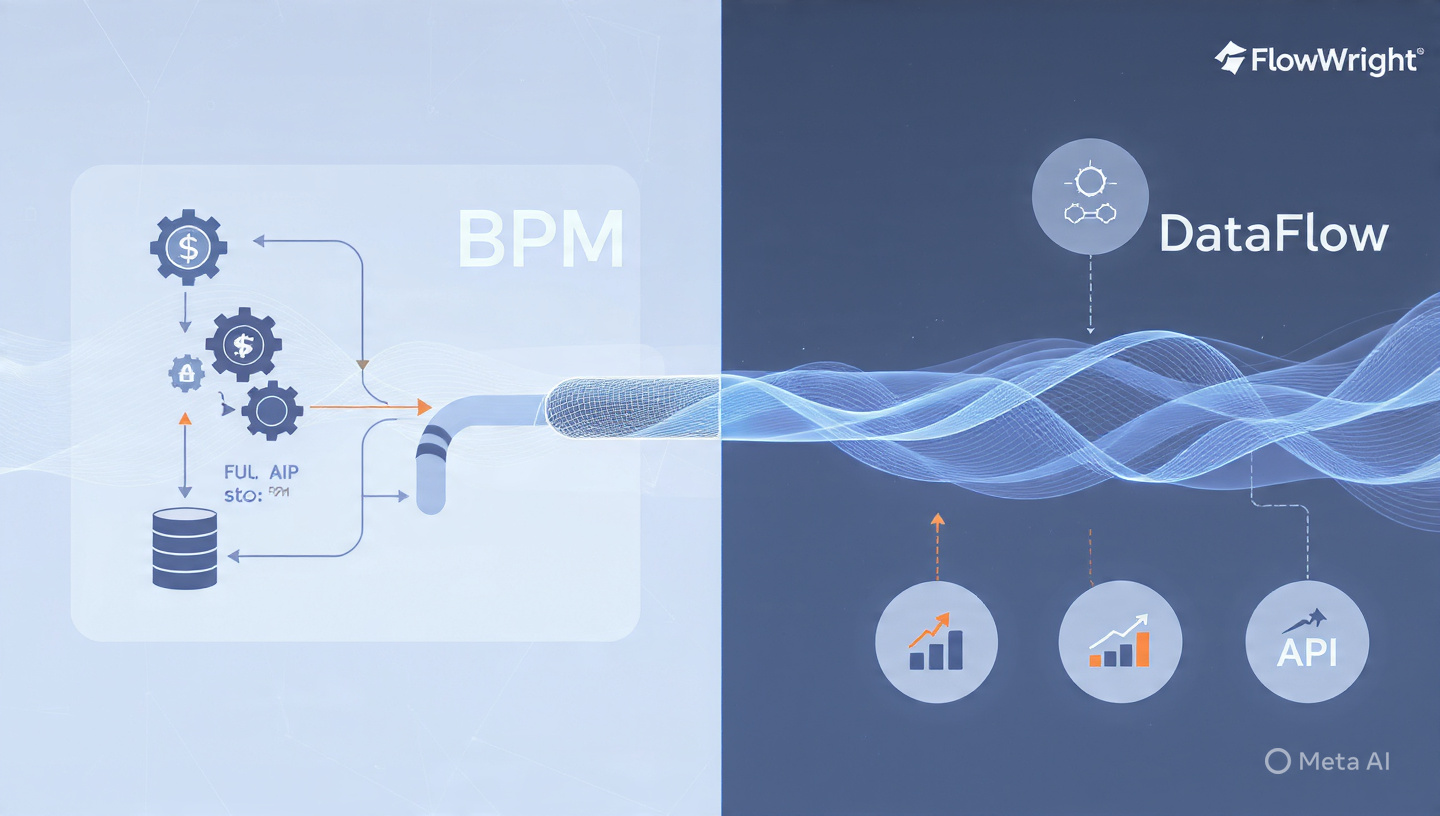
Business Process Management (BPM) and Extract, Transform, Load (ETL) sound like cousins. Both move data, both orchestrate steps, both care about rules. So when a team buys a BPM suite, the natural question pops up: “Can we just use this to replace our ETL jobs too?”
Nine times out of ten, the answer is no. Not because the BPM vendor is lazy, but because BPM and ETL were designed to solve different physics problems. FlowWright is the rare exception that actually runs ETL-grade workloads inside the same engine that runs your approvals, escalations, and human tasks. Here’s why that gap exists, and what FlowWright did differently.
BPM and ETL Have Different DNA
To understand why most BPM tools fail at ETL, you have to look at what each engine was optimized for.
1. Unit of work
- BPM: Thinks in instances. One loan application, one purchase order, one employee onboarding. The engine is tuned for thousands to millions of small, long-running state machines that wait on people, systems, or timers.
- ETL: Thinks in sets. Move 4 million rows from SQL Server to Snowflake, join with yesterday’s flat file, deduplicate, aggregate, then bulk insert. The engine is tuned for throughput, not waiting.
Most BPM engines use a row-by-row or event-by-event execution model. That’s fine when you’re routing a document. It falls apart when you try to loop through 2 million records because the overhead per item kills you.
2. State management
- BPM: Persists state after every step. If the server reboots mid-process, it must resume exactly where it left off. That safety costs disk I/O and transaction overhead.
- ETL: Treats failure as “restart the batch.” Checkpointing happens at block boundaries, not every row. It trades granular recovery for speed.
Put an ETL job on a classic BPM engine and you’ll see the database thrash from constant state writes. The same job that takes 4 minutes in SSIS suddenly takes 6 hours.
3. Transformation capability
- BPM: Mapping is usually limited to XSLT, simple expressions, or calling a web service to do the real work. There’s no native concept of group-by, window functions, slowly changing dimensions, or bulk lookups with caching.
- ETL: Built around data pipelines. Native components for pivot, unpivot, merge join, fuzzy lookup, conditional split, and in-memory caching of reference data.
When BPM vendors say “we do data integration,” they mean “we can call your REST API.” That’s not the same as transforming 10GB in flight without landing it.
4. Connectivity model
- BPM: Connectors are transactional. They assume you’re reading or writing one record as part of a process instance. Try to point them at a table and they’ll open a cursor and fetch one row at a time.
- ETL: Connectors are bulk. They use SqlBulkCopy, batch REST calls, file streaming, and parallel partition reads.
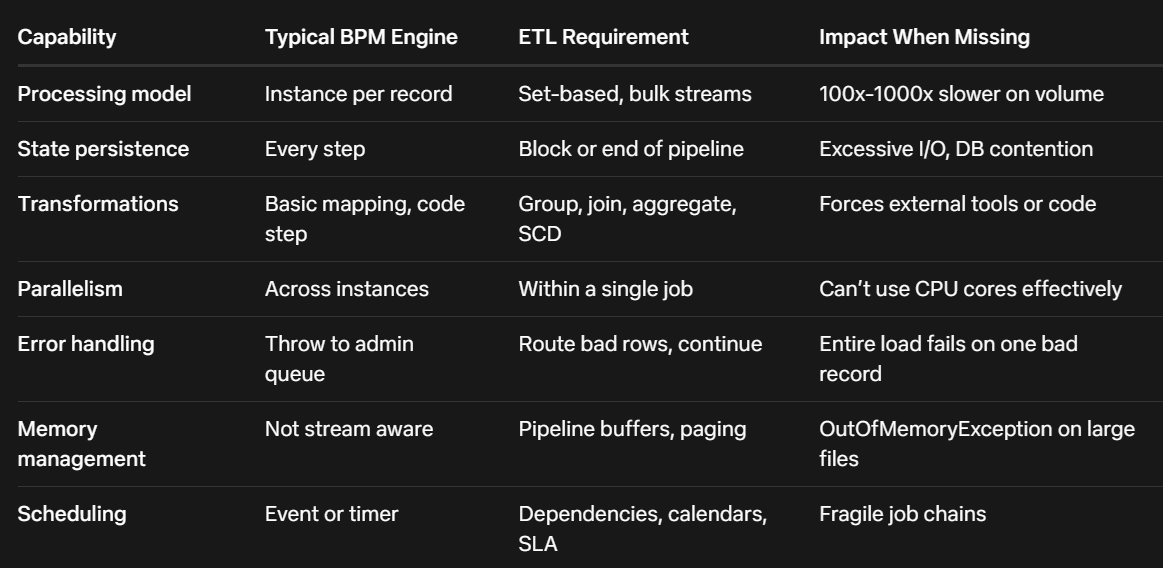
So here’s the scorecard most BPM products hit when you ask them to do ETL:
The Workarounds BPM Teams Usually Try
When teams hit this wall, they try three things:
- Loop inside the process
Build a BPM process that reads 1 row, processes it, loops back. It works for 500 rows. At 50,000 rows the process engine log files fill the disk and the DB deadlocks. - Shell out to code
Use a script task to call C# or Java that does the real ETL. Now you’ve hidden ETL inside BPM, but you lost visibility, lineage, restartability, and your BPM developers are now writing ADO.NET code. - Buy a separate ETL tool and “integrate”
Now you have two schedulers, two monitoring screens, two security models, and you’re passing files between them. That’s not unified automation.
None of these are wrong for small jobs. They collapse when ETL becomes a core workload.
What FlowWright Changed to Run ETL Natively
FlowWright started as a .NET BPM and workflow engine, but the architecture made three decisions that let it absorb ETL without bolting on a second product.
1. Dual execution engine: Instance + DataFlow
FlowWright keeps the classic workflow engine for human-centric and event processes. In parallel, it has a DataFlow engine that runs pipelines. A DataFlow definition looks like a workflow on the designer, but under the hood it compiles to a set-based execution plan.
When you drop a “SQL Reader” step followed by “Transform” and “SQL Writer,” FlowWright isn’t creating 1 million workflow instances. It’s creating one pipeline with buffer blocks between components. Data streams in batches of 10,000 rows by default, and each component runs on its own thread.
Result: You get BPM design ergonomics with ETL throughput.
2. Native bulk connectors and CDC
Most BPM connectors are SOAP/REST wrappers. FlowWright’s DataFlow connectors use native bulk protocols:
- SqlBulkCopy for SQL Server and Azure SQL
- Batch APIs for Salesforce, SharePoint, Dynamics
- Streaming readers for CSV, XML, JSON, Parquet
- Change Data Capture for SQL, Oracle, MySQL to pull only deltas
Because the connectors are bulk-aware, a 5 million row load doesn’t materialize 5 million objects in memory. It streams, which is why you don’t see the memory spikes that crash typical BPM attempts.
3. Transformations as first-class steps
In FlowWright DataFlow you get these as drag-drop steps, not code:
- Aggregate: Sum, count, min, max, group by with memory-safe spooling
- Merge Join: Hash or sort-merge with left/right/outer options
- Lookup: Cached or no-cache, with multiple output mapping
- Conditional Split: Route rows to different paths based on expressions
- Pivot/Unpivot: Native, no custom code
- SCD Type 1/2: Built-in slowly changing dimension handling
- Data Quality: Email, phone, regex validation with error routing
These are the primitives ETL developers expect. Having them visual means a business analyst can modify a rule without redeploying C#.
4. Unified scheduling, logging, and security
Because DataFlow runs in the same server as workflow, it inherits:
- Scheduler: Cron, dependencies, file watchers, and event triggers. Your ETL job can start when a workflow finishes, or vice versa.
- Logging: Row counts, elapsed time, error rows per step, all in the same dashboard as your approval processes.
- Security: Same AD groups, same API keys, same data gateway agents. No second permission model to maintain.
- Transactions: A workflow can start, call a DataFlow to stage data, wait for it to finish, then route a human task with summary metrics. Try that with two separate tools.
5. Error handling that behaves like ETL
If row 543,221 fails in a DataFlow, FlowWright routes it to an error output, logs it, and keeps processing. The job finishes with “4,999,999 success, 1 error.” In a pure BPM engine, that same bad row would fault the entire process instance and require admin intervention.
Where This Actually Matters
You don’t need FlowWright’s DataFlow to move 200 rows once a day. Where it pays off:
1. Operational data stores
Nightly load from ERP to reporting DB with transformations, SCD, and data quality. You want it scheduled, monitored, and restarted on the same platform that runs your exception workflows when data fails validation.
2. Human-in-the-loop ETL
Example: Load 100k leads, run dedupe, then anything with confidence < 80% routes to a person for review. The dedupe is ETL. The review is BPM. In separate tools, that’s a file drop and a mess. In FlowWright, it’s one definition.
3. API-heavy integration
Modern ETL isn’t just databases. It’s Salesforce to HubSpot to NetSuite with transformation in the middle. FlowWright’s DataFlow can page through REST APIs in parallel, transform in flight, and bulk upsert the destination, all while the workflow engine handles rate limits and retries.
4. Legacy modernization
Many companies have 500 DTSX packages or Informatica jobs. Rewriting them is expensive. Re-platforming them to a BPM that can’t run them is worse. FlowWright lets you lift the logic into DataFlow and keep the same orchestration, auditing, and security model the business already uses for workflow.
“Can’t I Just Use Power Automate + Data Factory?”
Sure, and lots of teams do. The trade-off is fragmentation. You now own two licensing models, two places to check when the CFO asks “why didn’t the close finish,” and you write custom code to make them talk.
FlowWright’s bet is that the line between process and data is artificial. Approving a vendor often means staging vendor data, validating tax IDs, and upserting to 3 systems. That’s 70% ETL, 30% workflow. Keeping it in one engine means one place to version, one place to secure, one place to troubleshoot at 2 AM.
The Honest Limitations
FlowWright isn’t trying to be Snowflake or Databricks. If your ETL is 10 TB per hour with complex Spark jobs, use a big-data engine and have FlowWright orchestrate it. DataFlow is for the huge middle: SQL to SQL, files to APIs, API to warehouse, up to hundreds of millions of rows, where throughput matters but you also need governance, lineage, and human steps.
It also won’t replace ultra-specialized ETL tools for things like mainframe EBCDIC unpacking or complex statistical transforms. It covers 80% of corporate ETL, which is where most BPM tools cover 0%.
Bottom Line
Most BPM products can’t do ETL because they were never meant to. They’re state machines, not pipelines. They persist too much, stream too little, and treat data as a single record, not a set.
FlowWright can because it added a second engine that thinks in sets, streams, and bulk operations, then unified it with the workflow engine on scheduling, security, and design.
So the question isn’t “can BPM do ETL?” It’s “was the BPM engine designed to run both models?” For most vendors the answer is still no. For FlowWright, it’s yes, and that’s why you’ll see customers running 50,000-step approval processes and 50-million-row nightly loads on the same cluster, monitored by the same team.
If your roadmap has both workflow and data integration, test that assumption early: give your BPM vendor 1 million rows and see what happens. Then try it in FlowWright DataFlow. The difference shows up in minutes, not whitepapers.
















