
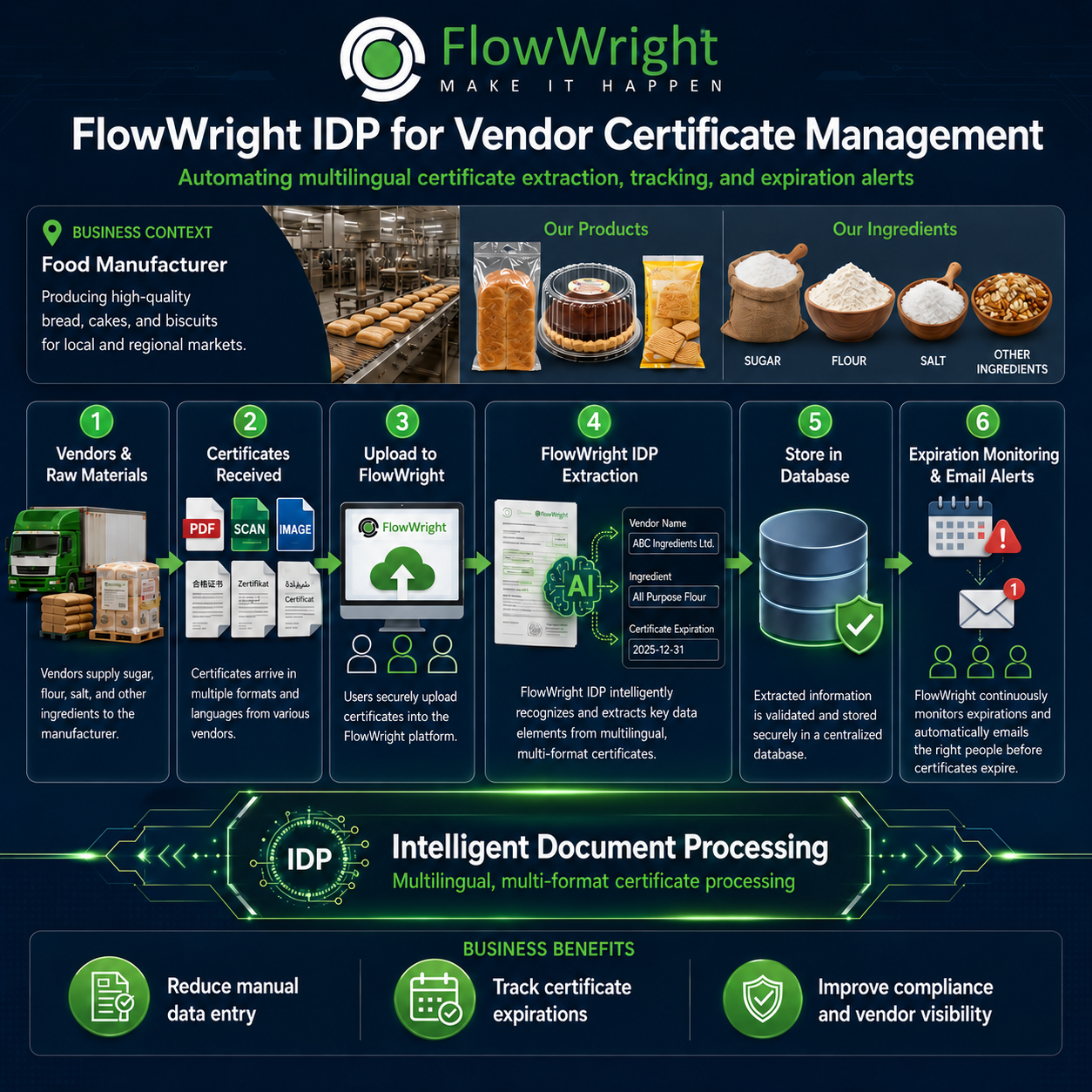
Vendor Certificate Management: Turning a Manual Compliance Burden into an Automated Business Process with FlowWright
Manufacturers depend on vendors for raw materials, ingredients, components, packaging, chemicals, and countless other supplies required to keep production moving. Along with those materials comes another critical dependency: vendor certificates.
Certificates of Analysis, Certificates of Conformance, food safety certificates, insurance certificates, quality certificates, regulatory documents, ingredient certifications, ISO certificates, and other vendor documentation all have one thing in common—they must be received, reviewed, stored, tracked, and frequently renewed.
The problem is that certificate management is often still handled through email, shared folders, spreadsheets, and manual reminders.
That works when an organization has ten vendors. It becomes a major operational problem when there are hundreds or thousands of vendors, multiple facilities, different certificate types, multiple languages, different expiration dates, and regulatory requirements.
This is exactly the type of business problem that FlowWright automation and Intelligent Document Processing (IDP) are designed to solve.
Instead of simply storing certificates electronically, FlowWright can manage the entire certificate lifecycle—from receipt to AI-powered extraction, validation, storage, expiration monitoring, notifications, and renewal.
The Vendor Certificate Problem
Consider a food manufacturer that purchases flour, sugar, salt, oils, flavorings, packaging materials, and other ingredients from dozens or hundreds of suppliers.
Each supplier may provide certificates in a different format.
One vendor sends a PDF generated by its ERP system. Another sends a scanned document. Another provides a photograph. An international supplier may send a certificate in Chinese, German, Spanish, Arabic, or another language.
Even when the documents contain essentially the same information, their layouts can be completely different.
Someone within the organization then has to determine:
- Which vendor supplied the certificate?
- What product or ingredient does it cover?
- What type of certificate is it?
- When was it issued?
- When does it expire?
- Does it meet the organization's requirements?
- Where should it be stored?
- Who needs to know when it is about to expire?
- Has a replacement certificate been received?
When these questions are answered manually, certificate management becomes a repetitive administrative process.
More importantly, it becomes a compliance risk.
An expired certificate might go unnoticed. A document might be sitting in someone's inbox. A spreadsheet reminder may not be updated. A supplier may continue delivering material even though required documentation has expired.
Automation changes the entire model.
How FlowWright Automates Vendor Certificate Management
FlowWright combines workflow automation, AI-powered Intelligent Document Processing, integrations, business rules, notifications, databases, forms, dashboards, and auditability into a single process.
A typical FlowWright vendor certificate process can work as follows.
1. Vendor and Raw Material Information Is Connected
The process starts with information the organization already maintains about its vendors and products.
FlowWright can work with vendor information from existing ERP, procurement, supplier-management, SQL database, REST API, or other enterprise systems.
For example:
Vendor: ABC Ingredients Ltd.
Ingredient: All Purpose Flour
Required Certificate: Food Safety Certificate
Expiration Requirement: Certificate must always remain current.
The automation process does not need to replace the existing system of record. FlowWright can orchestrate the process around it.
2. Certificates Are Received
Certificates can arrive through several channels.
A user may upload a certificate through a FlowWright form. Documents can be received through integrations, APIs, email-driven processes, document repositories, or other applications.
The certificate might be:
- scanned PDF
- image
- electronically generated document
- multilingual document
At this stage, the organization no longer depends on someone manually opening every document and typing information into a spreadsheet.
The document becomes an input to an automated business process.
3. FlowWright IDP Extracts the Certificate Information
This is where FlowWright Intelligent Document Processing changes the economics of the process.
Instead of creating a rigid template for every vendor certificate, FlowWright IDP can analyze the document and extract the business information required by the process.
For example, FlowWright might extract:
Vendor Name: ABC Ingredients Ltd.
Ingredient: All Purpose Flour
Certificate Type: Certificate of Analysis
Certificate Number: COA-458271
Issue Date: January 1, 2026
Expiration Date: December 31, 2026
The actual document might contain dozens of other fields, but FlowWright only needs to extract the information relevant to the business process.
This is particularly valuable when dealing with vendors that provide documents in different layouts, formats, and languages.
Traditional document-processing solutions often depend heavily on templates. A layout change can break the extraction process.
AI-based IDP provides a much more flexible model.
The business question changes from:
"Where is the expiration date located on this document?"
to:
"What is the certificate expiration date?"
That is a fundamentally different way of automating document processing.
4. FlowWright Validates the Extracted Data
Extraction is only part of the process.
Enterprise automation also requires control.
FlowWright workflows can validate information after extraction.
For example:
- Is the vendor recognized?
- Is the ingredient associated with that vendor?
- Is the expiration date valid?
- Has the certificate already expired?
- Is the required certificate type correct?
- Are mandatory fields present?
- Does the certificate need human review?
- Does the certificate satisfy an internal business rule?
When AI confidence or business rules indicate a potential issue, FlowWright can automatically route the certificate to the appropriate employee for review.
This creates a practical combination of:
AI + business rules + workflow + human judgment.
AI performs the repetitive document-reading work while the workflow provides predictability and control.
5. Certificate Information Is Stored Centrally
After validation, FlowWright can store the extracted information in a centralized database while preserving the original certificate.
The organization now has structured information instead of a collection of disconnected documents.
That means employees can search and report on information such as:
- certificates by vendor
- certificates by ingredient
- certificates by facility
- certificates by certificate type
- certificates expiring within 30 days
- expired certificates
- certificates awaiting review
- vendors missing required certificates
The difference is significant.
A PDF stored in a folder is a document.
A PDF connected to structured metadata, business rules, workflows, dashboards, and alerts becomes manageable business information.
6. FlowWright Continuously Monitors Expirations
One of the biggest advantages of automation is that the process does not stop after the document is stored.
FlowWright continues monitoring the certificate.
For example, an organization could configure the process to automatically send notifications:
90 days before expiration: notify the vendor-management team.
60 days before expiration: request an updated certificate from the vendor.
30 days before expiration: escalate the request.
7 days before expiration: notify procurement and quality management.
Expiration date reached: flag the vendor or material for appropriate action.
No employee needs to remember to check a spreadsheet every morning.
The process itself knows what requires attention.
That is one of the fundamental advantages of business process automation: humans manage exceptions while software manages routine monitoring.
From Certificate Tracking to Certificate Management
Many organizations believe they have implemented certificate management because they maintain an Excel spreadsheet containing expiration dates.
That is really certificate tracking.
True certificate management includes the complete lifecycle:
Receive → Extract → Validate → Store → Monitor → Notify → Escalate → Renew → Audit
FlowWright can orchestrate that complete lifecycle.
And because the process is implemented using FlowWright's low-code business process management platform, organizations are not building another isolated certificate-management application.
The same capabilities can later be reused for insurance certificates, contracts, licenses, permits, employee certifications, equipment inspections, regulatory documents, customer documents, and many other expiration-driven processes.
Short Time to Automation
One of the most important advantages of the FlowWright approach is the time required to automate the process.
A traditional approach might require building a custom application.
That means designing a database, creating screens, developing document-upload functionality, implementing security, creating APIs, building notification logic, developing scheduling services, implementing document extraction, creating reporting, testing everything, and then maintaining the application.
FlowWright already provides the underlying capabilities.
The implementation team primarily focuses on the business process:
- Define how certificates enter the process.
- Define the information IDP should extract.
- Configure validation rules.
- Configure exception workflows.
- Store the extracted information.
- Configure expiration rules.
- Configure notifications and escalations.
- Build the required dashboards.
For many certificate-management scenarios, the difficult part is no longer writing software.
It is defining the business rules.
That substantially reduces implementation effort and allows an organization to move from a manual process to an automated process in a relatively short implementation cycle rather than starting a conventional software-development project.
It also makes future changes much easier.
If the business decides that certificates should trigger an alert 45 days before expiration instead of 30 days, that should be a process configuration change—not a new application-development project.
The Business Value
The technology is useful, but the real justification for certificate automation is business value.
Reduce Manual Data Entry
Employees no longer need to open documents and repeatedly enter vendor names, certificate numbers, dates, and product information.
FlowWright IDP performs the initial extraction automatically.
Human effort can be reserved for exceptions and validation.
Reduce Compliance Risk
Expired or missing certificates become visible before they become a problem.
FlowWright continuously monitors dates and executes predefined actions.
The organization moves from reactive certificate management to proactive compliance management.
Improve Vendor Visibility
Once certificate information is structured, the organization can immediately see the documentation status of each vendor.
A dashboard might show:
438 active vendors
27 certificates expiring within 60 days
8 vendors awaiting updated documentation
3 expired certificates requiring action
Management gets operational visibility without asking employees to manually prepare reports.
Create an Audit Trail
A controlled business process provides something spreadsheets and shared folders struggle to provide: process history.
The organization can determine when a certificate was received, what information was extracted, who reviewed it, what approvals occurred, when notifications were issued, and what actions were taken.
For regulated organizations, that auditability can be just as important as the automation itself.
Improve Scalability
Manual certificate management grows almost linearly with the number of vendors.
Double the vendors and the administrative workload often increases substantially.
Automation changes that equation.
FlowWright can monitor thousands of certificates with the same underlying process logic, allowing employees to concentrate on the relatively small percentage requiring intervention.
AI Is Only Part of the Solution
There is considerable attention today around using AI for document processing.
But recognizing information within a certificate is only one part of the business problem.
Knowing that a certificate expires on December 31 is useful.
Automatically determining what should happen because it expires on December 31 creates business value.
That requires more than AI.
It requires:
AI + workflow + rules + integrations + people + notifications + auditability.
That combination is where FlowWright fits.
FlowWright IDP understands the document.
FlowWright workflow understands the process.
FlowWright business rules determine what should happen.
FlowWright integrations connect the process with enterprise systems.
FlowWright dashboards provide visibility.
And FlowWright automation ensures that the appropriate action happens at the appropriate time.
Turn Vendor Certificates into an Automated Business Process
Vendor certificate management is a good example of a process that organizations often tolerate for years because the individual tasks appear simple.
Receive an email.
Open a PDF.
Read an expiration date.
Update a spreadsheet.
Set a reminder.
Send another email later.
Each individual step is simple.
At enterprise scale, however, thousands of simple steps become expensive, inconsistent, difficult to audit, and risky.
FlowWright turns those disconnected activities into a controlled, intelligent, end-to-end business process.
Certificates arrive in multiple formats and languages. FlowWright IDP extracts the required information. Workflow validates and routes exceptions. Structured data is securely stored. Expiration dates are continuously monitored. Notifications and escalations happen automatically. Dashboards provide real-time visibility.
And because the solution is built using the FlowWright automation platform, organizations can implement the process quickly and continue adapting it as their requirements evolve.
The result is not simply better document processing.
It is less manual work, stronger compliance, better vendor visibility, faster implementation, and a vendor certificate process that runs predictably every day.
















