
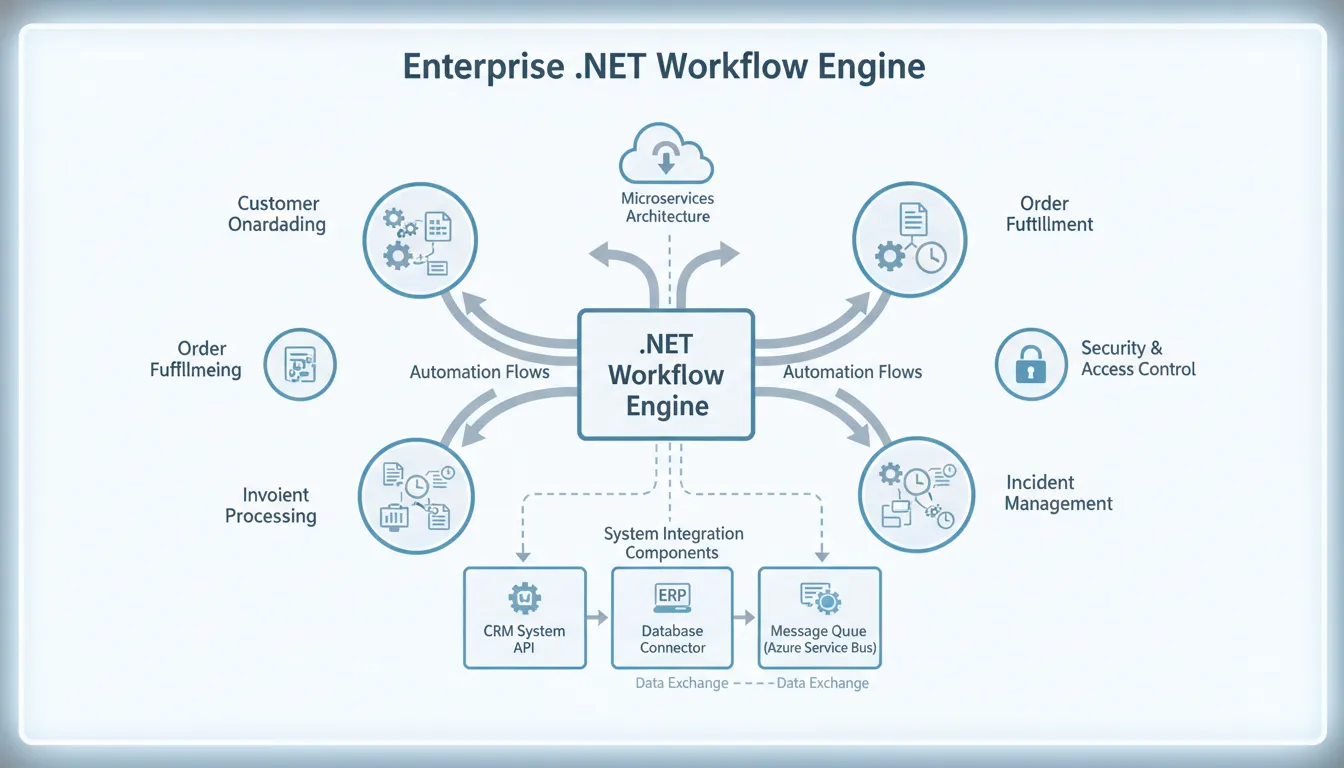
Choosing a .NET workflow engine defines how well your enterprise software systems can grow and stay easy to update. A poor choice leads to rigid code and high maintenance costs. Architects should pick engines that manage complex tasks and integrate well with existing tools.
A .net workflow engine is a software tool that runs, automates, and manages complex business tasks within .NET applications. These engines provide the systems needed to define, execute, and monitor workflows. They ensure tasks happen in the correct sequence and handle errors gracefully.
For enterprise environments, a dedicated engine replaces hard-coded logic with a flexible layer that supports state persistence, version tracking, and visual design. This is critical for applications that manage hundreds of tasks or multi-step approval processes across many systems. According to Microsoft ISE, modern workflow engines allow organizations to run complex processes with precision and scalability.
By centralizing process logic, development teams gain visibility into their workflows and reduce long-term maintenance costs. Selecting the right engine lets teams focus on business rules while the platform handles task states and transitions automatically.
Understanding how these tools fit into your technology stack is the first step toward building robust, automated business systems. In the section below, we examine the core components and features that define a .NET workflow engine.
What Is a .NET Workflow Engine?
A .NET workflow engine is a software runtime that orchestrates business processes inside a .NET application. It manages how work flows from one step to the next, replacing hard-coded control logic with a configurable process layer. Instead of embedding rules in application code, you define workflows declaratively, and the engine tracks the state of each running instance. This makes enterprise applications easier to maintain and scale.
Process control and orchestration
At its core, a workflow engine acts as the conductor for your software. It determines what action to take next based on configured rules, a role commonly called orchestration. When an organization uses workflow automation software, it can coordinate dozens of tasks simultaneously without sequencing errors. A well-designed engine ensures every step follows the correct path every time, which is essential for applications that must scale reliably.
By using a defined process model, teams reduce the risk of lost data or missed deadlines. Orchestration also helps in saving time and reducing operational costs. Automated processes handle routine work around the clock, allowing staff to focus on complex problems that require human judgment. Research from the Department of Veterans Affairs demonstrates that automation can save substantial resources by processing routine tasks with zero human error. This enables organizations to scale their operations without proportionally increasing headcount.
Core software building blocks
A .NET workflow engine relies on several fundamental components. The workflow definition serves as the blueprint, mapping every step in a process. Activity nodes represent individual actions such as sending an email, querying a database, or calling an external API. Transitions connect these nodes and define the order of execution. By assembling these building blocks, developers can construct complex applications without getting lost in procedural code.
State persistence is another critical component. It enables the engine to remember the exact position of every running workflow, even if the system restarts. When a long-running process reaches a wait state, the engine serializes its progress to a database. On recovery, the engine deserializes the state and resumes execution exactly where it stopped. This capability is vital for processes that span hours, days, or weeks and must survive server restarts or network interruptions.
Visual design meets code flexibility
Many modern engines include a visual process designer that lets developers model workflows through drag-and-drop interactions. This helps non-technical stakeholders understand process flows and accelerates prototyping. Technical teams can extend these visual models with custom C# code or JSON definitions for complex logic that cannot be expressed visually. This combination bridges the gap between business analysts and development teams.
A strong engine also exposes a clean API surface for integration with other systems. It connects with CRMs, databases, messaging platforms, and legacy systems through standard protocols. This makes the engine a central hub for business logic across the enterprise. By using a consistent framework, organizations avoid the fragmentation that comes with point-to-point custom integrations, leading to applications that are easier to update and extend over time.
Why Enterprise Applications Need a Dedicated Workflow Engine
Avoiding the hard-coded logic trap
When building large applications, it is tempting to embed business rules directly into source code. Initially straightforward, this approach becomes unmanageable as the organization grows. Every conditional branch, approval step, and routing rule tangled in the codebase creates technical debt. Changing one rule risks breaking unrelated functionality. A dedicated workflow engine extracts business logic from application code into a separate, maintainable layer. Development teams can update process flows without touching the core application, reducing regression risk and accelerating change delivery.
Scalability and process governance
Enterprise organizations execute thousands of process instances concurrently. Hard-coded approaches struggle to manage this volume reliably. A purpose-built engine provides built-in queuing, retry logic, and load balancing. Modern workflow automation helps teams redirect effort from operational firefighting to strategic initiatives. The Microsoft ISE blog emphasizes that well-designed engines support both precision and elasticity, allowing applications to grow under load without degradation.
Key scalability benefits of a dedicated workflow engine include:
- Rules execute 24/7 without human intervention or errors.
- Workload scales up or down based on demand, not capacity planning.
- Complex branching and parallel paths are managed without additional custom code.
- Data integrity is preserved across all business units through centralized state management.
Observability and version management
Business rules evolve continuously. When multiple versions of a process run simultaneously, traceability becomes essential. Custom code typically lacks built-in workflow versioning, making it difficult to determine which logic governed a specific task. A dedicated engine provides full workflow observability, enabling teams to trace every step of any process in real time.
FlowWright strengthens this with 100% backward compatibility across all versions. Existing workflows continue running after engine upgrades, eliminating the risk of breaking production processes. Visual design tools complement this by letting teams map workflows graphically. FlowWright includes graphical debugging that allows developers to step through running workflows, set breakpoints, and identify bottlenecks visually. This transparency turns process automation from a black box into a clear, auditable system.
Key Features to Evaluate in a .NET Workflow Engine
Selecting the right .NET workflow engine for your stack is a long-term investment decision. An enterprise-grade engine must support complex orchestration with precision and scalability. According to Microsoft research, evaluating an engine requires examining visual designers, integration flexibility, state management, and horizontal scaling capabilities.
Core functionality and design
The strongest tools offer a visual designer accessible to both developers and business analysts. This simplifies process modeling and improves collaboration. A comprehensive activity library covering common operations like email dispatch, API calls, and database queries accelerates development. A capable workflow automation platform also allows custom activities written in C# for unique business requirements.
Data persistence and infrastructure
State persistence is non-negotiable for long-running processes that span days or weeks. The engine must integrate with enterprise databases such as MSSQL, PostgreSQL, or Oracle to persist workflow state reliably. This ensures that server failures do not cause data loss or process abandonment. High-quality workflow automation software also provides real-time monitoring and audit trails.
| Feature Category | Must-Have | Nice-to-Have |
|---|---|---|
| Process Design | Drag-and-drop visual designer | Web-based browser designer |
| Data Storage | Support for MSSQL and PostgreSQL | Support for Oracle or MongoDB |
| System Access | Full REST API and SDK | Webhooks and event triggers |
| Operations | Real-time monitoring and audit logs | Graphical process debugging |
| Scale | Multi-tenant support | Distributed execution nodes |
| Logic | Native .NET Core support | JSON or YAML definitions |
Integration and monitoring
An engine must expose a clear API surface so external applications can start workflows, query statuses, and receive notifications. Monitoring tools are equally important for identifying and resolving bottlenecks before they impact operations. These features help boost business efficiency by making complex processes observable and manageable.
Scalability rounds out the evaluation. The engine should support multi-tenancy for organizations that need data isolation across clients or departments. It should also run across clustered servers to handle peak loads. By focusing on these core areas, you select a platform that grows with your business for years to come.
Embeddable vs. Server-Based: Which Architecture Fits Your Stack?
Architecture choice is one of the most consequential decisions when adopting a .NET workflow engine. You must decide whether the engine runs inside your application process or as a standalone service. This decision affects development practices, deployment topology, and operational overhead. Both models have distinct advantages, and the right choice depends on your product strategy and organizational structure.
Benefits of an in-process engine
In the embeddable model, the workflow engine runs within the same process as your application. This is ideal for independent software vendors who want to add workflow capabilities to their products. Embedding gives you full control over user experience and branding. Since the engine shares the application's memory space, there is no network latency for workflow operations. You can use an embeddable workflow engine to deliver a seamless, self-contained product experience.
For software companies, this approach eliminates the need for customers to deploy and maintain a separate server. The engine is invisible to end users, and you can white-label it under your own brand. A strong .NET workflow engine in this category allows you to focus on differentiating features rather than building process infrastructure from scratch.
When a central server makes sense
A server-based deployment runs the workflow engine as a centralized service that multiple applications can call. This architecture suits large enterprises that need to coordinate processes across departments. It provides a single source of truth for process definitions, execution logs, and audit trails. Central control enables organizations to manage and streamline IT services across distributed teams, ensuring consistent enforcement of business rules.
Centralized engines excel when many applications must share the same process logic. Updating a workflow in one place propagates changes to every consumer application automatically. This model also simplifies capacity planning: the engine cluster scales independently from the applications it serves. Operations teams gain a single dashboard for monitoring throughput, error rates, and resource utilization across all automated processes.
Use these criteria to determine the right fit:
- Evaluate your deployment model. If you ship software to external customers, an in-process engine is typically the better choice.
- Assess your scale requirements. A central server is preferable when multiple applications must execute the same shared processes.
- Consider your team's expertise. In-process engines are often simpler for C# developers to integrate and test.
- Factor in branding. Choose an engine that supports white-label customization if the workflow surface is customer-facing.
- Plan for growth. Verify that your chosen architecture can accommodate increased throughput as your business scales.
How to Evaluate a .NET Workflow Engine for Your Enterprise
Selecting the right engine requires a structured evaluation process that goes beyond feature checklists. The goal is to find a platform that aligns with your technical requirements, team capabilities, and long-term roadmap. A proper evaluation reduces the risk of costly migrations later.
A six-step evaluation framework
Follow this process to evaluate a .NET workflow engine thoroughly:
Map your process requirements. Document every workflow your organization runs, including complex branching, human approval steps, and data transformation needs. A comprehensive requirements map reveals whether a candidate engine can handle real-world scenarios. Ensure the tool supports the specific constructs your business processes depend on.
Evaluate integration with your technology stack. Verify compatibility with .NET Core, your database platforms, CI/CD pipelines, and messaging infrastructure. Tight integration reduces implementation time and ongoing maintenance costs. Fast data flow between systems is critical for enterprise scale and precision in high-traffic applications.
Assess the learning curve. The engine should offer a visual designer that business analysts can use while still providing full code-level control for developers. If the tool is too complex, adoption will suffer. Find the balance that lets developers ship quickly while giving business stakeholders visibility into process flows.
Review licensing and deployment models. Determine whether the engine runs on-premises, in the cloud, or both. Understand the cost structure as you scale user counts and process volumes. A flexible licensing model allows you to start small and grow without unexpected cost increases.
Evaluate vendor stability and support. Investigate the vendor's track record, update cadence, and support quality. Strong service level agreements and a history of reliable releases indicate a sustainable platform. Reliable workflow automation support minimizes downtime and keeps operations running smoothly.
Run a proof of concept. Before committing, implement a representative workflow end to end. This validates how the engine handles your specific data, integration points, and edge cases. It also gives your team hands-on experience with the tool. A successful proof of concept is the strongest signal that the engine will perform in production.
After completing these steps, you will have the data needed to make an informed decision. You will know which engine fits your codebase, your team's skill set, and your budget. This structured approach reduces selection risk and sets the foundation for long-term automation success.
Finally, evaluate how the engine manages change. Business rules evolve, and your platform must accommodate updates without disrupting running processes. An engine with strong backward compatibility and transparent debugging tools will save significant effort every year. Investing evaluation time now ensures you build on a foundation that lasts.
FlowWright: Enterprise-Ready .NET Workflow Automation
FlowWright is a robust .NET workflow engine purpose-built for enterprise requirements. Modern teams need a platform that scales without breaking existing investments. While some engines require full rewrites every few years, FlowWright ensures long-term stability through backward compatibility and modern architecture.
Modern engine architecture and stability
FlowWright is built on .NET Core, delivering high performance and cross-platform deployment across cloud and on-premises environments. Unlike legacy options such as Windows Workflow Foundation, this engine provides a streamlined runtime with lower overhead. Since version 1.0, FlowWright has maintained 100% backward compatibility. Organizations can upgrade the platform without concern that existing workflows will break.
Enterprise teams rely on automated software bots to handle routine processes efficiently. A stable .NET engine ensures these bots operate reliably around the clock. This reliability is why organizations in over 18 countries trust FlowWright for mission-critical workflows.
Visual tools for accelerated development
Building a workflow automation platform requires tools accessible to both developers and business users. FlowWright includes a visual process designer with drag-and-drop workflows, a comprehensive activity library, and the ability to create custom steps in C#. This combination of low-code ease and full-code flexibility enables teams to ship process automation rapidly.
The platform also includes a forms designer for building user interfaces without external tools. All form data flows directly into workflow variables and back out. For debugging, FlowWright provides an industry-first graphical debugger. Developers can step through live workflows, inspect variable values, set breakpoints, and resolve issues interactively. This visual debugging approach significantly reduces development cycles for complex automation projects.
Reporting and OEM flexibility
Effective business process management depends on actionable data. FlowWright includes dashboards and real-time reporting that surface process bottlenecks and performance trends. Managers make data-driven decisions based on actual workflow metrics. Research shows that workflow automation benefits compound when paired with robust analytics tools.
For software vendors, the workflow automation software is designed for deep embedding through the OEM partner program. You can integrate the engine directly into your product with full white-label customization. This eliminates the cost of building your own workflow infrastructure while delivering enterprise-grade capabilities to your users.
Frequently Asked Questions
What is the best .NET workflow engine for enterprise projects?
The best .NET workflow engine depends on your specific requirements for scalability, integration, and deployment model. For enterprise organizations, FlowWright offers a strong combination of .NET Core architecture, visual design tools, backward compatibility, and OEM flexibility. Evaluate candidates against your process complexity, existing technology stack, and long-term maintenance needs to determine the best fit.
How do .NET workflow engines manage long-running processes?
They use state persistence to handle long-running processes. When a workflow reaches a wait state, the engine serializes its current progress to a database, freeing server memory and protecting against failures. When the trigger condition is met, the engine loads the persisted state and resumes execution. This mechanism is essential for processes involving human approvals, external system delays, or scheduled activities.
What are the benefits of an embeddable .NET workflow engine?
An embeddable engine runs inside your application process, eliminating network latency for workflow operations. Software vendors use this model to deliver workflow automation as an integrated feature without requiring customers to deploy separate infrastructure. White-label support allows the engine to appear as a native part of your product. This approach reduces time to market and operational complexity compared to building custom workflow capabilities in-house.
Can you integrate a workflow engine into an existing C# application?
Yes. Most .NET workflow engines provide NuGet packages and configuration-driven setup that simplify integration. You add the engine as a dependency, define your workflows programmatically or through the visual designer, and start the runtime. Integration typically requires minimal changes to existing application architecture, allowing teams to add process automation incrementally.
Ready to find the right .NET workflow engine?
Building custom workflow infrastructure diverts engineering resources from your core product. Choosing an unproven engine introduces risk to production systems. You need a proven platform that delivers enterprise reliability from day one.
Stop investing development time in non-differentiating process infrastructure. Let your team focus on features that drive revenue and customer value. The right engine accelerates delivery and reduces long-term maintenance burden.
Get a Demo of the FlowWright .NET workflow engine to see how it fits your enterprise architecture.
















