
Enterprise IT teams managing hybrid infrastructures face a persistent challenge: legacy on-premise databases contain mission-critical data, but those systems were never designed to communicate with modern cloud applications. The result is manual data migration, brittle point-to-point integrations, and growing technical debt that stalls digital transformation initiatives.
Get a Demo of FlowWright's iPaaS Platform
iPaaS workflow automation enables enterprises to connect legacy databases with cloud environments through a unified integration hub, eliminating manual data pipelines while preserving existing infrastructure investments. By leveraging pre-built connectors, visual workflow designers, and event-driven architectures. IT teams can synchronize on-premise SQL Server and Oracle databases with SaaS applications in real time without custom integration code.
This guide examines the technical architecture behind iPaaS workflow automation, the concrete benefits for enterprise IT operations. And a framework for selecting the right platform for your organization's integration requirements.
Why Enterprises Struggle to Connect Legacy Databases and Cloud Systems
Most large enterprises operate hybrid environments where on-premise databases coexist with dozens of SaaS applications. Without a centralized integration layer, IT teams face growing data integration backlogs, security vulnerabilities in unsupported legacy systems, and escalating maintenance costs from bespoke point-to-point connections.
Enterprise IT environments are inherently heterogeneous. Organizations typically maintain core transactional data in on-premise relational databases such as SQL Server. Oracle, or PostgreSQL while simultaneously adopting cloud-based SaaS applications for CRM, ERP, HR, and analytics. According to recent research, large enterprises now average 112 SaaS applications across their organizations, each generating and consuming data that must flow to and from legacy systems.
The Growing Data Integration Backlog
The disconnect between legacy data stores and cloud applications creates a persistent integration backlog. IT teams frequently resort to building point-to-point integrations, each requiring custom code tailored to the specific source and target systems. This approach does not scale. When a legacy database schema changes even incrementally, every dependent integration risks failure. A 2025 study found that 89% of enterprises report significant difficulty managing their data integration backlogs, with most teams unable to keep pace with new integration requests.
Effective iPaaS workflow automation capabilities directly address this backlog by replacing bespoke integrations with a centralized hub that manages all data movement through a single governance framework. Teams can deprecate fragile point-to-point connections and route all integrations through the platform's pre-built connector library.
Security Risks of Legacy Data Systems
Beyond operational inefficiency, legacy systems introduce material security exposure. Many on-premise databases and their host operating systems have reached end-of-life status, meaning they no longer receive security patches. The Government Accountability Office has documented legacy systems with unpatchable cybersecurity vulnerabilities that cannot be remediated through traditional patching cycles. Connecting these systems directly to cloud services or exposing them via the internet creates unacceptable risk.
An iPaaS workflow automation platform mitigates this by acting as an intermediary layer. Data flows from legacy systems through the platform's secure transport layer before reaching cloud destinations, eliminating direct exposure of vulnerable databases. Enterprise IT leaders gain centralized visibility and control over every data flow, with audit logging. Encryption in transit and at rest, and role-based access controls enforceable at the integration level.
What Is iPaaS Workflow Automation?
Integration Platform as a Service (iPaaS) provides a cloud-hosted or hybrid deployment model for connecting applications, data sources, and business processes. When combined with workflow automation capabilities, the resulting platform enables enterprises to design, execute. And monitor end-to-end process flows spanning on-premise and cloud environments without writing custom integration middleware.
iPaaS workflow automation represents the convergence of two architectural patterns: integration-platform-as-a-service for system connectivity and workflow automation for process orchestration. The combined model provides a unified runtime environment where data transformations, API calls, conditional branching, and human workflow steps coexist within a single process definition.
The Architectural Shift from Point-to-Point to Hub-and-Spoke
Traditional integration architectures rely on point-to-point connections, where each application pair requires a dedicated integration. In an enterprise with N applications, this approach generates up to N(N-1)/2 unique integrations, each with its own maintenance burden. A hub-and-spoke architecture centralizes all integration logic within the iPaaS platform, reducing connection complexity from quadratic to linear scaling.
Key architectural advantages include:
- Connector abstraction: Pre-built connectors encapsulate API authentication, rate limiting, retry logic, and data format handling for each target system
- Message routing: A publish-subscribe pattern allows any connected system to emit events that other systems consume without direct coupling
- Data transformation: Visual mapping tools convert between legacy data models and cloud-native formats without custom transformation code
- Error handling: Centralized dead-letter queues, retry policies, and alerting reduce the operational burden of integration failures
Event-Driven Workflow Design
Modern iPaaS platforms support event-driven architectures where workflow execution is triggered by specific events rather than scheduled batch processes. FlowWright provides 300+ out-of-the-box workflow steps for constructing these event-driven flows through a visual drag-and-drop designer. This low-code approach enables integration architects to define complex orchestration logic , including parallel branches, conditional paths, and human approval gates , without writing procedural code.
The event-driven model is particularly valuable for hybrid environments where latency between on-premise and cloud systems varies. Workflow instances can be designed to handle asynchronous execution, compensating transactions, and idempotent replay without requiring custom middleware.
How iPaaS Workflow Automation Bridges Legacy and Cloud Environments
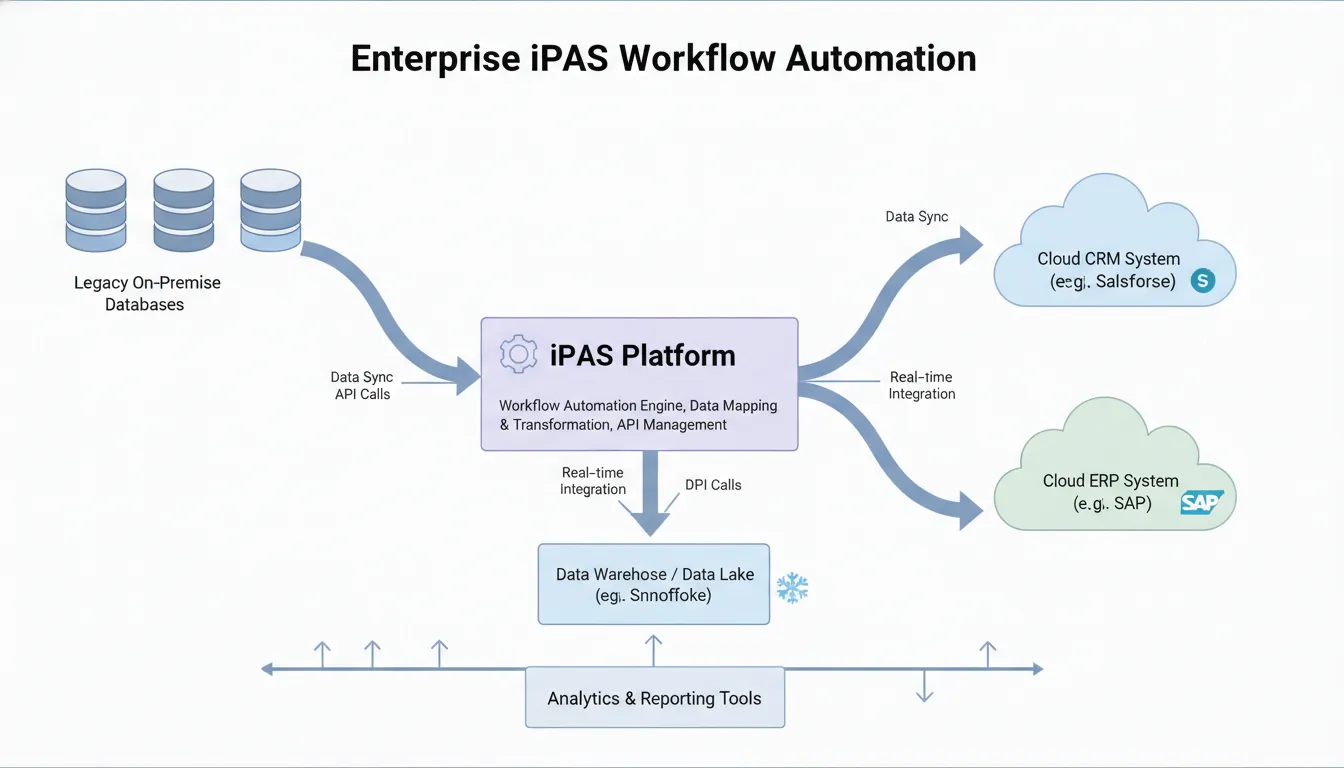
Bridging on-premise and cloud environments requires three core technical capabilities: reliable data movement patterns (ETL/ELT and event streaming). A robust message routing layer (Enterprise Service Bus), and model-driven transformation tools that map legacy data schemas to cloud-native formats.
Successfully connecting legacy databases to cloud applications demands more than simple API calls. The integration layer must accommodate different data models, latency tolerances, security postures, and operational reliability requirements across both environments.
Data Movement Patterns
Enterprises typically employ three primary data movement patterns when bridging legacy and cloud systems:
- ETL/ELT pipelines: Batch-oriented extraction, transformation, and loading for large-volume data migration and data warehouse synchronization. Suitable for analytics workloads where near-real-time latency is acceptable.
- Change Data Capture (CDC): Continuous capture of insert, update, and delete operations from legacy database transaction logs, streamed to cloud targets. Ideal for operational systems requiring sub-second synchronization.
- Event streaming: Publish-subscribe message patterns where legacy systems emit events to a message broker, and cloud applications subscribe to relevant event streams. Enables loose coupling between systems.
Each pattern maps to specific integration requirements. A mature iPaaS platform supports all three, allowing architects to select the appropriate pattern for each data flow rather than forcing a one-size-fits-all approach.
Enterprise Service Bus as the Integration Backbone
The Enterprise Service Bus (ESB) pattern provides the message routing, protocol translation, and content enrichment layer that connects heterogeneous systems. FlowWright's embedded ESB includes 500+ pre-built connectors spanning on-premise databases (Oracle, SQL Server, PostgreSQL, MongoDB) and cloud services (Salesforce, AWS, Azure, Workday, SAP).
A properly implemented ESB within an iPaaS platform provides:
- Protocol mediation: Translating between SOAP, REST, JDBC, and proprietary protocols without custom adapters
- Content-based routing: Directing messages to different targets based on data content or metadata headers
- Message enrichment: Augmenting payloads with data from multiple sources during transit
- Transaction management: Ensuring exactly-once delivery semantics across distributed systems
Model-Driven Legacy Data Mapping
A significant technical challenge in hybrid integration is the semantic gap between legacy data models and cloud-native schemas. Relational databases designed decades ago use normalized schemas, fixed-field definitions. And referential integrity constraints that do not map directly to the document-oriented or API-first models used by modern cloud applications.
The NIST model-driven integration framework addresses this by defining formal transformation rules between legacy entity-relationship models and target schemas. FlowWright's visual data mapper implements this approach, allowing integration architects to define field-level mappings. Type conversions, and value transformations through a graphical interface rather than handwritten XSLT or JavaScript transformations.
Key Benefits of iPaaS Workflow Automation for Enterprise IT
Enterprise IT organizations that deploy iPaaS workflow automation realize measurable improvements in integration velocity, operational cost, security posture, and time-to-market for new digital initiatives. The platform consolidates what would otherwise require a dedicated integration team into a manageable, governed capability.
Reduced Integration Cost and Complexity
Building and maintaining custom integration code is expensive. A TeamDynamix survey found that 74% of organizations lack sufficient staff to manage their integration workloads. Forcing IT leaders to choose between slowing down business initiatives and overburdening their teams. An iPaaS platform reduces this pressure by providing pre-built connectors, reusable workflow templates, and visual design tools that lower the skill bar for building integrations.
Key cost implications include:
- Eliminating per-integration development cycles for connector protocols and error handling
- Reducing maintenance burden when connected systems update their APIs (the platform absorbs version changes)
- Lowering validation and testing costs through automated testing frameworks , research shows automated testing reduces legacy system validation costs significantly
Enhanced Security and Compliance Posture
Security is a primary concern when opening legacy systems to cloud connectivity. An iPaaS platform provides multiple security controls that are difficult to implement across disparate point-to-point integrations:
- Encryption: TLS 1.3 for data in transit, AES-256 for data at rest
- Access control: Role-Based Access Control (RBAC) scoped to specific integrations, data fields, and environments
- Compliance frameworks: SOC 2 Type II, HIPAA, and GDPR alignment built into the platform's deployment architecture
- Audit trails: Immutable logs of every data transformation, routing decision, and error event across all integrations
These controls are particularly important for regulated industries where data residency, encryption standards, and access logging are non-negotiable compliance requirements.
Accelerated Time-to-Market
In competitive markets, the speed at which IT can integrate new cloud services directly impacts business agility. With a low-code iPaaS platform, integration architects can build production-ready workflows in days rather than months. Non-technical team members can contribute to simple integration tasks using visual designers, reducing the integration backlog without requiring additional developer headcount.
The enterprise workflow automation platform architecture scales horizontally: as transaction volumes grow, additional worker nodes can be deployed without disrupting running workflows. This distributed architecture ensures that integration throughput keeps pace with business growth.
Real-World Use Cases: iPaaS Across Industries
Enterprise iPaaS workflow automation delivers value across multiple verticals by solving the common problem of connecting legacy data systems to modern cloud applications. Healthcare organizations use it for HIPAA-compliant EHR data exchange, financial institutions for real-time fraud detection, and government agencies for secure citizen service portals.
Healthcare Data Integration
Healthcare organizations operate some of the most complex hybrid IT environments. With on-premise Electronic Health Record (EHR) systems that must exchange data with cloud-based analytics, telehealth, and patient portal applications. HIPAA compliance requires end-to-end encryption, access controls, and audit logging for every data transaction involving Protected Health Information (PHI).
An iPaaS workflow automation platform enables healthcare IT teams to build secure data pipelines between legacy EHR systems and modern cloud applications without exposing PHI to direct internet connectivity. Integration architects can define data transformation rules that ensure HL7 and FHIR format compliance while maintaining HIPAA-required controls.
Financial Services and Banking
Financial institutions maintain core banking systems on mainframe or legacy UNIX platforms while adopting cloud-based fraud detection, customer relationship management, and regulatory reporting tools. The integration challenge is compounded by strict regulatory requirements for data residency, transaction auditability, and real-time reporting.
By deploying an iPaaS layer, banks can:
- Stream transaction data from legacy core systems to cloud-based AI/ML fraud detection models in real time
- Automate regulatory report generation by aggregating data across on-premise and cloud sources
- Orchestrate customer onboarding workflows that span legacy identity verification systems and modern digital front-end applications
Government and Public Sector
Government agencies face the dual challenge of modernizing citizen-facing services while maintaining legacy record systems that often predate the internet. The GAO has identified legacy IT systems as a material risk to federal operations, with many systems running on obsolete hardware and unsupported software.
iPaaS workflow automation allows agencies to build secure bridges between legacy citizen databases and modern web portals without requiring a full system replacement. FOIA request workflows, benefit application processing, and license renewal systems can all be automated through the integration layer while maintaining compliance with federal security mandates.
Manufacturing and Supply Chain
Manufacturing environments combine on-premise production systems (MES, SCADA, ERP) with cloud-based supply chain management, logistics, and IoT analytics platforms. Real-time data from factory floor sensors must flow to cloud analytics engines while production orders from cloud-based systems must reach on-premise execution systems.
Workflow automation software orchestrates these bidirectional flows. Ensuring that production data from the factory floor triggers inventory adjustments in the cloud ERP and that customer orders placed through cloud portals are routed to the correct production line schedules.
Software and OEM Embedding
Independent software vendors (ISVs) and OEM partners can embed iPaaS workflow automation capabilities directly into their products using embeddable workflow technology. This enables them to offer integration and process automation features to their end users without building a workflow engine from scratch. Multi-tenant architecture, white-label branding, and granular permission models make this suitable for SaaS products serving enterprise customers.
How to Choose an iPaaS Workflow Automation Platform
Selecting the right iPaaS platform requires evaluating deployment flexibility, security and compliance capabilities. Total cost of ownership, and the platform's ability to handle both legacy and modern integration patterns. The evaluation should prioritize platforms that support hybrid deployment models and provide pre-built connectors for the specific systems in your technology stack.
Deployment Flexibility
Enterprises with strict data residency or compliance requirements often need on-premise or hybrid deployment options. A cloud-only iPaaS platform cannot serve organizations that require data to remain within their network boundary. Evaluate whether the platform supports:
- On-premise deployment: The integration runtime runs within the organization's data center or private cloud
- Cloud-native deployment: The platform runs in the vendor's cloud environment, suitable for organizations without data residency constraints
- Hybrid deployment: Workflows span on-premise and cloud runtimes, with centralized management from a single console
FlowWright's .NET Core engine supports all three deployment models, providing architectural flexibility for organizations at any stage of their cloud migration journey.
Security and Compliance Capabilities
When evaluating platforms, verify that the vendor's security architecture aligns with your organization's compliance requirements. Key certifications and capabilities include:
- SOC 2 Type II certification for service organization controls
- HIPAA BA Agreement for healthcare data handling
- GDPR compliance tools for data subject access requests and right-to-erasure workflows
- Role-Based Access Control (RBAC) with fine-grained permission scoping
- Encryption key management, including BYOK (Bring Your Own Key) support
Comparative Evaluation Framework
The following table compares the capabilities organizations should prioritize when selecting an iPaaS platform for enterprise hybrid integration scenarios:
| Evaluation Criterion | Standard iPaaS | Enterprise iPaaS |
|---|---|---|
| Deployment models | Cloud-only | On-premise, cloud, hybrid |
| Connector library | 50-100 pre-built connectors | 500+ connectors with custom API support |
| Workflow engine | Linear sequence only | Event-driven, parallel branches, human tasks |
| Customization | Low-code visual designer | Low-code + pro-code (.NET, Python SDK) |
| White-label / OEM | Not available | Full multi-tenant embedding support |
| Compliance certs | SOC 2 | SOC 2, HIPAA, GDPR, FedRAMP |
Total Cost of Ownership
Beyond license pricing, evaluate the total cost of ownership across a 3-5 year horizon. Consider integration maintenance costs (the platform's ability to absorb API version changes from connected systems), operational overhead (monitoring. Alerting, and incident response tooling), and the cost of training staff on the platform's design tools. Organizations that select platforms with distributed architecture and backward compatibility commitments typically realize lower TCO over time as their integration footprint grows.
Frequently Asked Questions
What is the difference between iPaaS and workflow automation platforms?
iPaaS platforms focus on system connectivity: they provide connectors, data transformation, and message routing between applications and data sources. Workflow automation platforms focus on process orchestration: they manage the sequence of tasks, decisions, and handoffs within a business process. Combining both into a single platform , iPaaS workflow automation , allows enterprises to connect legacy databases to cloud applications AND orchestrate the business processes that depend on those data flows. Eliminating the integration gap between systems and processes.
How does iPaaS help bridge legacy local databases and cloud environments?
iPaaS platforms provide pre-built connectors that create secure data channels between on-premise databases (SQL Server, Oracle, PostgreSQL) and cloud applications. These connectors handle protocol translation, authentication, and data format conversion automatically. FlowWright's platform includes 500+ pre-built connectors and 300+ workflow steps, allowing integration architects to build hybrid data pipelines in a visual designer without writing custom integration code. The platform also supports event-driven synchronization, so data changes in legacy databases propagate to cloud applications in real time.
Can iPaaS replace custom-built integration solutions?
Yes, for the majority of enterprise integration scenarios. Custom-coded integration layers require ongoing maintenance for every API version change, schema migration, and security patch across all connected systems. An iPaaS platform centralizes this maintenance burden: when a connected system updates its API. The platform vendor updates the corresponding connector, and existing workflows continue operating without code changes. For organizations with heavily customized legacy systems, platforms like FlowWright also support custom connector development through SDKs, providing a migration path from fully custom solutions.
Why is iPaaS considered essential for enterprise digital transformation?
Digital transformation initiatives require data to flow freely across organizational boundaries, systems, and environments. Legacy databases contain the transactional history, customer records, and operational data that cloud applications need to deliver value. Without an integration layer, transformation projects stall at the data connectivity stage. iPaaS workflow automation provides the integration infrastructure that enables organizations to modernize incrementally. Connecting legacy systems to new cloud applications without requiring expensive and risky rip-and-replace migrations.
Ready to Connect Your Legacy Databases to the Cloud?
Your enterprise data should not be trapped in systems that cannot communicate with modern applications. Every month of delay in establishing secure, reliable integration between legacy databases and cloud environments extends technical debt. Increases security exposure, and slows your organization's ability to respond to market opportunities.
FlowWright's enterprise iPaaS platform provides the connectors, workflow engine, and security controls you need to bridge legacy and cloud environments today. With support for on-premise, cloud, and hybrid deployment models, 500+ pre-built connectors. And 300+ out-of-the-box workflow steps, your integration architects can build production data pipelines in days, not months.
Get a Demo of FlowWright's iPaaS workflow automation platform.
















