
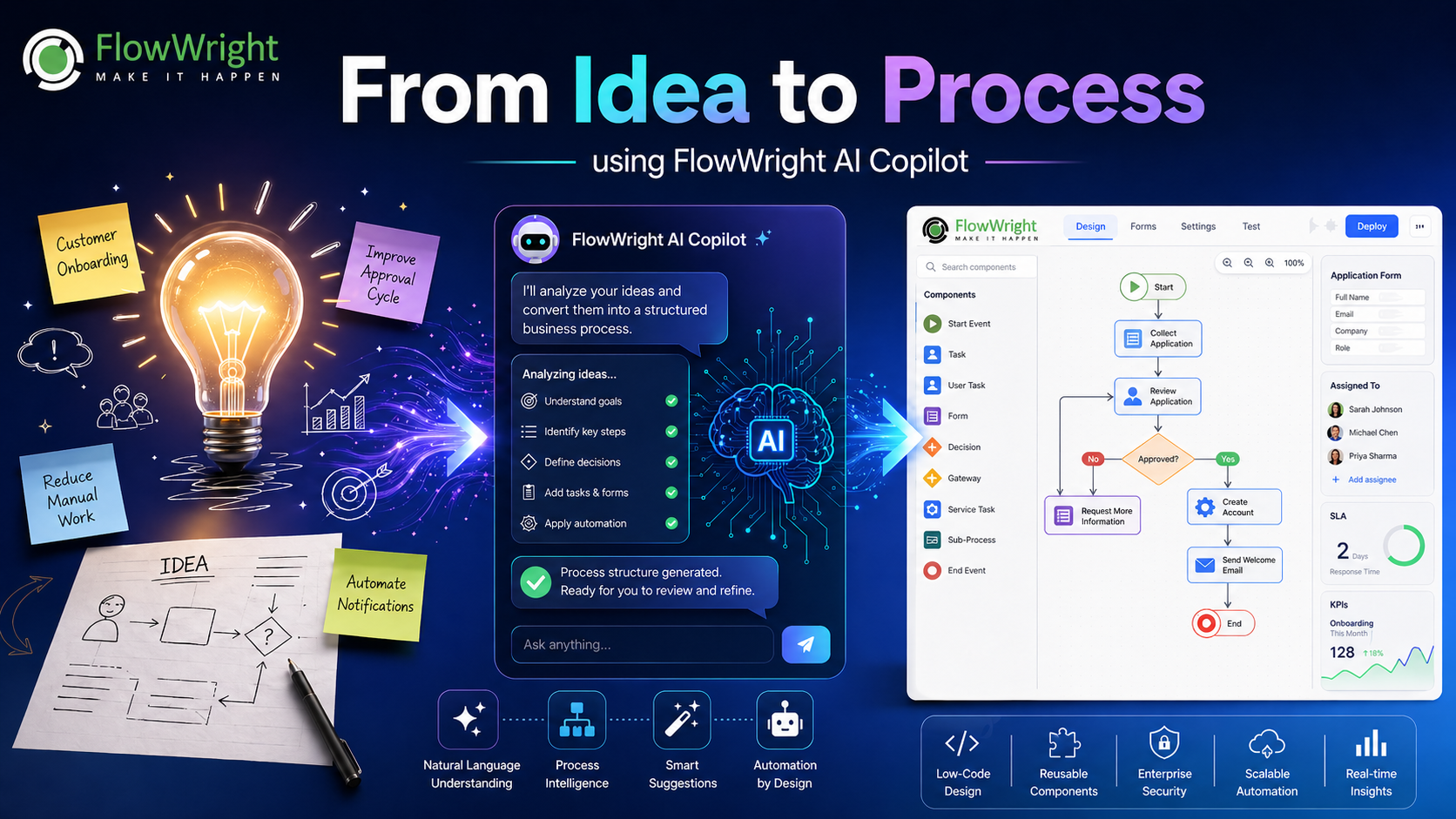
Every great automation project starts the same way: with an idea.
It may begin as a simple statement from a business user: “We need to approve customer requests faster.” It may come from operations: “Too many tasks are being handled manually.” It may come from compliance: “We need better tracking and audit history.” Or it may come from IT: “This process touches too many systems and needs to be standardized.”
The challenge is not usually the idea itself. The challenge is turning that idea into a working business process.
That is where FlowWright AI Copilot changes the game.
FlowWright AI Copilot helps transform plain business ideas into structured, executable workflow processes. Instead of starting with a blank canvas, users can describe what they want to automate, and the AI Copilot assists in generating the process structure, identifying key steps, suggesting tasks, forms, decisions, rules, integrations, and automation points.
The result is faster process design, better collaboration between business and IT, and a much shorter path from concept to execution.
The Problem with Traditional Process Design
Business process automation has always required translation.
A business user understands the problem. A process analyst understands the flow. A developer understands systems and integrations. A compliance officer understands audit and control requirements. But converting all that knowledge into a clean, executable workflow can take time.
Traditional process design often involves multiple stages:
Discovery meetings.
Whiteboard diagrams.
Email threads.
Manual documentation.
Process mapping.
Technical review.
Form design.
Rule definition.
Integration planning.
Testing.
Deployment.
Each step adds time. Each handoff creates the risk of misunderstanding. Each interpretation can introduce gaps between what the business asked for and what eventually gets built.
FlowWright AI Copilot reduces this friction by allowing users to start directly from natural language.
Instead of manually building every step from scratch, the user can describe the goal:
“Create a customer onboarding process where a sales rep submits a request, finance reviews credit terms, legal approves contracts, operations creates the account, and the customer receives a welcome email.”
From that description, the AI Copilot can help generate a structured workflow foundation. It can identify the roles involved, the major activities, approval points, decision paths, forms, notifications, and possible automation steps.
The user still remains in control. AI accelerates the design, but the final process is reviewed, refined, tested, and deployed by the people responsible for the business outcome.
Turning Natural Language into Workflow Design
FlowWright AI Copilot starts with something very simple: a business idea written in plain language.
That idea may be rough. It may be incomplete. It may include only the desired outcome. The Copilot helps convert that idea into a more complete process model.
For example, a user might write:
“We need to automate employee offboarding. When HR submits a termination request, IT should disable access, facilities should collect equipment, finance should process final payments, and compliance should verify that everything is completed.”
From this description, FlowWright AI Copilot can help identify:
The process trigger.
The primary request form.
The departments involved.
The tasks assigned to each group.
The sequence of work.
Parallel activities.
Decision points.
Required approvals.
Notifications.
SLA tracking.
Audit requirements.
Completion criteria.
This is where AI becomes highly valuable. It does not simply generate text. It helps create process intelligence.
A good process is more than a list of steps. It includes dependencies, ownership, timing, exceptions, business rules, and escalation paths. FlowWright AI Copilot helps uncover these elements early, so the process designer is not forced to discover them later during testing or production use.
From Blank Canvas to Process Blueprint
One of the hardest parts of process automation is getting started.
A blank design canvas can be intimidating, especially for users who understand the business process but are not experienced workflow designers. AI Copilot helps remove that barrier.
The user can begin with an idea, and FlowWright can help produce a first version of the process blueprint. This blueprint may include:
Start events.
User tasks.
Approval tasks.
Decision steps.
Forms.
Notification steps.
System integration steps.
Sub-processes.
Exception handling paths.
End events.
This initial design gives the team something concrete to review. Instead of discussing abstract requirements, business and technical teams can look at a real process structure and refine it together.
That changes the conversation.
Instead of asking, “What should the process look like?” the team can ask:
“Is this the right approval sequence?”
“Should finance and legal run in parallel?”
“What happens if the request is rejected?”
“Who owns the exception path?”
“Do we need an SLA for this step?”
“Should this be a sub-process?”
“What data should be captured on the form?”
“What system should this step integrate with?”
AI Copilot helps move the team from theory to design faster.
Better Collaboration Between Business and IT
FlowWright has always been designed to support both business users and technical teams. AI Copilot strengthens that bridge.
Business users can express requirements in plain language. Technical users can refine the generated process into a robust enterprise automation. Developers can add integrations, custom steps, API calls, database operations, and system-level logic where needed.
This creates a practical division of responsibility.
Business teams define the intent.
AI Copilot accelerates the structure.
Process designers refine the workflow.
Developers extend it where needed.
Administrators control security and deployment.
Managers monitor execution and performance.
The result is not “AI replacing process design.” The result is AI-assisted process design, where human expertise remains central.
This is especially important in enterprise environments. Business processes are not isolated diagrams. They involve security, compliance, data, systems, users, roles, and auditability. FlowWright AI Copilot helps accelerate design while still allowing organizations to maintain governance and control.
Designing Forms, Tasks, and Decisions
A process is only useful if it captures the right information and routes work correctly.
FlowWright AI Copilot can help suggest the forms needed for a process. For a customer onboarding process, it may suggest fields such as company name, contact information, account type, contract details, credit terms, approval status, and onboarding notes.
For an employee offboarding process, it may suggest employee name, department, termination date, manager, access removal checklist, equipment return status, final payroll status, and compliance confirmation.
These form suggestions save time and help users think through the data required to execute the process properly.
The Copilot can also help identify decision points.
For example:
Is the request approved?
Is additional information required?
Is the customer high risk?
Is the purchase amount above a threshold?
Does legal review apply?
Was equipment returned?
Did the SLA expire?
These decisions are critical because they determine how work moves through the organization. A good process must handle both the happy path and the exception paths. AI Copilot helps expose these paths early.
Building Automation into the Process
The real value of workflow automation is not just routing tasks. It is automating work wherever possible.
FlowWright AI Copilot can help identify where automation makes sense.
For example:
Send an email notification when a task is assigned.
Create a record in an external system after approval.
Call a REST API to validate customer data.
Update a database when the process reaches a milestone.
Generate a document based on submitted form data.
Start a sub-process for additional review.
Escalate overdue tasks to a manager.
Create audit records for compliance reporting.
Send reminders before SLA deadlines.
These automation points turn a basic workflow into an intelligent business process.
Instead of simply moving tasks from one person to another, FlowWright can orchestrate people, systems, data, documents, decisions, and integrations as part of one end-to-end process.
AI Copilot helps the user see those opportunities earlier in the design cycle.
Human in Command
Enterprise automation cannot be fully delegated to AI without review. Processes affect customers, employees, compliance, finance, operations, and security. Mistakes can create real business risk.
That is why the right model is not “AI in control.” The right model is “human in command.”
FlowWright AI Copilot assists the process designer, but the user remains responsible for approving the final design. The generated process can be reviewed, modified, tested, secured, and deployed using FlowWright’s process design and execution capabilities.
This matters because every organization has unique rules.
An approval process at one company may require two levels of review. Another may require legal approval only above a certain dollar amount. A life sciences company may require additional compliance checks. A financial services company may require strict audit and segregation of duties.
AI can suggest. Humans validate. FlowWright executes.
That combination gives organizations speed without sacrificing control.
Reducing Time to Value
The faster an organization can move from idea to process, the faster it can realize business value.
FlowWright AI Copilot helps reduce time in several ways:
It accelerates initial process design.
It reduces manual process mapping effort.
It helps users think through missing steps.
It suggests forms, tasks, and decisions.
It identifies automation opportunities.
It improves communication between business and IT.
It creates a working starting point faster.
It supports faster iteration and refinement.
This is especially useful for organizations that have many manual processes waiting to be automated. Most companies have dozens or hundreds of workflows trapped in email, spreadsheets, shared drives, and informal team knowledge.
AI Copilot gives teams a faster way to convert those ideas into structured automation.
Examples of Ideas That Can Become Processes
FlowWright AI Copilot can help with many types of business processes, including:
Customer onboarding.
Vendor onboarding.
Employee onboarding.
Employee offboarding.
Purchase approvals.
Document review and approval.
Complaint handling.
Change management.
IT service requests.
Compliance reviews.
Contract approvals.
CAPA workflows.
Quality inspections.
Incident management.
ERP cutover planning.
Data validation workflows.
Exception handling processes.
Each of these processes starts as a business need. FlowWright helps turn that need into executable workflow automation.
For example, a complaint handling process can begin with a simple statement:
“When a complaint is received, classify it, assign it to the right department, investigate the issue, approve the resolution, notify the customer, and track closure.”
AI Copilot can help turn that into a process with intake forms, classification steps, investigation tasks, approval routing, customer notifications, SLA tracking, and management dashboards.
The idea becomes a process. The process becomes execution. Execution becomes measurable business improvement.
From Process Design to Operational Intelligence
Once a process is deployed, the value continues.
FlowWright can track process execution, task status, bottlenecks, delays, approvals, exceptions, and completion rates. This turns automation into operational intelligence.
Organizations can see:
How many processes are running.
Where work is delayed.
Which tasks are overdue.
Who is responsible for pending work.
How long each step takes.
Which decisions occur most often.
Where exceptions are happening.
Which processes need optimization.
AI-assisted design helps create the process. FlowWright execution helps manage the process. Analytics and reporting help improve the process over time.
This creates a continuous improvement cycle:
Idea.
Design.
Automate.
Execute.
Measure.
Improve.
FlowWright AI Copilot helps accelerate the first steps, but the full value comes from running, monitoring, and improving the process across the enterprise.
Why This Matters Now
Organizations are under pressure to move faster, reduce costs, improve compliance, and deliver better customer experiences. At the same time, IT teams are overloaded, business users need faster solutions, and manual processes continue to slow down operations.
AI-assisted workflow design gives companies a practical way to scale automation.
Instead of waiting weeks to define the first version of a process, teams can generate a starting point quickly. Instead of relying only on technical users, business teams can participate more directly. Instead of losing requirements in translation, users can describe their intent and immediately see it transformed into a structured workflow.
This is where FlowWright AI Copilot provides real value.
It does not just make process design faster. It makes process design more accessible, more collaborative, and more intelligent.
Thoughts
Every automation journey starts with an idea. But ideas alone do not transform a business. Execution does.
FlowWright AI Copilot helps bridge the gap between business intent and executable workflow. It allows users to describe what they want, receive a structured process starting point, refine the design, add forms and decisions, integrate systems, apply automation, and deploy the process with enterprise control.
The result is a faster path from concept to automation.
From idea to process.
From process to execution.
From execution to measurable improvement.
That is the power of FlowWright AI Copilot.
















