
Get a demo of FlowWright's event-driven workflow engine and see how its built-in ESB connects your enterprise systems without custom code.
A workflow engine is a software platform that executes business processes by advancing tasks through predefined logic steps. Traditional engines relied on rigid if-then rules that struggled with dynamic enterprise demands. Modern designs use event-driven architectures that react to real-time triggers rather than polling for changes. An engine with a built-in Enterprise Service Bus (ESB) provides native message queuing, routing, and transformation capabilities. This embedded approach eliminates the operational overhead of maintaining separate integration middleware and enables responsive automation at scale.
What Is a Workflow Engine in an Event-Driven Architecture?
A workflow engine is a core software component that manages business processes by advancing tasks through conditional logic. In an event-driven architecture (EDA), the engine does not wait for manual triggers. Instead, it responds to events as they occur in real time. This architectural shift is fundamental for modern applications that need to scale dynamically.
By adopting an embeddable .NET workflow engine, teams can build systems that react automatically to external triggers. These triggers operate without slow manual checks or polling intervals. This design helps developers create more responsive systems that stay aligned with business operations.
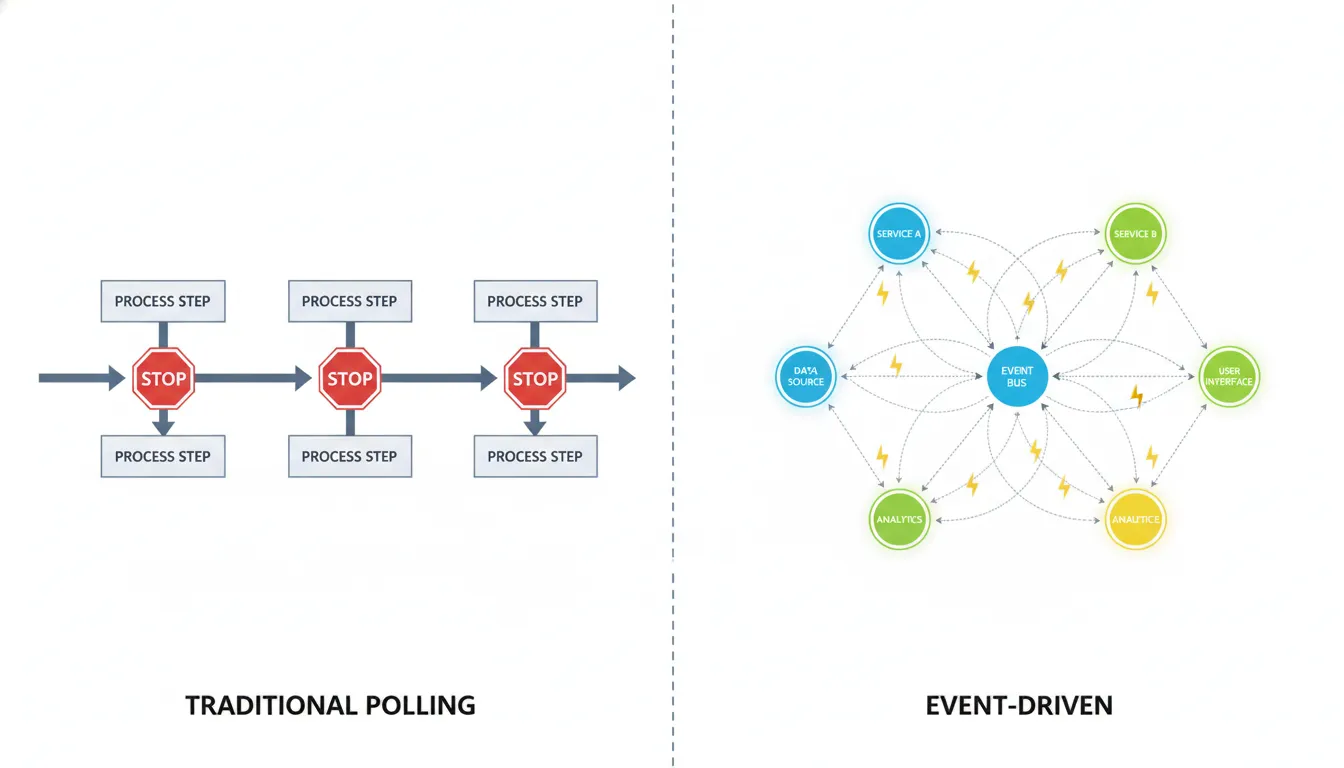
A workflow engine in an event-driven architecture reacts to real-time signals instead of polling for updates. It receives events from connected systems and, using configurable business rules, determines the next action. This push-based model eliminates idle polling cycles and enables sub-second response times across distributed enterprise environments.
Moving From Rigid Logic to Event Triggers
For years, automated systems depended on rigid conditional logic to advance tasks. Legacy systems polled for updates on fixed schedules, creating latency and resource waste. In an event-driven model, the workflow engine instantiates a process the moment an event fires. This could be a file upload, a sensor reading, or a message from another application.
This approach allows the system to handle variable workloads with better efficiency and precision. When an event occurs, the engine uses instantiation to create a dedicated process path for that occurrence. For instance, when a customer places an order, the engine starts a fulfillment process specific to that transaction. The engine then manages the lifecycle of that instance from initiation through completion.
This guarantees that every task follows the correct rules without skipping validation steps. Using an event-driven approach helps developers build more adaptable applications that evolve as the business grows. It removes the bottlenecks inherent in older polling-based systems.
The Role of a Built-In ESB
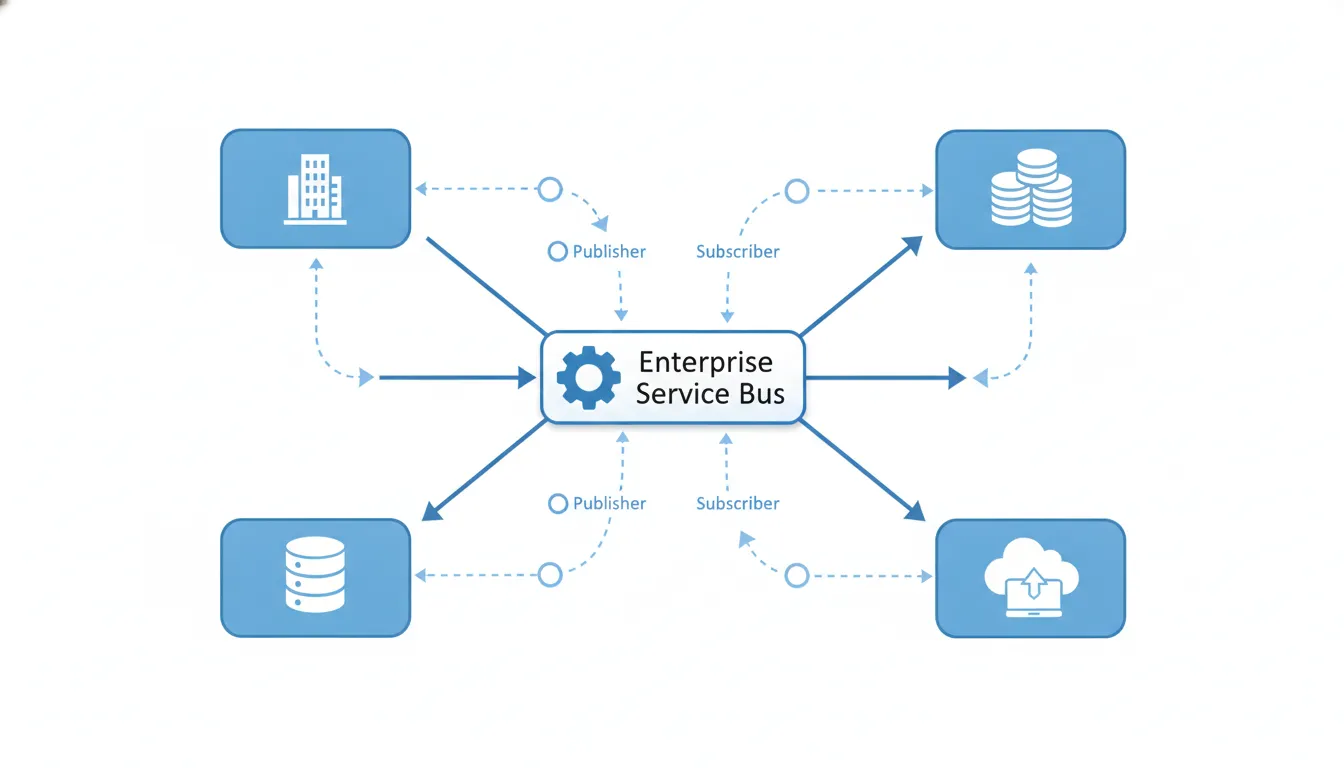
A built-in Enterprise Service Bus (ESB) functions as the central message hub for all events in the system. While some engines require external middleware to integrate with other applications, an embedded ESB handles this communication within the platform itself. It manages message routing, format transformation, and queuing to ensure reliable data delivery.
This keeps the workflow engine connected to everything from legacy on-premises systems to modern cloud services. The ESB provides several core capabilities for event-driven flows:
- It publishes and subscribes to event messages across the enterprise.
- It transforms data formats to match each application's requirements.
- It routes information to the correct destination based on configurable rules.
- It uses message queuing to handle traffic spikes without data loss.
By using a built-in hub, teams avoid writing custom integration code for every connection. Instead of crafting new logic for each endpoint, the ESB applies standardized rules to pass data reliably. This makes the architecture easier to maintain and debug. It also enables real-time data routing without intermediary processing steps.
Lifecycle and State Management in .NET
The lifecycle of a workflow involves several distinct stages. It begins with definition, where users design a process blueprint. Next, the engine handles instantiation, execution, and state management. State management is a critical function because it tracks progress for every active process instance.
If a system restarts or a step has a long delay, the engine persists the current state in a durable store. This ensures the process can resume exactly where it left off without data loss. In a .NET environment, a distributed engine provides additional reliability and throughput. These engines can span multiple servers to handle high transaction volumes.
If one server fails, another takes over processing immediately. Once the process reaches its final step, the engine archives the completion data for audit purposes. This complete record is valuable for organizations that must comply with regulatory data retention requirements. With over 300 configurable steps, developers can model complex workflows quickly and with less code.
How a Built-In Enterprise Service Bus Powers Event-Driven Workflows
A modern workflow engine must communicate with many different systems. An Enterprise Service Bus (ESB) provides this integration layer. It acts as the central nervous system for data exchange. In an event-driven architecture, the ESB captures signals from connected applications and instructs the engine on what actions to take.
This allows teams to manage enterprise-scale workloads without performance degradation. Enterprise automation research confirms that effective message management is essential for maintaining operational continuity in large organizations.
Most legacy systems use polling. The engine repeatedly queries other applications for status changes, consuming bandwidth and compute cycles. An ESB eliminates this by enabling the engine to react to events. When something happens, the ESB pushes the data directly where it is needed. This makes the entire system faster and more responsive to real-world conditions.
A built-in ESB powers event-driven workflows by providing native publish/subscribe messaging, content-based routing, and format transformation. It acts as a centralized message backbone that decouples event producers from consumers. This allows the workflow engine to respond to events without polling and enables loose coupling between integrated systems.
Publish and Subscribe Messaging
The ESB uses a publish-subscribe model to distribute data. When an event occurs, such as a new order placement, a system publishes a message. The ESB then delivers that message to every subscriber registered for that event type.
This keeps systems loosely coupled. One component can change without breaking dependent services. It also means new processing steps can be added to a workflow without rewriting existing integration code.
This model scales naturally. Multiple systems can listen for the same event simultaneously. For example, a new customer registration can trigger an email confirmation, a CRM update, and a billing verification all in parallel.
The ESB manages message throughput so the engine focuses on business logic. This results in a more resilient and adaptable event-driven workflow system for your enterprise.
Message Queuing and Content-Based Routing
A built-in ESB also handles message transformation and intelligent routing. Different systems often use incompatible data formats. The ESB can transform payloads so every destination system can interpret them correctly. This ensures that data from a legacy database can feed into a modern web application without translation errors.
Message queuing guarantees delivery. If a downstream service is temporarily unavailable, the message waits in the queue until the service recovers. This prevents data loss during transient failures.
Content-based routing is another powerful capability. The ESB inspects message content to determine the correct destination. If an order exceeds a certain value, it might route to a manager for approval. If it is a standard transaction, it proceeds directly to fulfillment. This gives you granular control over process flows, as the engine can integrate with diverse database types and conditional logic paths.
| Criteria | Built-In ESB | Separate ESB |
|---|---|---|
| Latency. | Very low; internal calls. | Higher; network overhead. |
| Maintenance. | Single platform to manage. | Two systems to maintain. |
| Integration. | Native; no custom code. | Requires API development. |
| Reliability. | Shared failover logic. | Split failure domains. |
| Cost. | Included in platform. | Additional licensing fees. |
FlowWright embeds the ESB directly within its platform. Most competing solutions require purchasing and configuring a separate ESB, which adds expense and complexity.
With a built-in approach, you get lower latency and simplified administration. Events and routes are configured in one place using a visual designer rather than through external configuration files. This makes it easier to build a resilient system that scales with your business needs.
Key Stages in the Event-Driven Workflow Lifecycle
Every business process progresses through a defined sequence of stages from initiation to completion. In an event-driven system, the workflow engine does not follow a fixed sequential list. It responds to incoming data and signals as they arrive. This eliminates the polling overhead that degrades legacy systems. This approach makes the .NET workflow engine significantly more adaptable. The lifecycle typically encompasses five stages: definition, instantiation, execution, state management, and completion.
The event-driven workflow lifecycle consists of five stages: definition (designing the process blueprint), instantiation (creating a process instance triggered by an event). Execution (advancing through steps based on logic), state management (persisting progress for reliability), and completion (archiving results and audit data). Each stage builds on the previous one to create resilient business automation.
Process Design and Instantiation
The first stage is definition. Teams create a process blueprint using standard notations such as BPMN, YAML, or JSON. This blueprint defines how the system should respond to different event types. Modern workflow engine platforms allow both developers and business analysts to collaborate on these designs. This shared perspective ensures the automated process accurately reflects business requirements.
The second stage is instantiation. A specific process instance begins when a triggering event occurs. For example, a customer purchase or a message on the ESB can start a new instance. This allows the system to scale horizontally, handling many concurrent processes without manual intervention. Each instance follows the master blueprint while maintaining its own state and data context.
Execution and State Persistence
Execution is the third stage. The engine advances work from one step to the next using configurable logic. It might route a task to an approver or send data to another system via the ESB. Event-driven execution keeps processes moving without idle waiting periods.
State management is the fourth stage and a defining feature of a robust event-driven workflow platform. The engine persists the progress of every active instance in a durable data store. If a system restarts or encounters a delay between steps, the engine resumes exactly where processing stopped. This durability ensures that long-running processes remain safe across days or weeks. It protects work against infrastructure failures and extended wait states.
Completion and Audit Trails
The final stage is completion. When the process reaches its terminal step, the engine finalizes execution. It does not merely stop; it cleans up active state to free resources and maintain system performance. This housekeeping is essential for keeping the engine responsive at scale.
During completion, the engine also archives process data for audit compliance. This creates a complete record of what occurred, who approved each step, and when actions were taken. A thorough audit trail helps organizations meet regulatory requirements. It also enables managers to identify bottlenecks and optimize process performance over time.
Practical Scenarios for Event-Driven Workflow Automation
Event-driven architectures help large enterprises manage complex, distributed operations. They enable systems to communicate without being chained to rigid execution sequences. A workflow engine in this architecture acts as the central orchestrator. It responds to events such as a new sale or a data change in real time. This makes the organization faster and more responsive. It also reduces manual interventions that introduce errors and delays.
Event-driven workflow automation excels in three common enterprise scenarios: cross-system data synchronization (syncing CRM and ERP records in real time). Multi-step approval routing (managing sign-off chains without manual tracking), and cross-system data reconciliation (validating data consistency across distributed databases). Each scenario leverages the ESB for reliable message delivery and the workflow engine for stateful process execution.
Cross-System Data Synchronization
Many enterprises struggle with data silos. Sales teams use one platform while finance teams use another. When a deal closes, the data must propagate from one system to the next. Manual data entry is slow and error prone. An event-driven workflow engine solves this. It listens for a deal-closed event. Then it pushes the data to the ERP system immediately. This keeps all departments operating from the same data set.
This integration uses the enterprise service bus to route messages reliably. The ESB transforms data formats so the receiving system can consume them without custom mapping. This capability is essential for organizations running diverse application portfolios. It ensures that business facts remain synchronized across the entire technology stack, enabling data-driven decisions based on current information.
Multi-Step Approval Workflows
Complex projects frequently require multiple approvals spanning days or weeks. A polling-based system might time out or lose process state. An event-driven system handles these scenarios reliably. It persists state at each approval step, ensuring no task is dropped. It also allows approvers to work at their own pace without halting the overall process.
For example, a procurement request might require sign-off from department heads, finance, and legal. The system sends a notification to the first approver. Upon approval, the event triggers the next step in the sequence. If an approver is unavailable, the system can route the task to a delegate based on configurable escalation rules. This keeps the process moving without manual supervision. Every decision is recorded in the audit trail.
- CRM-to-ERP data sync. The system uses publish-subscribe messaging. When a sales record changes, it publishes an event. The ERP system subscribes and updates its records automatically. This keeps customer and order data synchronized across the enterprise.
- Tiered approval routing. A purchase event initiates the workflow. The engine routes the request to the first reviewer. Upon approval, the event triggers the next reviewer in the hierarchy. The flow follows your organization's exact governance rules and can skip steps when thresholds are met.
- Cross-system data reconciliation. Large enterprises store data across multiple databases. The system uses message queuing to collect and compare data from disparate sources. It identifies discrepancies and triggers corrective workflows automatically. This reduces audit preparation time and improves data accuracy.
FlowWright simplifies these implementations with over 300 prebuilt workflow steps. You can drag and drop these steps into a process design using the visual designer without writing integration code. If a process fails, the visual debugger helps you identify the root cause quickly by inspecting data at any stage through configurable breakpoints. This tooling is essential for effective business process management in modern enterprises.
Event-Driven vs. Traditional Workflow: Why Architecture Matters
The architecture a workflow engine uses determines its speed, reliability, and scalability. Legacy systems rely on polling-based models that check for updates on fixed schedules. A modern event-driven workflow automation platform uses push-based event triggers instead. This architectural choice fundamentally changes how applications communicate and how quickly teams can deliver results.
Event-driven workflow architecture differs from traditional polling-based models in five key areas: trigger mechanism (push events vs. scheduled polls). System coupling (loose vs. tight), integration topology (ESB-mediated vs. point-to-point), response latency (milliseconds vs. seconds to minutes), and scalability (horizontal, elastic vs. vertical, constrained). The event-driven model consistently outperforms in distributed enterprise environments.
The Limits of Rigid Logic Models
For decades, workflow engines depended on simple conditional rules to advance work. These legacy systems frequently employed tight coupling, where each process component had direct knowledge of the next. This creates a brittle dependency web that is difficult to maintain. Changing one element can break multiple dependent parts. When one component in a tightly coupled system fails, the entire process may stall. This makes it difficult for a business to scale or adapt to new requirements.
Loose Coupling and Real-Time Event Triggers
An event-driven model uses a message bus for communication, enabling loose coupling. In this design, process components do not need awareness of each other. Each service performs its function and emits an event signal. Instead of polling for completion status, dependent services wait for and react to these signals. This push-based approach eliminates the latency inherent in polling loops. It helps teams build more resilient process automation that responds to data in real time as it flows through the message bus.
State Persistence Across the Workflow Lifecycle
Every process moves through a defined set of stages: initiation, execution, and completion. A critical aspect is state management. The engine must persist the progress of every active instance in durable storage. This ensures continuity after a restart or crash. If a server fails, the engine knows exactly where to resume processing. This reliable state tracking helps teams verify process outcomes after completion. It also guarantees that no data is lost during long-running or asynchronous processes.
| Feature | Traditional Model | Event-Driven Model |
|---|---|---|
| Trigger Method. | Polling on fixed intervals. | Push-based events. |
| System Coupling. | Tight coupling. | Loose coupling. |
| Integration Model. | Point-to-point connections. | Built-in ESB. |
| Response Time. | Higher latency. | Sub-second response. |
| Logic Implementation. | Rigid conditional steps. | Dynamic message routing. |
| Scalability. | Difficult to scale. | Designed for horizontal scale. |
Choosing the right architecture goes beyond implementation convenience. It determines how well your system can evolve over time. A built-in ESB makes it straightforward to add new services without disrupting existing integrations. This makes the architecture durable and future-ready. Most modern enterprises now adopt event-driven architectures to reduce operational overhead and accelerate time-to-market.
Building Event-Driven Workflows on Your .NET Stack
For .NET development teams, leveraging a native stack is the most effective way to maintain performance and minimize technical debt. A native .NET Core workflow engine eliminates the translation layers that degrade performance in distributed systems. This approach ensures your process logic executes efficiently while staying fully compatible with existing C# code and libraries.
Building event-driven workflows on .NET with a native embedding model eliminates cross-platform translation overhead. The engine runs as a NuGet package within your application domain. Shares your existing dependency injection and configuration framework, and supports SQL Server, PostgreSQL, and MongoDB for state persistence. Full backward compatibility ensures existing processes are not disrupted during migration.
Native .NET Core Integration
Modern workflow engine for .NET platforms are distributed as NuGet packages or lightweight services. This means they integrate directly into your build pipeline and use the same tooling your team already employs. These engines support multiple database backends including MS SQL Server, PostgreSQL, and MongoDB, giving you the flexibility to choose the optimal data store for your workload.
Native engines provide full backward compatibility. This is essential for long-running processes that may persist across version upgrades. When you update the engine, active process instances continue running on their original version until completion, eliminating the risk of breaking in-flight workflows. The engine can handle processes running for days, weeks, or months without state corruption.
Visual Debugging and Process Monitoring
FlowWright's visual debugger gives developers direct insight into running processes. You can set breakpoints on any step, inspect variable values, and step through execution in real time. This capability dramatically reduces the time needed to diagnose and fix process logic issues compared to examining log files after the fact.
The visual designer allows both developers and business analysts to collaborate on process design. Changes are reflected immediately in the process definition without requiring code deployments. This accelerates iteration cycles and ensures the automated process stays aligned with evolving business requirements.
Embedding for OEM and ISV Use Cases
For independent software vendors and OEM partners, FlowWright's embeddable architecture allows white-label integration. The engine runs inside your application process space, sharing your authentication, session management, and deployment lifecycle. This eliminates the operational burden of managing a separate workflow service.
Multi-tenancy is built in at the engine level. Each tenant receives isolated process instances, configuration, and audit data while sharing the same infrastructure. This makes the platform suitable for SaaS providers who need to offer workflow automation capabilities to their customers without per-tenant infrastructure costs.
For a personalized walkthrough of how the .NET workflow engine integrates with your specific stack, schedule a demo with the FlowWright team.
Frequently Asked Questions
How does a workflow engine work?
A workflow engine executes business processes by advancing tasks through predefined logic steps. It receives events or manual triggers, evaluates routing rules, and determines the next action. The engine persists state between steps to ensure reliability in long-running processes. An event-driven engine reacts to incoming signals rather than polling for updates, which reduces latency and resource consumption.
What are the key features of an enterprise workflow engine?
Enterprise workflow engines provide process design tools, state persistence, integration capabilities, audit logging, and scalability. Advanced platforms include a built-in ESB for message routing, visual debugging for troubleshooting, and multi-tenancy for SaaS deployments. The best engines also support multiple database backends and offer embedding options for OEM integration.
Why use a workflow engine for business automation?
Workflow engines reduce manual effort by automating repetitive tasks, enforcing consistent process execution, and providing audit trails for compliance. They eliminate the errors introduced by manual handoffs and ensure that every process instance follows the same rules. Event-driven engines further improve efficiency by reacting to triggers in real time.
How do workflow engines support event-driven architecture?
Workflow engines support event-driven architecture by subscribing to message queues, processing events as they arrive, and triggering downstream actions without polling. A built-in ESB amplifies this capability by providing native publish-subscribe messaging, content-based routing, and format transformation. This enables loosely coupled integrations that scale across distributed enterprise environments.
Ready to streamline your enterprise workflow with a built-in ESB?
FlowWright's event-driven workflow engine with embedded ESB gives you native integration capabilities without the overhead of separate middleware. Whether you are synchronizing CRM and ERP data, managing multi-step approval chains. Or building OEM workflow automation into your product, the platform provides the tooling and runtime you need.
Get a demo of FlowWright's workflow engine and discover how its built-in ESB can accelerate your enterprise automation initiatives.
















