
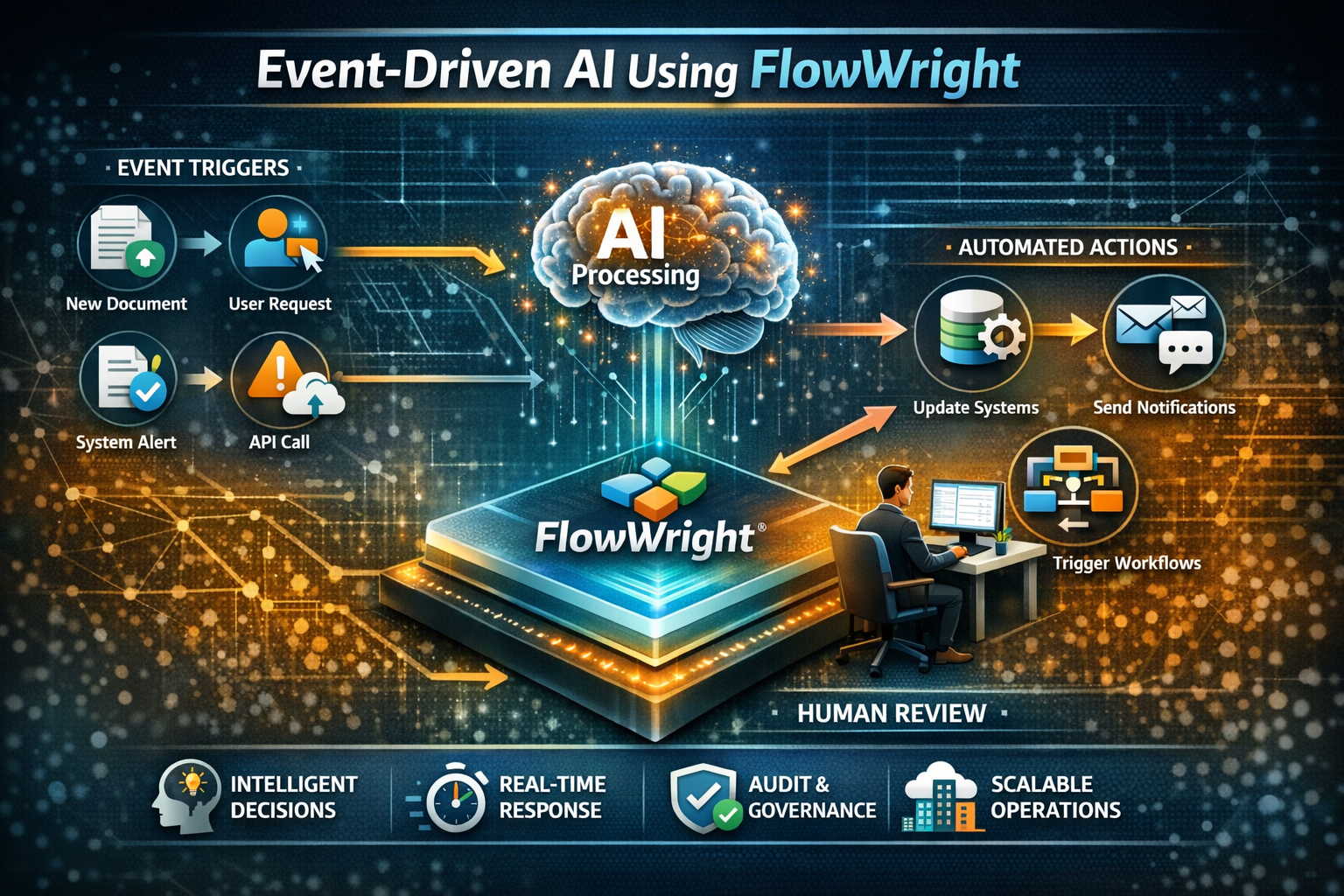
Your most talented people are likely spending too much of their day on repetitive, low-value work. They get stuck monitoring queues and processing forms instead of tackling strategic challenges. While artificial intelligence can automate these tasks, its power only creates business value when it reacts to the right event, at the right time, and with the right controls. This is where event-driven architecture and workflow orchestration come together. This guide will show you how to move FlowWright from theory to practice; real-world examples of AI in business process automation will help you empower your workforce.
Event-driven AI using FlowWright is about building systems where business events automatically trigger AI-powered actions, decisions, validations, escalations, and downstream processes. Instead of humans constantly checking dashboards, polling systems, reading emails, reviewing documents, or manually routing work, the platform responds as events happen. AI is not sitting isolated in a chatbot window. It is embedded inside the operational flow of the enterprise.
This is the difference between experimenting with AI and actually operationalizing it.
What Is Event-Driven AI?
Event-driven AI is an architecture where AI models or AI services are invoked in response to real-time business or system events. Those events can come from many sources:
- A document is uploaded
- A customer submits a form
- A sensor reports a threshold breach
- A user sends an email
- A database row changes
- A support ticket is opened
- A payment fails
- A fraud alert is raised
- A contract reaches renewal date
- A workflow task is overdue
- A machine or application publishes telemetry
In a traditional application, these events are often handled with hard-coded business logic or manual intervention. In an event-driven AI system, the event becomes the trigger for intelligent action.
For example:
- A new invoice arrives, AI extracts fields, validates values, and starts an approval workflow
- A complaint email arrives, AI classifies sentiment and urgency, then routes it to the correct business unit
- A compliance regulation update is detected, AI summarizes the change, identifies impacted processes, and initiates review tasks
- A manufacturing alert is raised, AI analyzes patterns against historical incidents and recommends next steps
- A loan application is submitted, AI scores document completeness, flags risk indicators, and routes exceptions for human review
This is not just automation. This is intelligent automation driven by events.
Why Event-Driven AI Is a Game-Changer for Business
Most enterprise systems are still built around passive interaction models. Users log in, check status, search for issues, review queues, and manually decide what should happen next. This creates delay, inconsistency, and operational overhead.
An event-driven AI model shifts the enterprise from passive response to active execution.
The benefits are significant:
Faster response times
The system reacts immediately when an event occurs.
Less manual monitoring
Teams no longer need to constantly watch for conditions that require action.
More consistent decisions
AI can classify, summarize, detect anomalies, or recommend next steps in a repeatable manner.
Improved scalability
As event volumes rise, the system can handle them through orchestrated workflows rather than additional human effort.
Better governance
When AI is embedded inside a workflow platform, every decision, handoff, approval, and exception can be tracked.
That last point matters the most. AI without orchestration can become chaotic. AI inside an event-driven workflow engine becomes auditable, controllable, and enterprise-ready.
Unlocking Human Potential
Event-driven AI does more than just improve system efficiency—it redefines the role of your team. By automating responses to routine business events, you liberate your employees from the grind of manual monitoring and repetitive data entry. Think about it: instead of spending hours processing standard invoices or routing basic support tickets, your team can focus on what they do best. They get to apply their expertise to strategic planning, creative problem-solving, and building stronger customer relationships. This shift allows your organization to unleash the full potential of its workforce, empowering people to become innovators who manage exceptions and drive growth.
Moving from Reactive to Predictive Insights
Most businesses operate in a reactive state, addressing issues only after they’ve already happened. Event-driven AI changes this dynamic entirely by shifting your operations from reactive to predictive. When you embed AI into your workflows, an event doesn't just trigger a response—it can trigger a forecast. For example, an unusual pattern in logistics data can initiate an AI model that predicts a supply chain disruption, automatically starting a process to find alternative suppliers. This is how leading organizations move beyond theory and into practice. Instead of just reacting to alerts, you can anticipate future needs, mitigate risks before they impact your bottom line, and seize opportunities that your competitors haven't even seen yet.
How FlowWright Powers Your Event-Driven AI Strategy
FlowWright is not just a workflow engine and not just an AI integration point. It is a platform that brings together events, business logic, forms, rules, task management, document handling, APIs, and process orchestration in one environment.
That makes it ideal for event-driven AI.
FlowWright can sit at the center of enterprise operations and react to incoming events from users, systems, databases, documents, APIs, or external services. Once an event is detected, FlowWright can launch a process, apply rules, call AI services, store outputs, trigger approvals, route tasks, update systems, and monitor outcomes.
This gives organizations something that isolated AI tools cannot provide: operational continuity.
AI rarely works alone in the enterprise. It usually needs context, approvals, exception handling, retries, security boundaries, audit logs, and integration to downstream systems. FlowWright provides that missing operational layer.
How Event-Driven AI Works in FlowWright
A typical event-driven AI pattern in FlowWright looks like this:
Step 1: An Event Triggers the Process
The event may originate from:
- A web form submission
- A REST API call
- A message or integration endpoint
- A file drop into a document repository
- A scheduled detection job
- A business rule threshold
- A user action in an application
- A database change or external connector event
Step 2: FlowWright Captures the Event Data
FlowWright captures the event and maps it into a business process context.
This is important. The event is not just data. It becomes part of a governed process instance with variables, security, metadata, ownership, and status.
Step 3: The AI Model Gets to Work
FlowWright calls an AI model or provider for a specific purpose such as:
- Classification
- Extraction
- Summarization
- Recommendation
- Decision support
- Translation
- Sentiment analysis
- Risk scoring
- Document interpretation
- Natural language generation
The AI call is not the process. It is a step within the process.
Step 4: FlowWright Translates the AI's Output
The response is mapped into workflow variables, business rules, or decision tables. The process can branch based on confidence level, extracted values, or detected conditions.
Step 5: Smart Human-in-the-Loop Review
If confidence is low, policy requires approval, or an exception is detected, FlowWright routes the work to the right person or team.
Step 6: Other Systems Are Updated Automatically
Based on the AI-assisted outcome, FlowWright can update CRM, ERP, DMS, ticketing, email, or custom applications.
Step 7: A Complete Audit Trail Is Created
The event, AI input/output, workflow routing, approvals, and final resolution are all part of the process history.
That is how event-driven AI becomes enterprise-grade.
Real-World Examples of AI in Business Process Automation
Automating Document Intake and Processing
A customer uploads a contract, claim, invoice, or onboarding packet. That upload is the event.
FlowWright starts a process automatically. AI reads the document, classifies the type, extracts important fields, identifies missing items, and generates a summary. Business rules validate thresholds and required values. If the confidence is high, the workflow continues automatically. If not, a human reviewer receives a task with the extracted data already populated.
This drastically reduces manual review time while still preserving control.
Reducing Expense Claim Processing Time
Think about the universal chore of submitting an expense report. The moment an employee uploads their receipts, an event is triggered. Instead of that report sitting in a queue for manual review, an AI-powered workflow can instantly begin. The AI scans receipts, extracts key data like vendor and amount, and validates the claim against company policies in real-time. This approach can dramatically cut processing time—in some cases by up to 50%. This isn't just about getting employees reimbursed faster; it's about intelligent automation that reduces manual errors and frees up finance teams for more strategic work. By embedding AI within a workflow platform, the entire process becomes faster, more accurate, and fully auditable, providing the operational control that finance departments require.
Instantly Triaging Customer Service Requests
An email or support case enters the system. That is the event.
FlowWright triggers AI to classify intent, detect urgency, evaluate sentiment, and identify relevant product or service categories. The case is routed to the right queue, SLA clocks start automatically, and escalation rules are applied.
Instead of a support manager manually reviewing inbound items, FlowWright and AI perform intelligent triage at scale.
Proactively Monitoring for Compliance Risks
A regulation update, policy revision, or audit event occurs. That is the event.
FlowWright can call AI to summarize the regulatory change, compare it with existing procedures, identify impacted departments, and launch review workflows across business units. Tasks are assigned, attestations collected, and remediation tracked.
This turns compliance from a reactive exercise into an event-driven operating model.
Responding to Operational Issues in Real Time
A telemetry threshold breach, failed transaction pattern, or suspicious system event occurs. That is the event.
FlowWright can invoke AI to correlate the incident with prior events, propose likely causes, and recommend response actions. It can simultaneously notify support teams, create investigation tasks, and launch containment processes.
AI becomes a real-time assistant inside an orchestrated operational response.
Accelerating Sales and Contract Lifecycles
A proposal is submitted or a deal reaches a new stage. That is the event.
FlowWright can use AI to summarize the opportunity, review contract language, flag risky terms, generate follow-up content, and route approvals based on business rules. This speeds cycle time without removing governance.
Personalizing Retail and Marketing Campaigns
When a customer adds an item to their cart or browses a specific product category, that action is a business event. Instead of waiting for them to return, an event-driven process can react instantly. A workflow can trigger an AI model to analyze the customer's browsing history and past purchases. Based on the AI's output, the system can automatically send a personalized follow-up email or text message with relevant product suggestions. This turns a simple website visit into a tailored shopping experience, using AI to provide recommendations that are genuinely helpful and timely, much like the systems used by major online retailers.
Automating Financial Trading and Analysis
In finance, speed and accuracy are everything. An event could be a sudden stock price fluctuation, a large transaction, or a data pattern that matches a known fraud signature. An event-driven platform can capture this trigger and immediately invoke an AI model to analyze the situation. For example, if a transaction is flagged as potentially fraudulent, a workflow can use AI to score the risk level in milliseconds. Based on that score, the process can automatically freeze the transaction and create a case for a human analyst to review, preventing financial loss before it happens. This is how AI manages risk not just by flagging issues, but by taking immediate, orchestrated action.
Enhancing Healthcare Diagnostics and Patient Management
Consider the moment a radiologist uploads a new patient scan, like an MRI or CT scan. This upload can act as an event that kicks off an intelligent workflow. The process automatically sends the image to a diagnostic AI model trained to spot anomalies or early signs of disease. The AI's findings, highlighting areas of potential concern, are then attached to the patient's file and routed back to the radiologist as a new task. This doesn't replace the doctor's expertise; it augments it. The AI performs the initial, time-consuming analysis, allowing medical professionals to diagnose conditions faster and with greater accuracy.
Optimizing Manufacturing and Supply Chains
On a factory floor, an event might be a sensor reporting a temperature spike on a critical machine. In a traditional setup, this might go unnoticed until the machine fails. With an event-driven approach, that sensor reading triggers a workflow. The process can use AI to analyze historical data and predict an imminent failure. It then automatically generates a maintenance work order and schedules a technician before the breakdown occurs. This same logic applies to supply chains, where AI can forecast demand based on sales events, preventing stockouts and optimizing inventory levels, keeping the entire operation running smoothly.
Streamlining Human Resources and Hiring
The arrival of a new job application is a perfect event to trigger an intelligent process. Once a candidate submits their resume, a workflow can begin automatically. It sends the application to an AI service that screens for essential qualifications and skills, scoring the candidate's fit for the role. This initial screening happens instantly and without bias. The workflow can then route top candidates into an interview scheduling process while sending polite, automated responses to those who aren't a match. This allows HR teams to find the best candidates faster and focus their energy on engaging with the most promising applicants.
Bolstering Cybersecurity Defenses in Real Time
When a security system detects a suspicious event, like an unusual login attempt or abnormal data access, every second counts. This alert can trigger a high-priority workflow that immediately engages an AI model to analyze the threat. The AI can assess the pattern, confirm its malicious intent, and recommend a response. The workflow then executes the containment plan automatically—isolating the affected device from the network, disabling the compromised user account, and creating a critical incident ticket for the security team. This is how organizations can protect themselves from threats in real-time, using an orchestrated response that is far faster than any manual intervention.
Accelerating Legal Document Review
When a new contract is uploaded for review, the event can launch a workflow designed to save the legal team hours of work. The process sends the document to an AI model trained to understand legal language. The AI can extract key information like party names, effective dates, and renewal terms, while also flagging non-standard clauses or potential risks. The workflow then presents this structured analysis to a lawyer in a review task. This allows legal experts to bypass tedious reading and focus their attention directly on the critical elements that require their judgment, dramatically speeding up the contract lifecycle and helping them review documents more efficiently.
Making Smarter Procurement Decisions
An employee submitting a purchase request is an everyday event that can be made much smarter with AI. When the request is submitted, a workflow can use AI to provide immediate context. The AI can check for existing product licenses, analyze current spending patterns, and compare the request against approved vendor lists or more cost-effective alternatives. This analysis, along with the original request, is then routed to the procurement manager. Instead of approving requests in a vacuum, managers are equipped with AI-driven insights to help them make smarter decisions that control costs and align with company policy, all within an automated and auditable process.
Why Your AI Needs a Workflow Engine
A common mistake in enterprise AI adoption is treating AI as the entire solution. It is not.
AI is good at interpreting, generating, classifying, and recommending. But businesses also need:
- Security
- Access control
- State management
- Human approvals
- Timers and escalations
- Exception handling
- Integration
- Audit history
- Versioning
- Repeatability
These are workflow problems.
Without workflow, AI outputs stay disconnected from actual operations. A model may generate insight, but nobody acts on it consistently. Or worse, the action happens with no governance.
FlowWright closes that gap. It turns AI from a smart helper into an executable operational capability.
Balancing AI Automation with Human Expertise
Not every event should end in fully autonomous action. In many enterprises, the best model is not AI-only. It is AI-first with human oversight when needed.
FlowWright is well suited for this pattern.
You can design processes where AI handles the first pass, then FlowWright checks:
- Confidence score
- Risk level
- Value threshold
- Compliance sensitivity
- Customer tier
- Exception count
- Required policy approvals
Only the cases that truly need attention are routed to people. This preserves human control without forcing humans to do all the repetitive work.
That balance is critical in regulated, high-volume, or customer-facing operations.
Human-AI Collaboration as the New Standard
The most effective AI strategies don't aim to replace people; they aim to empower them. This partnership, where AI handles the heavy lifting and humans provide oversight and judgment, is quickly becoming the new standard for high-performing teams. Think of AI as a tireless assistant that can classify, summarize, and detect anomalies with incredible speed and consistency. This frees up your experts to focus on the exceptions, the complex decisions, and the strategic work that drives real value. A robust workflow platform is the key to making this collaboration work seamlessly. It acts as the conductor, intelligently routing tasks to AI for processing and then to the right person for review when human expertise is required, ensuring both efficiency and control.
How to Ensure Governance and Security in Your AI Processes
Enterprise AI adoption is often blocked not by lack of ideas, but by lack of trust.
Leaders ask valid questions:
- What triggered the AI action?
- What data was sent?
- What output came back?
- Who approved the decision?
- What happened after that?
- Can we explain the process?
- Can we prove compliance?
An event-driven AI architecture built on FlowWright gives answers to these questions. Since AI execution is embedded inside a process, the organization can track the full lifecycle of the event and response.
This is essential for banks, healthcare organizations, insurers, manufacturers, and any enterprise under audit, regulatory, or policy constraints.
FlowWright also allows organizations to keep AI within defined enterprise boundaries, control access, secure integrations, and ensure that automation is not running as an uncontrolled black box.
Addressing the Challenges of AI Implementation
Adopting artificial intelligence is about more than just plugging in a new piece of technology; it involves working through some very real business and technical challenges. While the potential of AI is enormous, so are the questions around security, fairness, and how it will fit into your existing operations. The key is to have a strategy and a platform that addresses these concerns from the very beginning. By building your AI initiatives on a solid foundation of process orchestration, you can turn these potential roadblocks into manageable steps. This ensures your AI is not only powerful but also responsible, secure, and fully integrated into your enterprise environment, creating real, sustainable value.
Overcoming Technical Integration Hurdles
One of the first walls many organizations hit is a technical one. Getting sophisticated AI tools to communicate effectively with existing, often older, enterprise systems can be a significant challenge. You can't just drop a new AI model into your infrastructure and expect it to work with decades-old databases or custom-built legacy applications. This is where a flexible integration and workflow platform becomes your most valuable player. Instead of creating a tangled web of custom code, you can use a central hub designed to connect disparate systems seamlessly. This allows modern AI services to interact with legacy data through controlled, well-defined processes, effectively bridging the gap between old and new without requiring a complete overhaul of your core infrastructure.
Upholding Data Privacy
AI models thrive on data, but using vast amounts of information brings up critical concerns about privacy and security. It's not enough for an AI to be smart; it must also be secure, especially when handling sensitive customer or corporate data. Letting an AI model have uncontrolled access is a risk most businesses can't afford to take. When you embed AI within a workflow automation platform, you wrap it in an essential layer of governance. You can precisely control what data the AI sees, create an immutable log of every interaction, and enforce your company's security policies at every step. This ensures that your intelligent processes are also compliant and trustworthy, building confidence with both your customers and internal stakeholders.
Ensuring Algorithmic Fairness and Avoiding Bias
A significant concern with AI, especially in sensitive areas like hiring, lending, or customer service, is the potential for algorithmic bias. An AI is only as objective as the data it's trained on, and hidden biases can lead to unfair or even discriminatory outcomes. The most effective way to counter this is by keeping a human in the loop for critical decisions. A robust process engine allows you to build rules that automatically flag certain AI-driven results—such as those with low confidence scores or those involving high-stakes scenarios—for human review. This AI-first, human-when-needed approach provides a critical safeguard, ensuring fairness, accountability, and common sense in your most important automated decisions.
Preparing Your Workforce for AI
The introduction of AI naturally leads to questions about its impact on the workforce. As AI takes over more repetitive and data-intensive tasks, the skills your team needs will undoubtedly evolve. This isn't about replacing people but about augmenting their abilities and re-focusing their efforts on higher-value strategic work that requires human creativity, empathy, and critical thinking. The transition becomes much smoother when you empower your existing team with low-code tools. Platforms like FlowWright enable business analysts and other subject matter experts to design, build, and manage AI-powered workflows themselves, making them active participants in the company's digital transformation journey rather than just spectators.
Getting Started with AI Automation: A Practical Approach
The idea of implementing AI across your organization can feel overwhelming, but you don't have to boil the ocean to make progress. The most successful AI strategies begin with practical, targeted applications that deliver clear and immediate value. Instead of aiming for a massive, complex overhaul from day one, focus on identifying specific processes where AI can make a measurable impact quickly. This approach allows you to build momentum, gain valuable experience, and demonstrate a tangible return on investment to the rest of the organization. These early wins create a flywheel effect, paving the way for more ambitious and transformative projects down the road.
Start with High-Impact, Low-Complexity Processes
A great starting point is to look for tasks that are repetitive, rule-based, and document-heavy, as these are often the source of hidden costs and inefficiencies. Think about processes like accounts payable, expense report approvals, or initial customer service triage. For many businesses, automating the intake and processing of invoices is a perfect first step. These workflows offer a high return by reducing manual data entry, eliminating late payment fees, and speeding up approval cycles. Using an intelligent document processing solution within your workflow engine, you can quickly set up a process that extracts invoice data, validates it against your business rules, and routes it for approval, delivering a tangible win early in your AI journey.
The Future of AI in Business
As AI technology continues to mature, its role in business will become even more integral and strategic. We're moving beyond simple task automation and toward a future where AI is a core component of decision-making, innovation, and competitive advantage. The focus will shift from *if* a company is using AI to *how* they are using it. The most successful organizations will be those that not only adopt powerful AI tools but also embed them within a framework of responsibility, transparency, and strong governance. This ensures that intelligence is applied in a way that is not only effective but also ethical and completely auditable.
The Growing Importance of Ethical and Responsible AI
Looking ahead, the conversation around AI will increasingly center on ethics and responsibility. Stakeholders, from customers and partners to regulators, will demand that businesses use AI in a fair, transparent, and accountable manner. It won't be enough to simply get a result from an AI; you'll need to be able to explain how that result was reached. This is why building AI on a workflow platform is so critical for future-proofing your strategy. It provides a complete, unchangeable audit trail for every AI-driven process, giving you the ability to demonstrate compliance and responsible use at any time. This transparency is key to building trust and protecting your brand's reputation in an AI-powered world.
Become a More Responsive Business with Event-Driven AI
The biggest strategic value of event-driven AI is not just efficiency. It is responsiveness.
Responsive businesses do not wait for people to notice problems, review inboxes, check dashboards, or move files between systems. They design their operations so that events automatically drive intelligent action.
FlowWright helps organizations build exactly that kind of enterprise.
When combined with AI, FlowWright can listen for events, understand context, make or assist decisions, involve humans where required, and complete the operational loop across systems and teams.
That is how AI becomes real business infrastructure.
Event-driven AI using FlowWright is not about adding AI to a workflow as a gimmick. It is about redesigning enterprise operations so that business events automatically trigger intelligent, governed, auditable responses.
This is where AI creates measurable value:
- faster decisions
- lower manual effort
- better consistency
- stronger compliance
- scalable operations
- real-time responsiveness
FlowWright provides the process orchestration layer that makes AI usable in the real world. It connects events to actions, AI to governance, and intelligence to execution.
In the coming years, the enterprises that win will not be the ones that merely experiment with AI prompts. They will be the ones that embed AI into event-driven operational systems.
That is the opportunity.
And that is where FlowWright stands out.
Frequently Asked Questions
What exactly is event-driven AI? Think of it as a system that automatically reacts to business activities. Instead of a person needing to check for new tasks, an "event" like a customer submitting a form or a document being uploaded instantly triggers a process. AI then gets to work within that process, doing things like classifying the request, extracting data, or flagging risks, all without manual intervention.
Is this just another term for automation? It's more like the next evolution of automation. Traditional automation often follows a rigid, pre-defined path. Event-driven AI is more dynamic. It uses AI to interpret the event and make intelligent decisions on what to do next. For example, instead of just routing all invoices to one person, it can read the invoice, understand its urgency and value, and then decide the best approval path, even routing exceptions to a human.
Why do I need a workflow platform like FlowWright for AI? Can't I just use AI tools directly? While AI tools are great at specific tasks like analysis or generation, they don't manage business operations. A workflow platform provides the essential structure around the AI. It handles security, ensures the right people are involved for approvals, creates a complete audit trail for compliance, and connects the AI's output to other systems like your CRM or ERP. It turns a smart AI model into a reliable, governed, and fully integrated business process.
Does implementing event-driven AI mean replacing my team? Not at all. The goal is to augment your team, not replace it. By automating the repetitive, low-value work like data entry or initial document screening, you free up your experts to focus on strategic challenges and complex exceptions where their judgment is most valuable. The platform can handle the routine tasks and then intelligently route the tricky or high-stakes items to the right person, making your team more effective.
This sounds complex. Where's a good place to start? The best approach is to start small with a process that is causing obvious friction. Look for repetitive, document-heavy tasks like processing vendor invoices or screening new job applications. These are often high-impact areas where you can quickly set up an intelligent workflow, demonstrate clear value by reducing manual effort and errors, and build momentum for more advanced AI initiatives.
Key Takeaways
- Shift from passive to active operations: Event-driven AI lets your business respond instantly to events like form submissions or system alerts. This moves your team away from manually monitoring queues and toward managing exceptions, allowing AI to handle the initial, repetitive work.
- Combine AI with a workflow engine for real results: AI models are powerful for tasks like analysis, but they need operational context to be useful in business. A workflow platform provides the necessary governance, security, and integration to turn AI insights into auditable, enterprise-grade actions.
- Balance automation with human expertise: The most effective strategy pairs AI's speed with human judgment. You can design processes where AI handles routine tasks and automatically routes exceptions or high-stakes decisions to the right people, ensuring both efficiency and control.
















