

Modern organizations face immense pressure to scale operations, eliminate manual bottlenecks, and maintain strict regulatory compliance across global offices. To achieve these goals, forward-thinking business leaders and technology architects deploy intelligent workflow platforms to streamline their core business functions. By analyzing real-world enterprise process automation examples, companies can identify high-impact opportunities to digitize complex workflows, integrate disparate software, and drive measurable operational efficiency. This comprehensive guide examines how global enterprises and mid-market organizations use visual process mapping and high-throughput automation engines to transform their everyday business operations.
What is Enterprise Process Automation?
Enterprise process automation is the systematic deployment of software platforms to orchestrate, execute, and monitor end-to-end business workflows across an entire organization. Rather than automating isolated tasks, enterprise-level automation coordinates complex, multi-system processes that span multiple departments, legacy databases, cloud applications, and human decision points. By utilizing a central, robust, and scalable platform like FlowWright. Companies can design visual process structures that execute automatically, ensuring absolute consistency, full regulatory auditability, and optimal resource utilization.
The Operational Imperative for High-Throughput Automation
Relying on manual procedures, paper forms, and fragmented email approvals is a major operational risk for growing businesses. These disconnected workflows lead to high error rates, slow response times, and a complete lack of operational visibility. When organizations try to scale without a unified automation framework, their administrative overhead grows exponentially, which slows down service delivery and frustrates both employees and customers.
Implementing a unified platform eliminates these friction points by providing a single source of truth for workflow state, execution history, and integration logic. With a powerful visual process builder and a high-performance .NET core workflow engine. Technical teams can model complex operational logic that handles hundreds of thousands of transactions per week. This level of throughput is necessary for managing high-volume document ingestion, global user access provisioning, and real-time compliance tracking.
Furthermore, standardizing on a scalable platform ensures that all automated processes inherit the same enterprise-grade security, failover protection, and audit logging. This centralized control model allows organizations to enforce strict segregation of duties, validate compliance with standards like SOC 2 Type II or HIPAA. And continuously monitor process performance to identify and resolve operational bottlenecks before they impact the bottom line.
Five In-Depth Enterprise Process Automation Examples
To understand how modern workflow software operates at scale, let us analyze five critical business functions where automated workflows deliver substantial operational and financial benefits. Each of these enterprise process automation examples outlines the operational trigger, sequential steps, approval gates, software integrations, compliance controls, and key performance indicators (KPIs) required for successful implementation.
1. Accounts Payable (AP) and Invoice Processing
Manual invoice processing is historically slow and prone to errors, often resulting in late payment penalties and strained vendor relationships. Automated AP processing solves this challenge by digitizing the entire lifecycle of an invoice, from ingestion to final payment ledger entry.
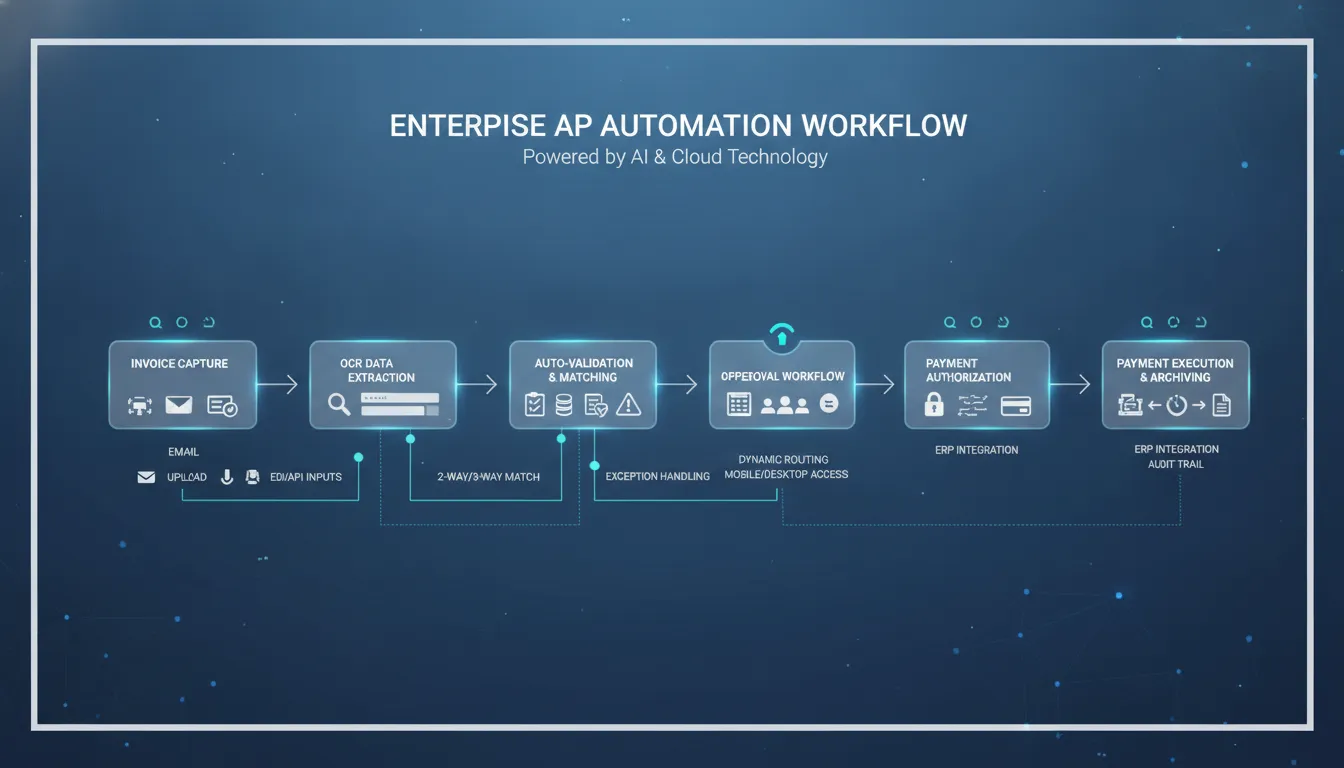
Trigger: The arrival of a new vendor invoice via a dedicated email inbox (such as ap@company.com) or a direct submission through a secure supplier portal.
Workflow Steps:
- The automation platform monitors the target inbox, extracts the invoice attachment, and initiates the workflow.
- An Intelligent Document Processing (IDP) engine parses the document, extracting key metadata including vendor name, invoice date, line-item totals, purchase order (PO) number, and tax details.
- The platform performs a 3-way match, comparing the parsed invoice data against the corresponding Purchase Order in the ERP system and the Receiving Report in the warehouse database.
- If the data matches within acceptable tolerance thresholds (such as less than a 1% variance), the system automatically routes the invoice for payment scheduling.
- If a discrepancy is detected (such as missing line items or mismatched cost details). The invoice is automatically flagged and routed to a dedicated procurement specialist for manual resolution.
- Once resolved or approved, the validated transaction data is exported to the general ledger, and a payment instruction is scheduled.
Approvals: Invoices under $5,000 with a successful 3-way match are automatically approved without human intervention. Invoices exceeding $5,000, or those with unresolved exceptions, are routed to the Finance Manager. High-value invoices over $50,000 require dual signature approvals from the Department Head and the Chief Financial Officer.
Integrations: ERP platforms (such as SAP, NetSuite, or Microsoft Dynamics 365), optical character recognition (OCR) and IDP engines, secure relational databases, and payment gateway APIs.
Operational Controls: Segregation of duties is strictly enforced (the employee who initiates the PO cannot approve the final invoice). Duplicate invoice detection logic checks vendor ID, invoice date, and total value to prevent double payments. Full SOC 2 audit trails log every automated check and human approval decision.
Key Metrics and Outcomes: Average cost per invoice processed, processing cycle time (reduced from weeks to hours), percentage of early payment discounts captured, and invoice exception rate.
2. HR Employee Onboarding and Resource Provisioning
Onboarding a new employee requires seamless coordination across HR, IT, Facilities, and Finance. Fragmented onboarding processes delay time-to-productivity and risk compliance issues if critical documents are missed or unauthorized access is granted.
Trigger: A status change to \"Hired\" in the Applicant Tracking System (ATS) or Human Resources Information System (HRIS).
Workflow Steps:
- The automation platform detects the HRIS trigger and initiates a comprehensive onboarding workflow.
- The visual forms designer dynamically generates a secure portal link and sends it to the new hire to collect mandatory documents (W-4. I-9, Direct Deposit, and signed non-disclosure agreements).
- The platform initiates an automated background check via a third-party screening API and monitors for the returned clearance certificate.
- Simultaneously, the system files hardware provisioning requests (such as laptop, phone, and monitors) with the procurement department, based on the hire's department and job role.
- IT security accounts are created automatically, provisioning access to specific SaaS platforms, active directories, and communication channels.
- The system schedules mandatory compliance training modules and adds welcome meetings to the hiring manager's calendar.
- Once all compliance documents are verified, the employee record is synced with the payroll processor.
Approvals: The Hiring Manager approves the custom hardware selection and software access list. The HR Compliance Officer performs a final audit and sign-off on the completed W-4 and identity verification documents.
Integrations: Core HRIS platforms (such as Workday or BambooHR), corporate Active Directory (via LDAP/OAuth), electronic signature services (like DocuSign), background screening APIs, and asset management systems (like ServiceNow).
Operational Controls: Role-Based Access Control (RBAC) ensures new hires only receive software permissions mapped explicitly to their job description. Compliance checklists prevent payroll activation until all mandatory legal forms are signed and validated.
Key Metrics and Outcomes: Days to full employee productivity, administrative hours spent per onboarding event, onboarding checklist compliance rate, and IT provisioning turnaround time.
For detailed examples of how complex organizations optimize their internal systems, you can explore our collection of client case studies, which demonstrate these automated workflows in highly regulated industries.
3. IT Access Provisioning and Identity Lifecycle Management
Securing enterprise data requires absolute control over user access. Manual account creation and de-provisioning are major security risks, often leaving active accounts assigned to separated employees or granting excessive permissions to active staff.
Trigger: An IT Service Desk request for account creation, role adjustment, or an automated employee termination signal from the HR platform.
Workflow Steps:
- The system intercepts the service desk ticket or HR termination webhook to determine the necessary access action.
- For new access requests, the platform evaluates the user's role and cross-references it with pre-approved security profiles.
- An approval task is dispatched to the department supervisor and the security administrator.
- Upon approval, the workflow engine communicates with target application APIs to provision or modify the user accounts.
- The platform runs a validation check to confirm that multi-factor authentication (MFA) is active and that the user's security group is correctly mapped.
- For terminations, the system immediately suspends all active directories, terminates active SaaS sessions, and revokes VPN access in parallel, preventing unauthorized data exfiltration.
- The trigger ticket is automatically closed with an audit log of all revoked or granted systems.
Approvals: Immediate supervisor approval is required for all access expansions. Dual approval from the Information Security Officer is mandatory for access to sensitive systems (such as financial systems or customer databases). Employee de-provisioning workflows execute instantly without human intervention upon receiving the termination trigger.
Integrations: Identity providers (such as Okta, SailPoint, or Microsoft Entra ID). IT Service Management (ITSM) platforms (like Jira Service Desk or ServiceNow), and enterprise application APIs (such as AWS, Salesforce, and Microsoft 365).
Operational Controls: Instantaneous, automated de-provisioning prevents \"orphan accounts.\" The platform enforces \"least privilege\" principles and maintains detailed, tamper-proof logs of every access modification for audit compliance.
Key Metrics and Outcomes: Account provisioning speed, account de-provisioning latency (reduced to zero), audit compliance rate, and percentage of idle SaaS licenses recovered.
4. Manufacturing Quality Control and Regulatory Compliance
In highly regulated fields like pharmaceuticals, food production, and aerospace, maintaining product quality is a strict operational requirement. Automated quality control workflows ensure that every product batch meets precise specifications before leaving the factory floor.
Trigger: A physical sensor alert, a completed production batch log in the Manufacturing Execution System (MES), or an inspector logging a non-conformance event.
Workflow Steps:
- An MES event triggers the quality control workflow, immediately locking the associated inventory batch inside the ERP system.
- The platform routes a testing task to the laboratory information system, detailing the required chemical or physical assays.
- Test results are fed back into the workflow engine via an API. If all parameters fall within predefined quality ranges, the batch is automatically advanced to the release phase.
- If an anomaly is detected, the workflow branches into an emergency isolation protocol: the physical batch is routed to a quarantine area. And alerts are sent to the plant director.
- The system initiates a structured Root Cause Analysis (RCA) workflow, requiring quality engineers to complete and document a formal review.
- Once corrective actions are logged, the system determines whether the batch must be scraped or can be safely released after re-work.
Approvals: The Lab Manager must sign off on analytical test results. The Quality Assurance Director holds sole authority to release quarantined batches. High-value batch scrap orders over $25,000 require Plant Manager approval.
Integrations: Manufacturing Execution Systems (MES), Laboratory Information Management Systems (LIMS), enterprise resource planners (such as SAP), and IoT device controllers.
Controls: Automated batch holds prevent accidental shipment of untested or non-conforming materials. Every step, test result, and approval is recorded in compliance with FDA 21 CFR Part 11 electronic signature regulations.
Key Metrics and Outcomes: Batch release cycle time, defect leakage rate, audit compliance score, and total cost of scrapped material.
Organizations looking to implement these complex manufacturing compliance workflows rely on comprehensive business process management software to manage visual logic and guarantee end-to-end traceability.
5. Customer Service Dispute Resolution and RMA Processing
Handling customer billing disputes and product returns manually leads to inconsistent resolutions, high processing costs, and unhappy customers. Automating these customer-facing workflows ensures fast, consistent, and satisfying service.
Trigger: A customer submits a billing dispute or a Return Merchandise Authorization (RMA) request through an online form or a customer service portal.
Workflow Steps:
- The customer submission triggers the dispute resolution workflow, automatically creating a tracking record in the CRM system.
- The system validates the purchase history in the transactional database, verifying that the invoice is within the dispute window and that the item is eligible for return.
- For billing disputes, the platform calculates the potential credit adjustment based on contract terms and historical order history.
- For RMAs, the platform automatically generates a prepaid shipping label via a logistics API and emails it to the customer.
- The system monitors warehouse receipt webhooks. Once the returned item is scanned at the warehouse, the warehouse team receives an automated inspection checklist.
- Upon successful inspection, the system initiates the refund or issues a replacement order in the billing system, notifying the customer via email.
Approvals: Refunds and credits under $100 are automatically approved. Dispute resolutions between $100 and $1,000 are routed to the Customer Service Supervisor. Large credits exceeding $1,000 require sign-off from the Customer Support Director.
Integrations: Customer Relationship Management (CRM) platforms (such as Salesforce or Zendesk), shipping carrier APIs (like FedEx or UPS), e-commerce engines, payment gateways (like Stripe), and warehouse management systems.
Operational Controls: Automated fraud checks cross-reference dispute frequency per customer account. System validations prevent credits from exceeding the original transaction amount.
Key Metrics and Outcomes: Customer satisfaction (CSAT) scores, average dispute resolution time, cost per return processed, and fraud detection accuracy.
Comparing Enterprise Process Automation Examples
The following table provides a high-level comparison of the five enterprise process automation examples discussed above, highlighting their primary business impact, key integrations, and core operational focus:
| Process Area | Primary Business Impact | Key Integrations | Core Operational Focus |
|---|---|---|---|
| Accounts Payable | Reduces cost per transaction and captures early payment discounts. | ERP platforms, IDP/OCR engines, secure general ledgers. | Ensuring financial accuracy and preventing payment duplication. |
| Employee Onboarding | Accelerates new hire productivity and ensures regulatory compliance. | HRIS, Active Directory, electronic signatures, procurement APIs. | Coordinating multi-department actions and form collection. |
| IT Access Provisioning | Secures data assets and eliminates inactive user accounts. | Okta, Active Directory, Jira Service Management, SaaS APIs. | Enforcing least-privilege security and automated de-provisioning. |
| Manufacturing Quality Control | Ensures product quality and maintains strict compliance. | MES, LIMS, SAP ERP, IoT device sensors. | Securing strict batch traceability and audit readiness. |
| Dispute & RMA Resolution | Improves CSAT score and lowers customer service overhead. | Salesforce, logistics APIs, warehouse managers, Stripe. | Accelerating customer resolutions and validating return eligibility. |
Bottom line: For high-volume financial or compliance workflows, prioritize integrating your core ERP and document-parsing engines. For human-centric workflows like onboarding and IT service desks, focus on visual forms, Active Directory sync, and automated security permissions.
How Do You Implement Enterprise Process Automation?
Successful deployment of enterprise process automation requires a structured, iterative methodology. By following a proven implementation framework, technical teams can design scalable, fault-tolerant automated processes that deliver immediate business value.
- Identify and Map the Process: Document the existing \"as-is\" workflow, identifying all manual tasks, system touchpoints, decision rules, and handoffs. Use a visual drag-and-drop process designer to create a clear graphical representation of the workflow.
- Define Triggers and Integration Endpoints: Determine the precise event that will initiate the workflow. Identify the APIs, databases, or webhooks required to exchange data between your central automation engine and external systems.
- Design the Form and User Interfaces: Create clean, responsive, and mobile-friendly web forms to capture human input where needed. Ensure that forms dynamically display relevant information based on the user's role and workflow state.
- Implement Business Logic and Routing Rules: Configure conditional branching, parallel execution paths, and escalation paths. Utilize a robust rules engine to evaluate complex business policies without hardcoding logic into the process engine.
- Enforce Security and Access Controls: Configure Role-Based Access Controls to secure the process and its data. Ensure that all automated communications and data transfers utilize secure protocols and encryption standards.
- Test and Debug Visually: Execute the workflow in a dedicated test environment, utilizing a visual process debugger to trace the execution path step-by-step. Identify and resolve bottlenecks, exceptions, or database errors before moving to production.
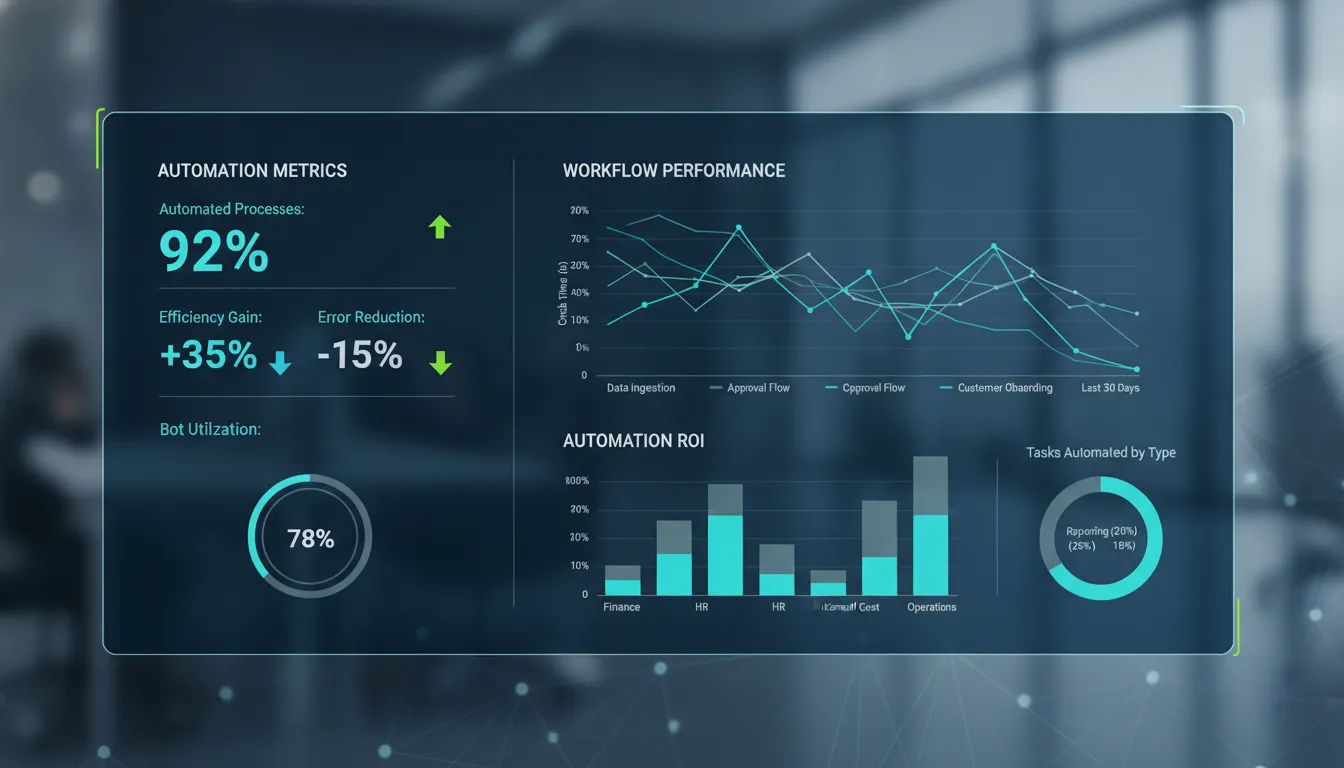
- Deploy and Monitor: Run the automated process on a distributed, highly available server infrastructure. Monitor real-time performance dashboards, analyze execution logs, and refine routing logic to continually optimize throughput and efficiency.
To successfully execute these steps, developers can leverage an embeddable .NET core workflow engine, which allows software companies and large enterprises to integrate robust automation capabilities directly into their proprietary applications without building the underlying architecture from scratch.
Advanced Strategies for Scaling Automated Processes
As organizations expand their automation footprint, they must implement advanced strategies to manage hundreds of distinct workflows without increasing architectural complexity. Two critical techniques for scaling enterprise-level automation are the deployment of dynamic sub-workflows and the implementation of multi-tenant architectures.
Dynamic Sub-Workflows and Runtime Adaptability
In standard automation engines, workflows are rigid and cannot change once execution begins. This limitation is highly problematic for complex enterprise operations where business rules or regulatory requirements may shift mid-process. To solve this, advanced platforms support dynamic sub-workflows. Which allow a running parent process to evaluate real-time data and spin up, morph, or replace nested sub-processes on the fly.
For example, in a global procurement workflow, the system can dynamically load localized compliance checklists and approval chains based on the manufacturing origin of the materials. This dynamic adaptability keeps the core parent workflow simple and clean, while allowing specialized subprocesses to handle the unique compliance rules of different regions or product lines.
Multi-Tenancy and White-Label OEM Embedding
For SaaS providers and software companies, offering built-in process automation to their customers is a powerful competitive differentiator. However, building a scalable, secure, and multi-tenant workflow engine from scratch is incredibly expensive and time-consuming.
By leveraging an embeddable, white-label workflow solution, software vendors can integrate visual designers, dashboards, and reporting widgets directly into their existing software. A native multi-tenant SaaS workflow model ensures that each customer's data, forms, and process structures remain completely isolated, secure, and customizable, while running on a single, shared application infrastructure. This approach allows software companies to deliver enterprise-grade BPM features to their market quickly, saving years of custom development time.
Frequently Asked Questions
What is the difference between task automation and enterprise process automation?
Task automation focuses on digitizing a single, isolated action, such as copying a file or sending an email notification. Enterprise process automation orchestrates complex, multi-system workflows that span multiple departments, databases, and human decision points across an entire organization, ensuring end-to-end efficiency, security, and visibility.
Can we automate workflows that require human decision-making?
Yes. Enterprise process automation platforms seamlessly combine automated system tasks with human tasks. When a human decision is required (such as a high-value invoice sign-off), the system automatically generates a responsive form. Notifies the assignee, escalates if delayed, and resumes the automated workflow once the decision is logged.
How does process automation ensure security and regulatory compliance?
Process automation platforms enforce absolute consistency by executing every process according to strict, pre-approved logical models. The system logs a tamper-proof, time-stamped audit trail of every database write, API call. And human approval, simplifying compliance with regulations like GDPR, HIPAA, and SOC 2 Type II.
Is it better to build our own workflow engine or embed an existing one?
For software developers and SaaS companies, embedding a proven enterprise workflow engine saves up to 90% of development costs and gets products to market years faster. Building a robust, high-performance visual designer, process debugger, and scalable engine from scratch is incredibly complex and distracts from core product innovation.
Conclusion: Drive Growth with Intelligent Enterprise Workflows
Deploying robust process automation is no longer a luxury. As it is a critical requirement for enterprises seeking to grow efficiently, secure their data, and maintain absolute regulatory compliance. By standardizing on a scalable, low-code platform, business and technology professionals can collaborate to build visually documented, high-throughput automated processes. Whether you are automating internal finance and HR operations, or embedding advanced workflow capabilities into a commercial software product. Implementing these proven automation examples will eliminate operational friction, reduce administrative overhead, and unlock long-term business growth.
















