
How execution control affects AI cost, reliability, and enterprise scale
A document arrives. AI reads it and identifies it as an invoice. The document is routed to accounts payable.
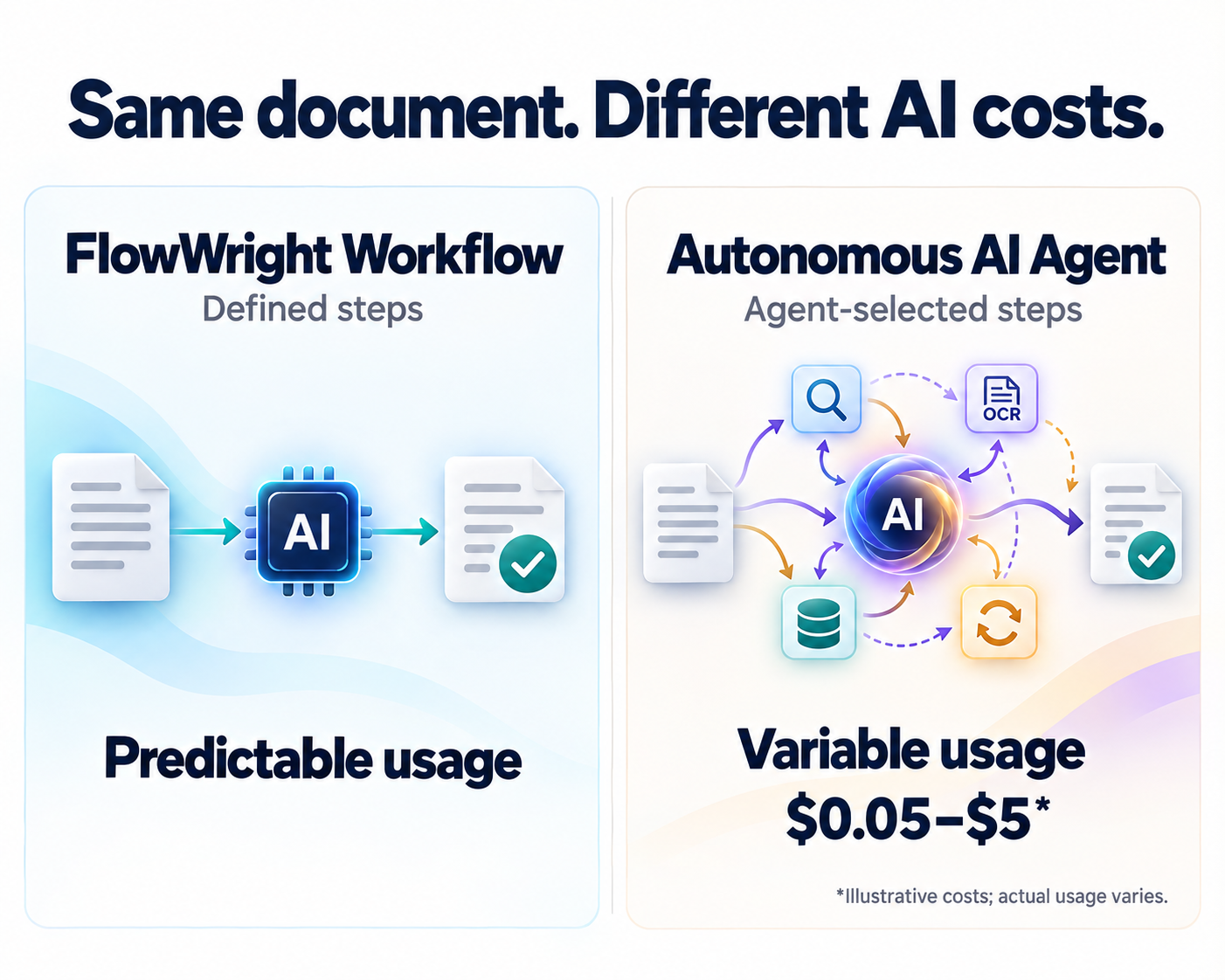
That result can come from an AI classification step inside a FlowWright workflow or from an autonomous AI agent. To the business user, the outcome may look identical. Underneath, the amount of work performed—and the cost of producing that outcome—can be very different.
In a predefined workflow, the process designer determines when AI runs, what it receives, and what happens after it responds. In an autonomous agent, the model can decide which tools to use, whether more information is needed, and whether to continue investigating.
For organizations processing thousands of documents, this distinction affects operating budgets, processing time, and the ability to explain each transaction.
FlowWright’s advantage in this scenario is the ability to place AI inside a controlled business process, making the work repeatable and its cost easier to budget.
One document and two ways to classify it
Consider a business receiving supplier documents through a shared inbox. Each document must be assigned one of five categories: invoice, purchase order, delivery note, credit memo, or unknown.
The business requirement is specific: identify the document type, record the result, and send it to the correct processing queue.
Both approaches below use AI to interpret the document. The difference is how they organize the work around that interpretation. This follows the architectural distinction between workflows with predefined paths and agents that dynamically select their actions.[1]
Approach one uses AI within a FlowWright workflow
FlowWright provides intelligent document classification, a visual process designer, business rules, task routing, and workflow execution history.[2] These capabilities can be combined into a classification process with explicit boundaries.
For this example, the workflow is designed to perform the following steps:
- Receive the document. Create a process instance and associate it with the incoming file.
- Prepare the content. Extract embedded text or use a configured OCR path when required.
- Call the classification model. Submit the prepared content with the approved document categories and require a structured response.
- Validate the response. Check the response format, permitted category, and required supporting evidence.
- Route the document. Send an accepted classification to the appropriate queue. Send unknown, invalid, or ambiguous results to a review task.
- Record the outcome. Preserve the classification and processing details for operational review.
The normal path is deliberately designed around one classification request. It does not give the model authority to search other systems, select another model, or repeatedly reconsider its answer.
The AI interprets the document. The workflow controls the surrounding business actions.
This design must account for what happens inside the classification step as well. One visible workflow step is not proof of one billable model call: a connector may perform chunking, retries, or additional requests internally. Those behaviors need to be inspected and bounded when establishing the cost model.
Approach two gives the goal to an autonomous AI agent
Now give an agent the same document and an instruction: “Classify this document and route it appropriately.”
Depending on its available tools and permissions, the agent might read the file, request OCR, examine the supplier record, retrieve similar documents, compare competing categories, and request another model response before making a decision.
For a clear invoice, it might finish quickly. For a document containing both an invoice and a delivery note, it might inspect individual pages and seek additional context. If a tool fails or returns incomplete information, it might try another approach.
This flexibility can help when classification requires investigation. It also means that the execution path may not be known before the task begins.
An agent does not necessarily perform all these operations, and it is not necessarily expensive. A tightly constrained agent may complete the task with approximately the same work as a workflow. The variability appears when the agent has discretion to add actions, repeat calls, or expand its investigation.
Why the AI bill can change
Each additional model request can add input and output token charges. Reading more pages can add OCR or document-processing charges. Searching another system can add a tool fee. Repeated reasoning can carry earlier content into later requests, increasing the amount of material processed.
A practical cost model is:
Per-document variable cost = model usage across all calls + OCR and document processing + metered tool usage.
Platform licensing, infrastructure, implementation, and human review belong in the broader total cost of ownership and should be evaluated separately.
With the example FlowWright workflow, the normal processing path and exception paths are defined in advance. With an autonomous agent, the number and size of operations can vary according to the agent’s decisions, within whatever limits its runtime enforces.
This is how a classification task could cost $0.05 in one run and $5 in another: the expensive run performs substantially more billable work, uses a more expensive model, or invokes additional paid services. Those amounts are illustrative, not FlowWright prices, provider quotes, or measured benchmark results. A few extra calls do not automatically produce a hundredfold increase.
Predictable execution does not guarantee identical pricing
It would be inaccurate to say that every document classified through FlowWright always costs exactly the same amount.
A two-page document and a two-hundred-page document can consume different resources. Scanned files may require OCR. Provider rates can change. Retry behavior can increase usage. Even a single classification call can have a variable token count.
The stronger claim is that a predefined FlowWright workflow makes AI usage controllable and costs more predictable for comparable documents under stable pricing and configuration.
To establish that predictability, define supported document sizes, the selected model, output limits, allowed preprocessing, retry counts, and exception handling. Measure actual provider usage against each process instance. Where connectors do not expose usage automatically, capture it through the integration.
A fixed selling price per document can be a commercial decision. It should not be confused with an underlying AI cost that never changes.
What the difference looks like at scale
Suppose an organization processes 100,000 documents per month. The following assumptions illustrate how a small proportion of expensive runs can affect the total.

In the third scenario, 95,000 documents cost $4,750 and the remaining 5,000 cost $25,000. The overall average rises to $0.2975 per document—5.95 times the first scenario.
This is a sensitivity example, not a forecast. It assumes equal classification quality and excludes licensing, infrastructure, and human review. A workflow with frequent manual exceptions could have a higher total business cost than these processing figures suggest.
The operational lesson is to track expensive exceptions as well as average cost. A low typical cost does not reveal how much a minority of long-running cases contributes to the monthly bill.
Cost is only one part of the decision
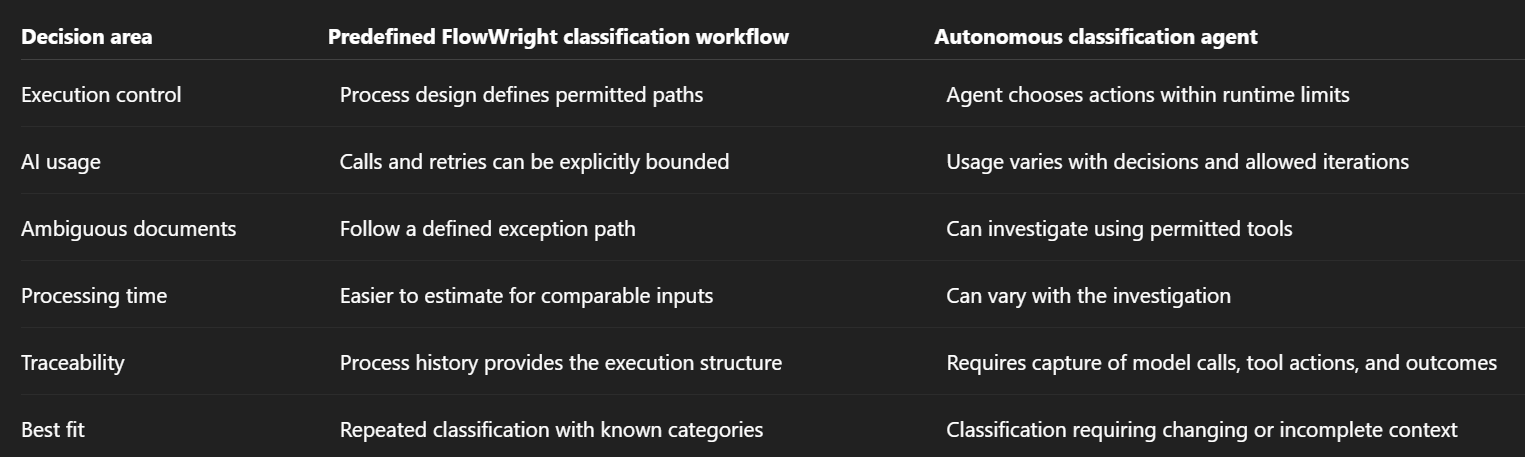
Neither architecture guarantees correct classification. A repeatable process can repeat an incorrect answer, and additional agent activity can produce a confident but incorrect conclusion.
Evaluate both approaches against the same labeled document set. Compare classification accuracy, exception rate, processing time, and total cost per correctly classified document. If model confidence scores are used, validate their relationship to actual accuracy before using them to automate acceptance.
Use agent investigation where it earns its cost
A useful design is to make the controlled workflow the standard path and reserve an agent for selected exceptions.
For example, an invoice bundled with an unfamiliar supporting document might fail the normal classification checks. The workflow can pass that exception to an agent with a specific task: examine the approved supporting records and return a proposed classification with evidence.
The integration should enforce the agent’s permitted tools, maximum model calls, token limits, execution time, and spending allowance. When a limit is reached, the process should return an explicit unresolved outcome and route the case for review.
These limits must be implemented in the runtime or integration. A prompt asking an agent to “keep costs low” is not an enforced budget. A spending cap also needs to allow for the maximum charge of the next request before that request starts.
The resulting design gives routine documents a predictable path while allowing more expensive investigation when the business value justifies it. It is an architectural pattern to implement and validate, not a claim that every cost control is automatically enabled in FlowWright.
Build document classification around a defined business outcome
For routine classification, the outcome is straightforward: determine the document type, validate the result, and route the document. A FlowWright workflow can define that process while using AI for the interpretation that requires it.
An autonomous agent becomes useful when the task genuinely requires it to discover what information to gather or what action to take next. That freedom should have a measurable benefit and an explicit operating budget.
Before deploying either approach, establish the acceptable error rate, maximum processing effort, and handling of unresolved documents. Then test with representative production files—including difficult cases—and measure the cost of reaching an accepted result.
Start with a controlled FlowWright classification workflow. Add bounded agent investigation where it improves the business outcome enough to justify the additional work.
To evaluate the approach for your organization, use a representative document sample to build a FlowWright proof of concept and measure classification accuracy, exception handling, processing time, and actual AI usage before scaling.
References
- Anthropic — Building effective agents. Architectural distinction between predefined workflows and autonomous agents.
- FlowWright — Enterprise Workflow Automation Features. Document classification, process design, rules, tasks, and execution history.
















