
It’s no longer about if your company uses automation, but how intelligently that automation adapts to change. We’ve all seen “static” automation fail. A single tweak to a website’s UI or a slight shift in an invoice layout can break an entire workflow, demanding hours of developer time to fix. This creates frustrating delays and pulls your tech team away from critical projects. What if your workflows could adapt instead of break? This is the power of FlowWright AI. It empowers your team to build resilient solutions, closing the gap between business needs and IT.
Enter FlowWright AI. By merging the structured power of Business Process Management (BPM) with the adaptive capabilities of Generative AI, FlowWright has redefined what it means to "automate." This blog explores how FlowWright AI is transforming digital operations from rigid scripts into fluid, intelligent ecosystems.
First, Let's Talk About Workflow
Before we get into the specifics of intelligent automation, let's ground ourselves in a concept that’s fundamental to every business operation: workflow. You might think of workflows as something reserved for massive manufacturing plants or complex software development cycles, but the truth is, they are everywhere. From the simple act of onboarding a new employee to the intricate process of managing a global supply chain, workflows are the invisible engines that power your business. They are the established patterns and sequences of tasks that turn raw inputs into finished products, services, or decisions. Understanding these patterns is the first step toward making them better.
The problem is that many of these critical processes are undocumented, inefficient, or reliant on outdated methods like email chains and spreadsheets. This creates friction, introduces errors, and makes it nearly impossible to see where things are going wrong. By formally defining and examining your workflows, you can begin to untangle these knots. This process of discovery allows you to identify bottlenecks, eliminate redundant steps, and pinpoint the exact moments where automation can deliver the most significant impact, transforming your operations from a series of disjointed tasks into a streamlined, efficient, and intelligent system.
What is a Workflow?
At its core, a workflow is simply the series of steps required to complete a task from start to finish. Think of it as a recipe for getting work done. A simple workflow might be approving a vacation request: an employee submits a form, it goes to their manager for approval, and then HR is notified. A more complex workflow could involve processing an insurance claim, which includes dozens of steps, multiple departments, data validation, and compliance checks. These sequences of activities, whether simple or complex, are the building blocks of how your organization functions and delivers value to your customers.
Moving Beyond Spreadsheets and Email Chains
For years, many teams have managed their processes using a patchwork of spreadsheets, email threads, and manual checklists. While these tools can work for very small-scale tasks, they quickly become a liability as the business grows. Relying on them leads to a lack of visibility, frequent human error, and zero accountability. Improving your workflow by moving to a dedicated system makes tasks easier, faster, and more accurate. It helps you gain critical insights into process performance, reduce operational costs, and ultimately create a much better experience for your customers by ensuring consistency and speed.
A 5-Step Guide to Workflow Improvement
Improving a workflow doesn’t have to be a monumental undertaking. It starts with a clear, methodical approach to understanding your current state and identifying opportunities for meaningful change. By breaking it down into manageable steps, you can systematically analyze your processes and build a solid foundation for automation. This five-step guide provides a practical framework you can use to begin optimizing how work gets done in your organization, paving the way for greater efficiency and control. Let's walk through how you can start this process.
1. Know Your Goals
Before you change a single step, you need to define what success looks like. What are you trying to achieve? Your goal could be to reduce the cost of processing invoices, make the customer onboarding experience seamless, or ensure information is more accessible across departments. Without a clear objective, your efforts will lack focus. For example, a goal might be "reduce the time it takes to approve a capital expenditure request from two weeks to two days." This specific, measurable target will guide every decision you make as you analyze and redesign the process.
2. Map the Process
Next, you need to visualize the workflow as it exists today. This involves identifying every task, decision point, and handover from beginning to end. This step is crucial for spotting the tasks that would benefit most from changes—usually those that are repetitive, error-prone, or cause significant delays. Using a graphical process designer can make this incredibly easy, allowing business and IT teams to collaborate on a shared visual model. This map will clearly expose bottlenecks, redundant loops, and areas where communication breaks down, giving you a clear blueprint for improvement.
3. Assign Jobs
Once you have a map of the process, it's time to clarify who is responsible for each part. In a manual workflow, this can often be ambiguous, leading to dropped balls and delays. In a structured workflow, you define clear ownership for every task, approval, and notification. This isn't just about assigning tasks to people; it's also about identifying where systems can take over. A modern workflow automation platform ensures the right work is routed to the right person or system automatically, creating a clear chain of accountability and keeping the process moving forward.
4. Make Tasks Simpler
With your process mapped and roles defined, look for ways to streamline. Not every step in your current workflow is essential. Question everything: Can some steps be performed at the same time? Are there redundant approval layers that can be removed? Can we simplify a form to capture only the necessary information? The goal is to make the process faster and more efficient without sacrificing quality or compliance. Automating a flawed or overly complicated process only helps you execute a bad process faster. Simplification should always come before automation.
5. Find Tasks to Automate
Finally, identify the tasks that are best suited for automation. These are typically the repetitive, rule-based activities that involve a lot of data but little strategic thinking—things like data entry, generating standard reports, or sending follow-up notifications. This is where modern tools can make a massive difference. For instance, an AI Copilot can help you build these automations quickly, even if you don't have a deep technical background. By offloading these manual tasks to a reliable system, you free up your team to focus on higher-value work that requires human creativity and critical thinking.
Why RPA Isn't Enough: The Shift to Adaptive AI
For years, Robotic Process Automation (RPA) was the gold standard. It excelled at "monkey work"—copying data from point A to point B. However, RPA is fundamentally "brittle." If the environment changes, the bot fails.
FlowWright AI represents a shift toward Hyperautomation. Instead of just following a path, the system understands the intent of the process. Using a methodology FlowWright calls WYSWYE (What You See is What You Execute), the platform allows users to build workflows that don't just follow rules but make contextual decisions.
The Executive Focus on AI
It's clear that artificial intelligence has moved from the tech team's whiteboard to the executive boardroom. AI is now essential for automating tasks, improving operations, and maintaining a competitive edge. But successful implementation isn't just about buying the latest tech. A helpful guideline is the 10-20-70 principle, which suggests that only 10% of resources should go to the AI algorithms themselves. The other 90% is split between the technology (20%) and, most importantly, the people and processes (70%). This massive 70% investment highlights a critical truth: making AI work requires strong leadership to guide changes in how business processes are structured. It’s about focusing on practical, human-centered solutions that empower your teams, rather than just chasing the latest AI hype. This is where a robust process automation platform becomes the foundation for your AI strategy.
Build Workflows Just by Describing Them
One of the most significant barriers to digital transformation has been the "technical tax"—the need for specialized developers to build every single automation. FlowWright AI eliminates this hurdle through Natural Language Process Generation.
Low-Code Tools for Everyone
This ability to use plain language to generate a process is a total game-changer. It opens the door for subject matter experts—the people who actually run the business—to build their own solutions without needing a deep background in computer science. FlowWright’s platform is built on a low-code philosophy that bridges the gap between business departments and IT. Instead of waiting in a long queue for development resources, teams can quickly assemble and deploy workflows to solve their immediate challenges. This frees up your developers to focus on more complex, high-value projects. It’s about putting the power to innovate directly into the hands of the people who know the processes best.
The Power of a Visual Designer
A core component of this accessibility is the visual workflow designer. Think about trying to explain a complex business process using only text—it can get confusing, and fast. A visual designer transforms that complexity into a clear, interactive flowchart. Within FlowWright, you can drag and drop steps, connect decisions with lines, and see the entire process unfold on a single canvas. This graphical approach makes it incredibly intuitive to build, review, and modify workflows, allowing you to spot potential bottlenecks or redundancies instantly. This focus on a clear, human-centered interface is one of the key features that makes sophisticated process management understandable and achievable for everyone in the organization.
How Does It Actually Work?
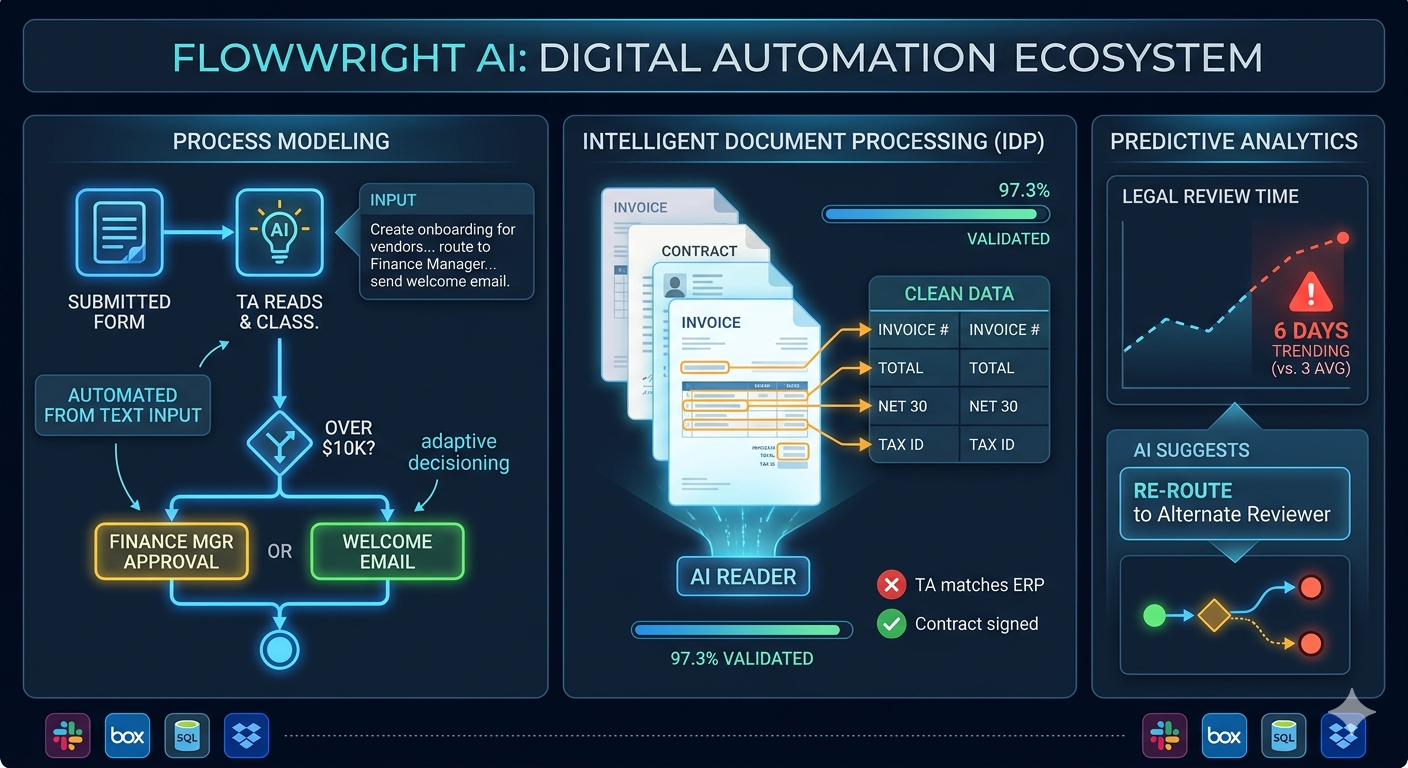
Instead of dragging boxes and drawing lines manually, a process owner can simply type:
"Create a vendor onboarding process that starts when a form is submitted, checks the vendor's tax ID against our database, routes it to the Finance Manager for approval if the contract is over $10,000, and sends a welcome email once signed."
FlowWright’s AI engine interprets this text and automatically generates the structured workflow, complete with decision gateways, task assignments, and integrations. This reduces the "time-to-value" from weeks to minutes.
Using AI for Policy and Decision Support
Beyond just building the workflow, AI is now a critical partner in executing it. Think about processes that get stuck waiting for a human decision. A manager has to review a complex policy document or a new contract to check for compliance risks before approval. This is where AI offers more than just automation; it provides intelligence. FlowWright embeds AI directly into the workflow to act as a decision support tool. For example, it can analyze an incoming document, classify it, extract key information, and even use generative AI to summarize risks or flag clauses that deviate from company policy. This doesn't replace the human expert but gives them a massive head start, turning a lengthy review into a quick verification.
The 10-20-70 Rule for AI Success
Successfully implementing AI isn't just about buying the latest technology. It’s about a balanced investment of resources, and a great way to frame this is with the 10-20-70 rule. Popularized in a Forbes article, this principle provides a simple but powerful guide for any organization looking to get real value from artificial intelligence. It suggests that for any AI initiative, you should allocate your resources—time, money, and effort—across three key areas. Getting this balance right is often the difference between a pilot project that fizzles out and a true digital transformation that delivers a competitive advantage. Let's break down what each part of the rule means for your business.
10% on Algorithms
The first 10% of your effort goes toward the AI algorithms themselves. This might sound small, but it’s because the foundational models are becoming incredibly powerful and accessible. For most companies, the goal isn't to invent a new large language model from scratch. Instead, the focus should be on leveraging a platform that has already done the heavy lifting. FlowWright’s AI Copilot, for instance, integrates sophisticated AI capabilities directly into the workflow environment. This allows you to apply advanced AI without needing a dedicated team of data scientists to build the core code, freeing you up to focus on the much larger parts of the equation.
20% on Technology and Data
The next 20% is dedicated to the technology and data that fuel the algorithms. An AI is only as smart as the data it can access. This part of the investment involves ensuring your data is clean, organized, and available. It also includes having a robust platform that can connect to your various systems, from databases and CRMs to cloud storage. A key strength of a mature business process management platform is its ability to serve as this connective tissue, seamlessly integrating with your existing tech stack to ensure the AI has everything it needs to function effectively within your operational reality.
70% on People and Processes
This is the big one: a massive 70% of your resources should be focused on your people and processes. Technology is a tool, but people are the ones who use it to get work done. This is where most AI initiatives fail. You can have the best algorithm and the cleanest data, but if your team doesn't adopt the new workflow or if the process itself is flawed, you won't see results. This is why empowering your business users is so critical. With low-code tools, the people who understand the business problems best can actively participate in designing, building, and refining the automated processes, ensuring the solution actually solves their real-world challenges.
How FlowWright AI Reads and Understands Your Documents
In 2026, data is rarely clean. It arrives in messy PDFs, scanned images, and conversational emails. Standard OCR (Optical Character Recognition) often fails to capture the "why" behind the data.
FlowWright AI utilizes Intelligent Document Processing to bridge this gap. It doesn't just "see" text; it understands entities.
- Classification: It automatically recognizes whether an attachment is an invoice, a legal contract, or a medical record.
- Extraction: It pulls specific data points (e.g., "Net 30" terms or "Force Majeure" clauses) even if they are located in different places across different documents.
- Validation: The AI cross-references extracted data with internal ERP systems to ensure the information is accurate before it ever reaches a human.
Solve Problems Before They Happen with AI Predict
Most workflow engines are reactive—they tell you what is happening. FlowWright AI is predictive. The AI Predict feature analyzes historical execution data to identify bottlenecks before they paralyze a department.
If the AI notices that "Legal Review" typically takes three days but is currently trending toward six, it can:
- Flag the risk to management.
- Suggest an alternative route (e.g., routing to a different legal team member with a lighter workload).
- Automate routine summaries of the pending documents to help the human reviewer speed up their assessment.
Why This Matters for Your Business
Connect Your Teams and Tools
FlowWright functions as an Enterprise Service Bus (ESB). It acts as the "connective tissue" between legacy systems (like old SQL databases) and modern SaaS tools (like Box, Dropbox, or Slack). By using AI to bridge these gaps, data flows seamlessly across the organization without manual "glue work."
Integrating Your Tech Stack with iPaaS and ETL
This "connective tissue" goes beyond simple point-to-point connections. FlowWright provides the advanced capabilities of an Integration Platform as a Service (iPaaS), creating a central hub for your entire tech stack. Instead of just passing data along, the platform actively manages the Extract, Transform, and Load (ETL) process. For example, our AI-powered Intelligent Document Processing can extract information from an unstructured PDF, the workflow engine can transform it by applying business rules and logic, and then it can load the clean, validated data into your CRM or ERP system. This turns a traditionally complex and code-heavy task into a streamlined, automated process, allowing your teams to build a truly unified digital ecosystem.
Simplify Governance and Stay Compliant
In highly regulated industries like Life Sciences or Finance, "black box" AI is a liability. FlowWright AI maintains a rigorous Audit Trail. Every decision made by the AI is logged, explainable, and reversible. This ensures that while the process is fast, it remains fully compliant with global standards like GDPR or HIPAA.
Scale Your Operations, Not Your Team Size
The primary goal of FlowWright AI isn't to replace humans but to augment them. By handling 90% of routine decision-making and data entry, companies can scale their operations 5x or 10x without a linear increase in hiring.
Bringing Business and Technology Together
The most effective automation happens when business knowledge and technical power work in harmony. Traditionally, there’s been a gap; business leaders know the process, but IT holds the keys to automation. FlowWright AI closes that gap by acting as a universal translator. By merging the structured logic of Business Process Management with the intuitive power of Generative AI, the platform allows a department head to describe a process in plain English. The AI then interprets that business intent and constructs the technical workflow, creating a functional starting point that technology teams can then refine and integrate, rather than building from scratch. This collaborative approach ensures processes are built correctly from the start and frees up valuable developer resources to focus on more complex architectural challenges.
Designed for Enterprise, Government, and Innovators
Large-scale organizations run on a complex mix of systems, some new, some decades old. FlowWright is engineered for this environment, acting as the connective tissue for your entire technology stack. For global enterprises and government agencies, it provides a robust and secure way to get legacy systems and modern cloud apps talking to each other, ensuring data flows where it needs to, without interruption. This integration capability is critical for modernizing operations without the risk and expense of a complete system replacement. For innovators and software companies, FlowWright offers a different kind of power: the ability to embed our AI-driven workflow engine into your own products, giving you a massive head start in delivering advanced automation features to your own customers.
FlowWright AI in Action: Reimagining Claims Processing
Imagine an insurance company receiving thousands of claims daily.
- Intake: FlowWright AI monitors a support inbox.
- Analysis: It reads a claim, extracts the policy number, and uses AI to summarize the incident description.
- Decisioning: If the claim is under a certain threshold and the documentation is complete, the AI auto-approves the payment.
- Exception Handling: If the AI detects potential fraud or a complex legal issue, it routes the claim to a senior adjuster, providing a "cheat sheet" of the key issues to investigate.
Your Next Step Toward Smarter Automation
Digital automation is no longer about "setting it and forgetting it." It is about building an agile infrastructure that learns and grows. FlowWright AI provides the tools to move beyond simple task-based automation into the world of intelligent, self-optimizing processes.
As we move further into 2026, the companies that thrive will be those that stop fighting their data and start orchestrating it. With FlowWright AI, the "Future of Work" isn't just a buzzword—it's a configured, executed, and optimized reality.
Frequently Asked Questions
What's the difference between the automation you describe and the RPA tools my company already uses? Think of it this way: traditional RPA is like a train on a fixed track. It's great at moving things from point A to point B, but if the track changes even slightly, the train stops. FlowWright AI is more like a self-driving car. It understands the destination (the goal of the process) and can adapt its route if it encounters a detour, like a change in a document's format or a new step in an approval process. It's about building resilient workflows that adapt instead of break.
Do I need to be a developer to build workflows with FlowWright AI? Not at all. One of the biggest shifts is the ability to build processes using natural language. You can simply describe the workflow you need, like "When a new invoice arrives, check if it's over $5,000, and if so, send it to the finance manager for approval." The AI interprets this and builds the visual workflow for you. This empowers the people who actually know the business processes to create their own solutions, without waiting for IT.
My company's data is messy and comes in different formats like PDFs and emails. How does the AI handle that? This is exactly what Intelligent Document Processing (IDP) is designed for. Instead of just reading text, the AI understands context. It can identify that a document is an invoice, find the due date and total amount, and even cross-reference that information with your internal systems to check for accuracy. It essentially cleans up and organizes your messy, unstructured data so it can be used effectively in an automated process.
The blog mentions the 10-20-70 rule. Why is the "people and processes" part so large? Because technology is only a small part of the equation. You can have the most advanced AI in the world, but if your team doesn't use it or if the underlying process is inefficient, you won't see any real benefits. The 70% focus on people and processes highlights the need to involve your team, simplify workflows before you automate them, and ensure the solutions you build actually solve real-world business problems. It’s about making sure the technology serves the people, not the other way around.
How does FlowWright AI help with compliance and auditing? In regulated fields, you can't have an AI making decisions in a "black box." FlowWright is built with governance in mind. Every action and decision, whether made by a person or the AI, is logged in a detailed audit trail. This means you can always see why a decision was made, who (or what) made it, and what data was used. This makes the entire process transparent and ensures you can easily demonstrate compliance.
Key Takeaways
- Start with your process, not the technology: Before you automate anything, you must understand and simplify your current workflows. Following a clear guide to define goals, map the process, assign roles, simplify tasks, and find what to automate creates a solid foundation, ensuring you improve a good process instead of just speeding up a bad one.
- AI makes automation both adaptive and accessible: Unlike rigid bots that break easily, FlowWright AI creates resilient workflows that can handle change. It also empowers non-technical users to build processes using natural language, which bridges the gap between business needs and IT resources.
- Adopt the 10-20-70 rule for real success: A successful AI strategy is less about the algorithm (10%) and more about the supporting technology and data (20%). The largest focus, at 70%, should be on your people and processes, because empowering your team to use these tools is the key to genuine transformation.
















