
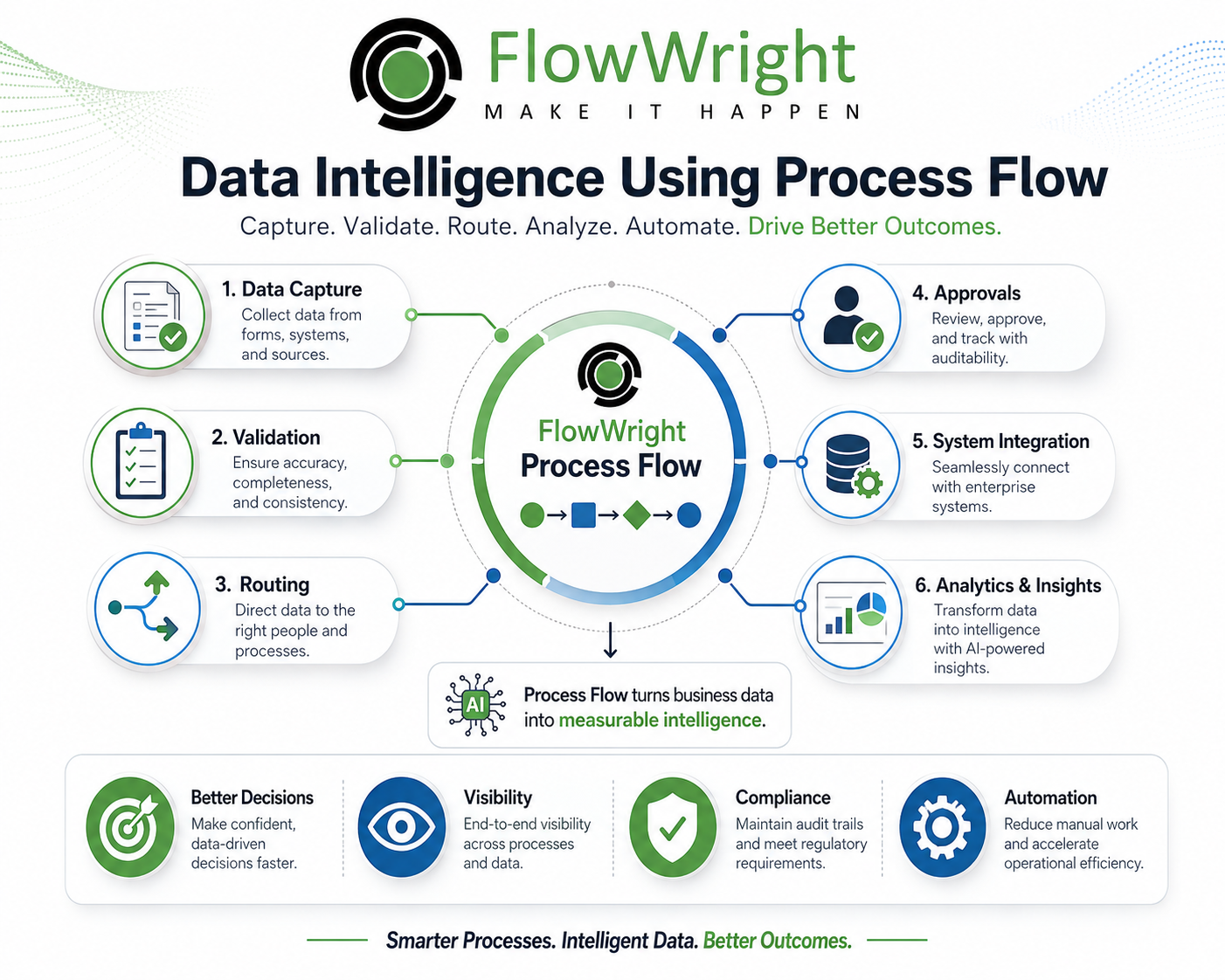
Your organization collects more data than ever before. It pours in from forms, applications, documents, machines, and countless other sources. But collecting data isn't the same as understanding it, and understanding it isn't the same as acting on it. This is where the real challenge lies—closing the gap between insight and execution. With process flow intelligence, you can build an operational framework that turns your data directly into smarter, more efficient workflows in real time. It’s about making your data work for you, not the other way around.
Most companies already have data. What they often lack is intelligence around how that data moves, why it changes, who touches it, what decisions are made from it, and how those decisions affect business outcomes.
That is where process flow becomes important.
A process flow is not just a sequence of tasks. It is a map of how work happens inside the business. It shows the people, systems, decisions, rules, exceptions, approvals, and outcomes that turn raw information into business action.
When process flow and data intelligence come together, organizations gain a powerful advantage. They can understand not only what data says, but also how data is created, validated, approved, used, and acted on.
FlowWright provides a strong foundation for this approach because it manages business processes, forms, tasks, rules, integrations, approvals, dashboards, reports, and audit trails in one workflow automation platform.
So, What Exactly Is Data Intelligence?
Data intelligence is the ability to turn data into trusted, useful, actionable insight.
It is more than reporting. Traditional reporting tells users what happened. Data intelligence helps explain what happened, why it happened, what is happening now, and what should happen next.
For example, a report may show that employee onboarding takes twelve days on average. Data intelligence can show where the delays occur, which departments cause bottlenecks, which approvals are late, which forms are incomplete, and what process changes can reduce the cycle time.
That difference matters.
Data intelligence is not just about dashboards. It depends on clean data, governed data, contextual data, and operational data. Process flow provides that context.
The Core Components of Process Intelligence
Process intelligence isn’t a single tool but a powerful combination of technologies that work together. Think of it as creating a complete, 360-degree view of how work gets done in your organization. It achieves this by blending three key components: process mining, task mining, and business intelligence. Each one provides a different lens for looking at your operations. Process mining gives you the high-level map of your end-to-end workflows, task mining zooms in on the individual steps people take to execute those workflows, and business intelligence connects all that operational data to your strategic business goals. Together, they help you move from simply collecting data to truly understanding it.
Process Mining
Process mining is like having a GPS for your business processes. It automatically analyzes the digital footprints left behind in your company’s IT systems—like your CRM, ERP, or a workflow automation platform—to create a visual map of how your processes actually run. This isn’t the idealized flowchart someone drew in a meeting; it’s the real deal, showing every variation, delay, and workaround that happens day-to-day. By examining these event logs, process mining uncovers hidden bottlenecks and inefficiencies you never knew existed. It answers the big questions: Where are approvals getting stuck? Which steps are most often repeated? Why does this process take twice as long on Fridays? It gives you a factual basis for making improvements.
Task Mining
If process mining shows you the map, task mining gives you a street-level view of the journey. This technology focuses on understanding the human side of work by observing user interactions on their desktops. It looks at the clicks, keystrokes, and copy-paste actions that make up individual tasks within a larger process. For example, task mining can reveal that your customer service team spends 15 minutes per ticket switching between three different applications just to find customer information. It highlights repetitive, manual work that is ripe for automation and identifies areas where better training or system integrations could save your team a significant amount of time and frustration. It adds crucial context to the process maps created by process mining.
Business Intelligence (BI)
Business Intelligence (BI) is the component that ties everything together and answers the ultimate question: "So what?" It takes the detailed operational insights from process and task mining and connects them to your broader business performance metrics. A BI system integrates this process data with information from across the business—like sales figures, customer satisfaction scores, or supply chain costs—and presents it in easy-to-understand visuals. This is where a platform with robust dashboards and reporting becomes invaluable. Instead of just knowing an invoicing process is slow, BI can show you how that delay directly impacts your cash flow and vendor relationships, allowing you to make data-driven decisions that align with your most important strategic goals.
Why Your Process Flow Is Key to Data Intelligence
Most enterprise data is disconnected from the process that created it.
A database may store a customer record, but it may not clearly explain who requested the change, who approved it, what validation was performed, which policy applied, or why an exception was allowed.
A document repository may store a contract, but it may not show how the contract was reviewed, what comments were made, who signed off, or how long approval took.
A help desk system may store a ticket, but it may not reveal the full business process around approvals, escalations, dependencies, and downstream actions.
Process flow adds the missing operational layer.
With a process-driven approach, every business transaction becomes traceable. A process captures the path data took from request to completion. It records each step, decision, approval, rejection, escalation, document, integration, and exception.
This gives organizations a complete view of data in motion.
Data at Rest vs. Data in Motion: What's the Difference?
Most analytics platforms focus on data at rest. They analyze data stored in databases, warehouses, lakes, and applications.
That is useful, but incomplete.
Business decisions often happen while data is in motion. A request is submitted. A form is validated. A manager approves. A compliance reviewer rejects. A system updates. A notification is sent. A document is generated. An exception is escalated.
These events are part of the data story.
FlowWright captures this story through process execution. Every workflow instance creates operational data about how work moved through the business.
For example, in a supplier onboarding process, FlowWright can capture:
- Who submitted the supplier request
- What data was entered
- Which fields were missing
- Who reviewed the request
- Which approvals were required
- Whether compliance checks passed
- How long each step took
- Which system was updated
- Whether the process completed successfully
- What exceptions occurred
This turns the process itself into a source of data intelligence.
Using Process Flow as Your Data Intelligence Engine
A well-designed process flow produces structured intelligence automatically.
Every task, route, rule, timer, approval, and integration generates useful data. Over time, this data becomes a powerful source for analysis.
FlowWright process flows can help answer questions such as:
Which processes are taking too long?
Which steps create the most delays?
Which users or departments are overloaded?
Which approvals are frequently rejected?
Which forms are submitted with incomplete data?
Which process paths are most common?
Which exceptions happen repeatedly?
Which systems fail during integration?
Which tasks are reassigned most often?
Which business rules are producing the most outcomes?
These questions are difficult to answer if business work is handled by email or spreadsheets. But when work is managed through FlowWright, these answers become visible.
The Technologies Behind the Scenes
Process intelligence isn't magic; it's powered by some seriously smart technologies working together behind the curtain. At the core, you’ll find artificial intelligence and machine learning, which act as the brains of the operation, constantly observing and learning from the data your business generates. To make sense of all your information, including the messy, human-generated kind, these systems use other specialized tools. Computer Vision enables software to "see" and interpret data from images and scanned documents, while Natural Language Processing (NLP) gives it the ability to "read" human language in emails and forms. These are essential for effective intelligent document processing, which turns unstructured content into structured data that can be automatically fed into a workflow, saving countless hours of manual effort.
Machine Learning (ML) and AI
At its heart, process intelligence uses artificial intelligence and machine learning to constantly gather and analyze how work gets done. These smart programs connect to all the different digital systems your company uses—from your CRM to your internal databases—to collect information. They don't just look at the final numbers; they examine every step along the way. By learning from this vast amount of data, ML algorithms can identify the hidden patterns and relationships that define your actual business processes, not just the ones drawn on a whiteboard. This is where tools like FlowWright's AI Copilot come in, using these insights to help you build and refine processes with intelligent, data-driven suggestions.
Computer Vision and Natural Language Processing (NLP)
A huge amount of critical business information is trapped in documents and text-based communications. This is where Computer Vision and NLP become so valuable. Computer Vision allows systems to process visual information, like extracting key data points from a scanned purchase order or a signed contract. NLP does something similar for text, understanding the content and context of an email or a web form submission. Together, they bridge the gap between unstructured information and structured workflows. For instance, they can automatically read an incoming customer request, identify its urgency, and route it to the right person without any human intervention, making your processes faster and more accurate.
A Step-by-Step Look at the Process Intelligence Workflow
So, how does this all come together in practice? Process intelligence follows a clear, logical workflow that turns raw operational data into concrete business improvements. It starts by gathering data from every corner of your organization and ends with implementing automated solutions to solve the problems it uncovers. Each step builds on the last, creating a continuous cycle of discovery, analysis, and optimization. This methodical approach ensures that your decisions are based on objective evidence, not just intuition. Let's walk through the four main stages of this workflow to see how it transforms data into meaningful action.
1. Collect and Aggregate Data
The first step is all about gathering the raw materials. Process intelligence tools connect to your various business applications—like ERP, CRM, and other databases—to collect event logs. These logs are the digital footprints that record every action, task, and transaction that occurs within a process. For example, a log captures when a case was opened, who it was assigned to, when it was approved, and when it was closed. A workflow automation platform is an especially rich source for this data, as it naturally captures every step of a process as it happens. This creates a detailed, chronological record of how work actually moves through your systems.
2. Clean and Organize Information
Raw data is often messy, inconsistent, and incomplete. Before any meaningful analysis can happen, the data needs to be cleaned and organized. This step involves correcting errors, filling in missing information, and standardizing different data formats into a single, coherent structure. For example, it might mean ensuring all date formats are the same or that customer names are spelled consistently across different systems. Using a process management tool with built-in forms and data validation rules from the start can significantly reduce the effort required at this stage, ensuring higher-quality data from the very beginning and making your analysis much more reliable.
3. Analyze and Generate Reports
With clean, organized data in hand, the analysis can begin. This is where process intelligence tools work their magic, transforming the raw data into a visual model of your business processes. Instead of a static flowchart that shows how a process *should* work, you get a dynamic map that shows how it *actually* works, including all the variations, delays, and rework loops. These visualizations make it easy to spot bottlenecks and inefficiencies at a glance. Dashboards and reports provide clear, unbiased information, helping you understand performance metrics like cycle times, costs, and compliance rates without any guesswork.
4. Action and Automate Improvements
The final and most critical step is turning insight into action. The analysis will pinpoint specific areas for improvement, such as a recurring bottleneck in an approval process or a manual task that is prone to errors. The goal is to use these findings to make tangible changes. This is where a flexible, low-code platform like FlowWright becomes incredibly powerful. Once you identify a problem, you can use a graphical designer to quickly modify the workflow, automate manual steps, or add new business rules. This allows you to rapidly deploy improvements and close the loop from analysis to execution, driving continuous optimization across the business.
Using Forms to Capture Actionable Data
Forms are one of the most important entry points for process intelligence.
A form captures structured data at the beginning of a process. It defines what information is required, how users provide it, what validation rules apply, and what metadata should be stored.
In FlowWright, forms can be used to capture business requests, service requests, compliance data, employee information, customer updates, supplier records, incident reports, approvals, and document metadata.
For example, an employee services request form may capture:
- Employee name
- Department
- Service type
- Requested effective date
- Supporting documents
- Manager approval requirement
- Priority
- Comments
Once submitted, the form data becomes part of the process. It can drive routing, approvals, business rules, integrations, reports, and dashboards.
This is where data intelligence starts. The organization is not just collecting a form. It is launching a governed process that produces operational insight.
How Workflow Steps Add Crucial Context to Your Data
Raw data often lacks meaning. Process steps provide meaning.
A form field may say that a request is “high priority.” But the process can show whether that priority triggered an escalation, whether the manager agreed, how fast the team responded, and whether the outcome matched the urgency.
A process flow enriches data by adding context at each step.
For example:
- A review step shows who evaluated the data.
- An approval step shows who accepted responsibility.
- A rule step shows which business condition was applied.
- An integration step shows which system was updated.
- A notification step shows who was informed.
- An escalation step shows where a delay occurred.
- A rejection path shows why a request failed.
This context is valuable for analytics because it connects data to action.
Make Better Decisions with Process Flow Intelligence
Many business processes contain decisions. These decisions may be made by people, rules, AI, or systems.
FlowWright can capture these decision points and make them visible.
For example, in a loan exception review process, the workflow may include:
- Request submission
- Risk scoring
- Compliance review
- Manager approval
- Exception committee review
- Final decision
- Documentation
- Notification
Each decision can be tracked with timestamps, comments, supporting data, and outcomes.
Over time, this creates decision intelligence.
The organization can analyze how often exceptions are approved, which reviewers reject the most requests, what reasons are common, which policy areas create friction, and whether decisions are consistent across departments.
This is especially useful in regulated environments where decision traceability matters.
Achieve Faster Time-to-Insight
Organizations that connect their process flows with data intelligence can dramatically speed up how quickly they find meaningful insights. Instead of just knowing *what* happened, you can understand *why* it happened and what to do next. Remember the example of employee onboarding taking twelve days? A simple report tells you the average time, but process intelligence shows you the exact step causing the delay. This capability allows your teams to move from identifying problems to solving them in real time. By using comprehensive dashboards that visualize live process data, you can spot bottlenecks as they form, enabling you to make informed decisions that improve performance on the fly rather than waiting for a quarterly review.
Drive Significant Cost Savings and Efficiency Gains
One of the most immediate benefits of process intelligence is its ability to drive significant cost savings by pinpointing and removing wasteful activities. When your entire workflow is captured and analyzed, you gain a clear map of how work gets done. This map reveals which processes take too long, which steps create unnecessary delays, and which approvals are frequently rejected. With this information, you can make targeted improvements instead of guessing where the problems are. This might involve simplifying a complex approval chain or automating integrations between systems to eliminate manual data entry. Each targeted fix enhances operational efficiency, reduces costs, and frees up your team to focus on more valuable work.
Find and Fix Bottlenecks with Process Mining
Process intelligence helps organizations understand how work actually happens, not just how it was designed to happen.
A process may be designed to take five steps, but real-world execution may reveal loops, rework, delays, bypasses, and exceptions.
FlowWright process execution data can support bottleneck analysis by showing:
- Average process completion time
- Average step duration
- Longest-running tasks
- Rework frequency
- Rejection frequency
- Escalation frequency
- Waiting time between steps
- User workload
- Department workload
- Process volume trends
For example, a capital expenditure approval process may appear simple. But process data may show that finance review is the main bottleneck, legal approval is rarely needed, and requests above a certain amount get rejected more often due to missing documentation.
That intelligence helps leaders improve the process.
Process Intelligence: The Evolution of Process Mining
Process mining is a powerful way to analyze historical data and understand how work got done. But what if you could see the full picture as it happens? This is where process intelligence comes into play, representing the next step in process analysis. It goes beyond just looking at past event logs by combining process mining with task mining (which examines user desktop interactions) and business intelligence (BI). This fusion gives you a complete, 360-degree view of your operations. Instead of only diagnosing past issues, process intelligence provides real-time insights, helping you understand not just that a bottleneck occurred, but why it’s happening right now. This allows for immediate, data-driven adjustments to keep your workflows running smoothly.
Turn Data into Insights with Operational Dashboards
Data intelligence becomes useful when it is visible.
FlowWright dashboards can show real-time operational status across processes. Instead of waiting for weekly reports, managers can see what is happening now.
A process intelligence dashboard may show:
- Active process instances
- Completed process instances
- Overdue tasks
- Bottleneck steps
- Approval cycle times
- Rejected requests
- SLA performance
- Department workload
- Exception trends
- Process volume by category
For example, an HR service dashboard could show open onboarding requests, pending manager approvals, average completion time, overdue IT equipment tasks, and training assignment status.
This gives management immediate visibility into operational performance.
Go From Reactive to Proactive with Process Flow Intelligence
Traditional reporting is often reactive. Leaders review what happened after the fact.
Process-based data intelligence allows organizations to become proactive.
Because FlowWright manages active workflow instances, it can identify problems before they become business failures.
For example:
- A task approaching its deadline can trigger a reminder.
- A missing document can pause the process.
- A delayed approval can escalate to a manager.
- A high-risk request can be routed to compliance.
- A failed system update can create an exception task.
- A process running longer than expected can trigger review.
This is a major advantage of using process flow for intelligence. The system does not just report on delays. It can act on them.
How AI Enhances Process Flow Intelligence
AI becomes more valuable when it operates with process context.
Without context, AI may analyze isolated data. With process flow, AI can understand where the data came from, what stage it is in, what decisions were made, and what actions are available.
FlowWright can use AI within controlled workflows to support:
- Document classification
- Data extraction
- Request summarization
- Exception detection
- Recommendation generation
- Risk scoring
- Next-step prediction
- Process optimization
- Compliance review assistance
- Natural language reporting
For example, an AI step can review a submitted contract, extract key terms, identify missing clauses, classify the document type, and recommend whether legal review is required. FlowWright can then route the process to the correct reviewer.
The important point is control. AI should not act randomly outside the business process. FlowWright allows AI to participate inside governed process flow, where actions can be reviewed, approved, logged, and audited.
How Process Intelligence Fits into Your Tech Stack
A Key Part of Process Discovery
You can’t fix a problem you don’t fully understand. That’s the simple idea behind process discovery, which is the work of mapping out how your business operates—not based on outdated manuals, but on how work actually happens day-to-day. Process intelligence is what makes this possible. It acts as a guide, using data from your existing systems to create a clear and accurate picture of your workflows. By combining insights from process mining and task mining, it gives you a complete, 360-degree view of your operations. This isn't about guesswork; it's about seeing the true path that work takes, including all the detours, delays, and exceptions that occur along the way. This clarity is the essential first step toward any meaningful improvement or automation initiative.
Fueling Robotic Process Automation (RPA)
Many organizations are interested in Robotic Process Automation (RPA) to handle repetitive, manual tasks. But which tasks should you automate? Automating a broken or inefficient process only makes you do the wrong thing faster. This is where process intelligence provides critical guidance. It analyzes your workflows to pinpoint the best candidates for automation—those high-volume, rule-based tasks that are slowing your teams down. Process intelligence provides the detailed instructions that RPA bots need to function effectively. It helps you optimize a process first, ensuring it’s as streamlined as possible before you hand it over to a bot. This approach ensures your automation efforts deliver real value instead of just amplifying existing problems.
Creating a Digital Twin of an Organization (DTO)
Imagine having a virtual, real-time model of your entire business that you could use to test new ideas safely. That’s the concept behind a Digital Twin of an Organization (DTO), and process intelligence is the engine that builds it. It continuously pulls operational data from your systems to create a living, breathing map of every process, from customer onboarding to supply chain management. This gives leaders a powerful tool for strategic planning. You can simulate the impact of a potential change—like a new compliance rule or a different team structure—and see the likely effects on efficiency and cost before you commit to it in the real world. It’s a way to make smarter, data-backed decisions with much lower risk.
Tracing Your Data's Journey with Process Flow
Data lineage is the ability to trace where data came from, how it changed, and where it went.
Process flow provides natural lineage.
For example, a customer address change may begin with a form submission. The data is validated, reviewed, approved, updated in CRM, synchronized to ERP, and recorded in the audit trail.
FlowWright can capture the full path.
This helps answer questions such as:
- Where did this value come from?
- Who approved the change?
- What rule allowed it?
- Which system received the update?
- Was the change rejected first?
- Were any exceptions raised?
- What documents supported the change?
This level of traceability is difficult to achieve when processes happen through email or manual system updates.
How Process Flow Makes Audits and Compliance Easier
For regulated organizations, process-based data intelligence is critical.
Auditors want evidence. They want to know whether procedures were followed, approvals were captured, controls were enforced, and exceptions were handled correctly.
FlowWright provides audit intelligence by recording the operational history of each process.
For example, in a document approval process, FlowWright can show:
- Who authored the document
- Who reviewed it
- Who approved it
- What comments were entered
- Which version was approved
- When it became effective
- Whether training was assigned
- Whether periodic review is required
This provides stronger evidence than scattered emails and manual logs.
Industries such as life sciences, finance, healthcare, manufacturing, government, and energy can use this intelligence to support compliance programs.
How to Use Process Feedback to Improve Data Quality
Data intelligence should improve future data quality.
FlowWright can help organizations identify where bad data enters the process and why.
For example, if 40% of supplier onboarding requests are returned because tax documents are missing, the organization can improve the form by making the document required.
If customer updates are often rejected because of invalid addresses, the process can add address validation.
If safety incident reports are incomplete, the form can add conditional questions based on incident type.
This creates a feedback loop:
- Process captures data.
- Dashboards reveal quality issues.
- Rules and forms are improved.
- Future submissions become cleaner.
- Process performance improves.
This is practical data intelligence. The insight directly improves operations.
How FlowWright Connects Your Entire Enterprise
Most process intelligence becomes more powerful when connected to enterprise systems.
FlowWright can integrate with databases, applications, APIs, document systems, identity systems, and reporting platforms.
This allows process flows to pull data from systems, update systems, validate against systems, and generate complete operational records.
For example, in an employee service process, FlowWright may integrate with:
- HR systems
- Payroll systems
- Active Directory
- Microsoft 365
- Document repositories
- Finance systems
- Ticketing systems
- Reporting databases
The process becomes the coordination layer across systems.
Instead of each system operating independently, FlowWright creates a connected process flow that provides visibility from request to outcome.
Process Intelligence Applications Across Industries
Optimizing Manufacturing and Supply Chains
In manufacturing and supply chain management, even small inefficiencies can create major disruptions. Process intelligence cuts through the complexity by showing you how work actually gets done, not just how it was designed on a flowchart. It analyzes data from your production lines, inventory systems, and supplier interactions to reveal hidden bottlenecks and opportunities for improvement. For example, you might discover that a specific quality check is consistently causing delays, or that materials from one supplier are frequently tied up in receiving. By visualizing these real-world workflows, you can make targeted changes to improve production speed, reduce waste, and build a more resilient supply chain. This level of insight is powered by data captured within automated processes, like those managed in a robust workflow platform.
Streamlining Logistics and Delivery
For logistics companies, success is measured in minutes and miles. Process intelligence provides a detailed map of your entire delivery journey, from the moment an order is placed to its arrival at the customer's door. It helps you understand and improve every step by analyzing operational data to optimize delivery routes and shorten shipping times. Imagine identifying the most common reasons for delays in your fulfillment center or discovering that a slight change in dispatch timing could help drivers avoid peak traffic. This isn't just about saving fuel or time; it's about creating a more predictable and reliable customer experience. When your order fulfillment and dispatch processes are automated, they generate a rich stream of data that becomes the fuel for this powerful analysis.
Accelerating Timelines in Life Sciences
In the life sciences industry, speed and accuracy are not just business goals—they are critical for patient outcomes and regulatory compliance. Process intelligence offers an essential layer of oversight for complex activities like clinical trials and drug manufacturing. It provides a clear, evidence-based view of how work is truly happening, ensuring that every step aligns with strict protocols. This is vital for maintaining compliance and preparing for audits, as it creates a transparent and traceable record of all actions and decisions. For instance, you can analyze the clinical data submission process to eliminate bottlenecks or monitor manufacturing workflows to prevent deviations before they occur. By embedding these checks within a platform like FlowWright, you ensure that every process is not only efficient but also fully auditable.
How Data Intelligence Transforms Employee Services
Consider an employee services automation process.
An employee submits a request through a FlowWright form. The request may involve onboarding, leave, equipment, HR profile changes, travel, training, or policy exceptions.
FlowWright validates the form, routes the request to the right approver, assigns tasks to HR or IT, updates systems, sends notifications, and records every action.
Over time, the organization can analyze:
- Most common employee request types
- Average response time by department
- Approval delays by manager
- Repeated service issues
- Volume trends by month
- Overdue task patterns
- Employee satisfaction impact
- Cost of manual work avoided
This is not just workflow automation. It is data intelligence generated from process flow.
Use Case: Smarter Document Governance with Process Intelligence
A document review and approval process is another strong example.
FlowWright can track document creation, metadata, review steps, approval cycles, revision control, comments, rejections, effective dates, and periodic reviews.
The organization can analyze:
- Documents pending review
- Average approval time
- Reviewers causing bottlenecks
- Documents rejected most often
- Common rejection reasons
- Expiring documents
- Policies due for review
- Compliance evidence readiness
This helps organizations govern document-heavy processes with better visibility and control.
Process Flow vs. Standalone Analytics: Why Context Wins
Standalone analytics can show data, but it often lacks operational control.
Process flow gives both intelligence and action.
A dashboard may show that approvals are delayed. FlowWright can also escalate the approval.
A report may show missing documents. FlowWright can also request the documents.
An analytics tool may show duplicate records. FlowWright can route cleanup tasks.
A BI system may show compliance gaps. FlowWright can launch remediation workflows.
This is the key difference. Process-based intelligence does not stop at insight. It drives execution.
What Can Process-Driven Data Intelligence Do for You?
Using FlowWright for data intelligence through process flow gives organizations several benefits.
It creates operational visibility. Leaders can see work in progress, not only completed transactions.
It improves accountability. Every task, approval, and decision has ownership.
It improves data quality. Forms, validation, rules, and review steps reduce bad data.
It improves compliance. Audit trails are captured automatically during execution.
It improves speed. Bottlenecks can be found and removed.
It improves decision-making. Leaders can make decisions based on real process behavior.
It improves AI readiness. AI can operate with better context, cleaner data, and governed workflows.
It improves continuous improvement. Process data shows where automation, rules, and forms should be refined.
Clarifying the Term: A Note on "Process Flow Intelligence"
Before we go any further, I want to clear up something you might run into. Throughout this article, we're using the term "process flow intelligence" to describe a strategic concept: the valuable insights you gain by understanding how work and data move through your organization. It’s about turning your operational data into a powerful tool for continuous improvement. However, if you search for this term, you'll also find a specific company with that name. Let's quickly distinguish between the concept we're focused on and the company to make sure we're all on the same page.
The Concept vs. The Company
So, what’s the difference? On one hand, "process flow intelligence" is the powerful concept we've been exploring: the practice of analyzing data generated from your automated business processes to make smarter decisions. It’s the operational awareness you get from a platform with comprehensive workflow features that track every step, decision, and delay in your workflows. On the other hand, "Process Flow Intelligence" is also the name of an innovative technology company that operates in a completely different industry. Their work is separate from the business process management strategies we're discussing here.
Process Flow Intelligence (PFI) the Company
Process Flow Intelligence, or PFI, is a UK-based company that develops highly specialized tools for industrial applications like mining, dredging, and tunneling. Their main focus is creating safer and more efficient ways to measure material density without using nuclear materials. According to their company profile, PFI uses a technology called Electrical Resistance Tomography (ERT) for non-invasive measurements, which sidesteps the risks tied to traditional methods. Their flagship product, the "i-Flow" density meter, is designed to be a faster, more cost-effective, and environmentally friendly solution for gaining detailed insights into material density in challenging industrial environments.
In short, while "Process Flow Intelligence" can refer to the broad concept of optimizing business processes through data and workflow management, it is also the name of a specific company that excels in advanced measurement technologies for industrial settings. For the rest of this article, when we talk about process flow intelligence, we are referring to the strategic concept of using your process data to drive business improvements.
What's Next? A Look at Intelligent Process Automation
The future of data intelligence is not just dashboards. It is intelligent process automation.
Organizations need systems that can understand work, guide users, detect problems, recommend actions, automate decisions, and prove compliance.
FlowWright supports this future by combining process automation, forms, tasks, business rules, integrations, reports, dashboards, document handling, and AI capabilities.
As businesses grow, process flow becomes the structure that connects data to execution.
Data alone does not run a business. Processes do.
When data intelligence is built on process flow, organizations can understand how work happens, improve how decisions are made, and automate operations with confidence.
FlowWright helps organizations move from passive reporting to active intelligence by making business processes visible, measurable, governed, and intelligent.
Frequently Asked Questions
What is the difference between data intelligence and regular reporting? Think of it this way: regular reporting tells you what happened, like showing that your average project completion time is 15 days. Data intelligence, especially when combined with process flow, tells you why it happened. It can show you that the delay is consistently at the legal review stage, which is holding up 70% of your projects. It moves you from just observing a problem to understanding its root cause so you can actually fix it.
Can't I just use my existing analytics tools for this? While standalone analytics tools are great for analyzing data at rest (data sitting in a database), they often miss the full story. They lack the context of how that data was created, who approved it, and what decisions were made along the way. Process flow intelligence analyzes data in motion. It doesn't just show you an outcome; it gives you a traceable record of the entire journey, which is something most analytics platforms can't do on their own.
Is this just for big companies with huge IT departments? Not at all. While the scale might be different, the core challenge is the same for businesses of all sizes: turning data into smarter actions. The key is using a platform that makes this accessible. With low-code tools like FlowWright, you don't need a massive team of developers to start building intelligent workflows. You can start small, perhaps by automating a single, frustrating approval process, and build from there as you see the benefits.
My company's data is a mess. Do I need to fix it all before I can start? This is a common concern, but you don't need perfect data to begin. In fact, starting with process flow intelligence is one of the best ways to clean up your data over time. By capturing information through structured forms and validated workflows from the start, you begin creating higher-quality data immediately. The process itself becomes a tool for identifying where bad data is coming from, allowing you to create a feedback loop that continuously improves data quality.
How is AI used in process flow intelligence? AI acts as a powerful assistant within your defined business processes. Instead of operating in a black box, AI can be used at specific steps in a workflow to do things like extract key information from a contract, classify an incoming customer request, or predict the risk level of a transaction. The process provides the necessary context and control, ensuring the AI's actions are logged, auditable, and routed for human approval when needed. This makes AI a practical tool for enhancing your operations, not a random element outside of them.
Key Takeaways
- Connect data to its operational context: Your data becomes far more valuable when you understand its journey. Process flow intelligence links raw data to the specific business process that created it, showing who touched it, what decisions were made, and why, which turns simple information into actionable insight.
- Use process data to find and fix inefficiencies: By treating your workflows as a source of intelligence, you can shift from reactive problem-solving to proactive improvement. Analyzing process data helps you pinpoint bottlenecks and automate manual steps, leading to significant cost savings and efficiency gains.
- Turn insights directly into automated action: The real power of process flow intelligence is closing the loop between analysis and execution. A flexible workflow automation platform allows you to not only see where a process is failing but also to immediately modify the workflow, automate a task, or add a new rule to fix it.
















