

Business logic becomes difficult to manage when it is separated from the process it is meant to control. A rule may determine eligibility, route an approval, select a next step, or change the data a later activity receives. If that logic lives in disconnected code, keeping it aligned with the workflow adds avoidable maintenance and deployment work.
Get a demo of FlowWright's business rules engine workflow platform and see how in-memory compilation, decision tables, and dynamic branching keep your process logic connected to execution.
A business rules engine workflow keeps decision logic inside the process model, so FlowWright can evaluate C# expressions at runtime. Compile rules in memory, and use the results to guide routing and data handling as each instance runs. This gives workflow architects and .NET developers a more direct way to adapt enterprise processes without restarting the application for every rule change.
The practical difference is not simply where a rule is stored. It is how closely rule evaluation is connected to execution, branching, and the changing context of each workflow instance. That connection becomes clearer when comparing integrated workflow logic with standalone logic.
What Makes a Business Rules Engine Workflow Different From Standalone Logic
Standalone decision logic answers a question, then hands its result back to the application. The surrounding workflow still has to interpret that result, determine the next activity, update process data, and coordinate the people or systems involved. That separation can create extra integration work and leave process behavior scattered across application code, rule services, and workflow definitions.
A business rules engine workflow connects the decision to the process that acts on it. Rule evaluation can determine which path a case follows, which data is updated, or whether an additional activity is required. The rule is therefore part of process execution, not merely an external calculation that another system must translate into action.
Logic is designed alongside the process
FlowWright integrates business rules into its visual workflow designer. Workflow architects can model process paths and use C# expressions evaluated at runtime when a decision requires more precise control over branching or data manipulation. This approach keeps the business decision close to the process context while still giving .NET developers a familiar way to express specialized logic.
The distinction matters when requirements change. A standalone rules service may return a different result, but the application still needs to be redeployed or reconfigured to respond correctly. FlowWright performs real-time, in-memory compilation of business rules, supporting rapid execution and dynamic adjustments without application restarts or costly deployments. That allows a workflow to react to current business conditions instead of relying solely on logic fixed into an application release.
Execution and scale remain part of the platform
Integration also affects operational consistency. An embedded rules capability can evaluate decisions within the same workflow runtime that manages process state, routing, and downstream actions. FlowWright's .NET engine is built for enterprise scalability, helping organizations adapt processes as business needs evolve while supporting the demands of high-volume operations.
For enterprise architects, the practical choice is not simply where to store a rule. It is whether decision logic can participate directly in a controlled, observable process. FlowWright's business rules engine workflow automation brings visual design, runtime expressions, and scalable execution into one environment, reducing the gap between deciding what should happen and making it happen.
How In-Memory Compilation Powers Real-Time Rule Execution
FlowWright treats business rules as executable parts of the workflow rather than static instructions that must be compiled into an application release. Rule definitions are maintained through XML and web.config-based configuration, then interpreted when the workflow runs. This architecture gives workflow architects and .NET developers a direct way to adjust process logic while keeping the surrounding application available.
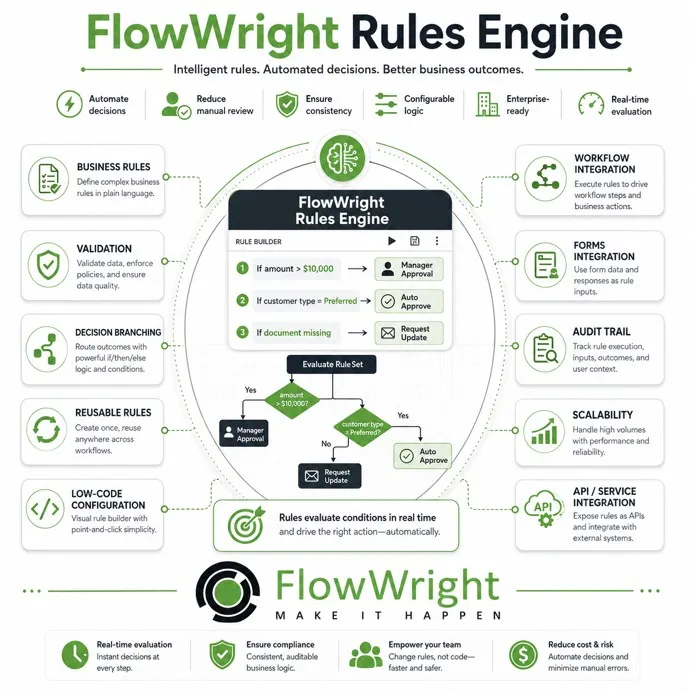
Runtime evaluation without an application restart
When a rule changes, FlowWright performs real-time in-memory compilation so the updated logic can be evaluated without an application restart or a costly deployment. That distinction matters in environments where processes run continuously and a maintenance window is difficult to schedule. A policy adjustment, routing condition, or validation requirement can be introduced with less operational disruption, while the workflow continues to use the current definitions.
The runtime model also keeps decision logic close to the process that uses it. Instead of copying conditions across application services. Teams can define the rule in the workflow configuration and let the engine evaluate it as each process instance reaches the relevant decision point. The result is a more maintainable boundary between application infrastructure and changing business policy.
C# expressions provide controlled technical depth
FlowWright supports C# expressions evaluated at runtime, giving developers precise control over process branching and data manipulation. This allows a rule to work with process variables, apply a meaningful business condition. And direct execution to the appropriate next step without forcing every scenario into a rigid, precompiled path. The visual workflow remains understandable, while the expression layer provides the flexibility expected by enterprise .NET teams.
Built for sustained enterprise execution
In-memory rule execution is most valuable when it supports more than a single decision. FlowWright is designed to handle high-volume enterprise workflows, so real-time evaluation can operate within broader process automation that includes forms, integrations, approvals, and reporting. This lets organizations respond to changing requirements without treating every rule update as a separate software release, while preserving the scalability needed for demanding operational workloads.
Decision Tables, Conditional Routing, and Approval Chains in Practice
A practical rules layer gives workflow architects a way to model decisions where they occur, rather than burying every exception in application code. FlowWright's visual designer integrates business rules into the process itself, giving teams granular control over branching and data manipulation. C# expressions are evaluated at runtime when advanced logic requires developer-level precision.
Use decision tables for multi-condition logic
Decision tables are useful when an outcome depends on several variables at once. An architect can define a grid of conditions and resulting actions, such as routing a request according to business unit, risk level, amount, or document status. The grid makes combinations easier to review than deeply nested code and gives process owners a clearer way to identify missing or conflicting rules.
Key benefits of decision tables in a workflow:
- Visual clarity — Conditions and outcomes appear in a readable grid rather than nested if-else blocks.
- Separation of concerns — The decision structure stays independent from surrounding process steps, so policy changes do not require redesigning the entire workflow.
- Auditability — Each combination of inputs and outputs is explicit, making it easier for compliance reviewers to confirm correct behavior.
This approach also separates the decision structure from the surrounding process steps. The workflow can collect data, evaluate the table, and continue along the appropriate path without forcing the entire process to be redesigned when a policy changes. See the FlowWright platform features for the broader set of visual design and automation capabilities.
Route conditions visually, then extend them when needed
Conditional routing handles straightforward if-else decisions directly on the process canvas. For example, a request may move to an additional review when a threshold is met, while lower-risk work proceeds through a shorter path. Visual branches let architects inspect the path a case will take and communicate that logic to workflow architects, process owners, and developers in a shared format.
When a condition involves calculations, transformations, or application-specific logic, C# expressions provide an extension point without abandoning the visual process model. FlowWright evaluates those expressions at runtime, so the rule can work with current process data rather than relying only on values known when the workflow was designed.
Build approval chains that respond to live data
Approval chains can combine sequential reviews with conditional branches. A request might require manager approval, then compliance review, with an additional subject-matter approval introduced only when runtime variables meet defined criteria. FlowWright supports runtime morphing, allowing a workflow to spawn sub-workflows and branch based on current data variables and business rule outputs. This means the process can adapt to the case in front of it instead of applying one fixed approval path to every request.
For enterprise teams, the benefit is control without unnecessary custom code. Architects define the process visually, developers add precise expressions where complexity warrants it, and the engine evaluates the rules as the workflow executes.
How Business Rules Dynamically Alter Process Flow Without Redeployment
Most process changes are not predictable enough to encode as a fixed sequence. A customer may require additional review, a transaction may cross a risk threshold. Or a case may need a specialist based on information gathered after the workflow has started. In a conventional implementation, changing that path can mean stopping an application, editing the process definition, and redeploying it. That creates delay precisely when the business needs a faster response.
FlowWright addresses this problem through runtime morphing. Its engine evaluates current data variables and business rule outputs while an instance is running. Based on those results, the active workflow can branch to a different definition or spawn a sub-workflow for a newly identified requirement. The original process does not need to be discarded simply because its next step depends on information that was unavailable at launch.
Respond to the data available now
Consider an approval process that begins with a standard review. If an order later exceeds a business-defined limit, the workflow can create an additional compliance or executive approval path. If the order falls within a lower-risk category, it can continue through the existing route. The decision is made from the values present at runtime, rather than from assumptions made when the process was originally designed.
This model is useful when rules vary by customer, region, product, risk profile, or organizational policy. Workflow architects can define a stable core process while allowing specific branches to appear only when needed. That keeps the primary design understandable without forcing every possible exception into one permanently expanded sequence.
Change logic without disrupting execution
Because rule compilation and evaluation occur in real time, business logic can be adjusted without requiring an application restart or a costly redeployment. Active instances can respond to updated conditions while preserving the broader process context. This separation between the process structure and its runtime decisions improves organizational agility: teams can adapt how work moves as policies and operating conditions evolve without treating every adjustment as a major release.
Business Rules Engine Workflow vs Standalone Rules Engines
The architectural choice is not simply whether an organization needs rules. It is where those rules live, how they are changed, and how closely they remain connected to process execution. Standalone engines can provide powerful decision modeling, but separating them from workflow execution often adds integration, deployment, and governance work.
| Dimension | FlowWright integrated approach | Standalone rules engine approach |
|---|---|---|
| Deployment model | Rules run inside the embedded .NET workflow engine, keeping decision logic close to process state, forms, integrations, and routing. | Rules typically run as a separate service or library boundary. The workflow must pass data to the engine and interpret its response, which can complicate integration. |
| Rule-change process | FlowWright supports real-time, in-memory compilation, allowing process logic to adjust without an application restart or costly deployment. Runtime evaluation can also change the path a workflow takes. | Changes may require a package release, service deployment, environment promotion, or coordinated version management, depending on the product and operating model. |
| Governance model | Workflow architects can govern rules in the same process context as approvals, data handling, and execution history. Visual design helps make branching logic easier to review. | Governance is often split between the rules repository and the workflow platform. Teams must align ownership, testing, versioning, audit trails, and access across both systems. |
| Skill level required | Process owners can work through visual design, while .NET developers retain access to programming abstractions and runtime expressions when deeper control is needed. | A dedicated business rules or BRMS team may be needed to model, integrate, test, and support a separate decision service, especially when logic is hard-coded or code-first. |
| Pricing model | Rules capability is part of the integrated FlowWright platform, so organizations avoid adding a separate rules-engine license to the workflow stack. | A separate license, service subscription, infrastructure footprint, or support contract may apply in addition to the workflow platform. |
For enterprises that need rules to evolve with live processes, integration reduces the distance between a decision and the action it triggers. FlowWright's scalable .NET engine is designed for high-volume enterprise workflows, while its programming abstractions make complex automation more accessible without hiding the control developers need. Read the guide to enterprise business rules management for broader governance considerations.
Frequently Asked Questions
What types of business logic can be handled inside a workflow?
Workflow rules can evaluate process variables, apply conditions, route work to different branches, and control approval paths. They can also select or create sub-workflows when the process requires a different sequence of activities.
Does changing a rule require redeploying the workflow?
Not necessarily. FlowWright compiles business logic in memory at runtime, so rule changes can take effect without restarting the application or redeploying the entire workflow. This helps workflow architects respond to changing policies while keeping the surrounding process intact.
Can .NET developers use code expressions with the visual designer?
Yes. FlowWright combines visual process design with runtime C# expression evaluation. Developers can implement precise conditions and calculations, while process owners can continue to understand the broader flow through the visual designer.
How do dynamic sub-workflows support complex decisions?
Dynamic sub-workflows let a running process spawn and manage additional workflow instances based on business rules. The process can branch to different workflow definitions or versions according to its context, rather than forcing every possible path into one fixed sequence.
Get started with FlowWright business rules
See how business rules can support responsive workflow automation while keeping process logic connected to execution. A focused conversation can help your team assess where real-time rule evaluation and flexible process design fit your environment. Get a demo of FlowWright's business rules engine workflow platform and talk with the FlowWright team about your goals.
















