
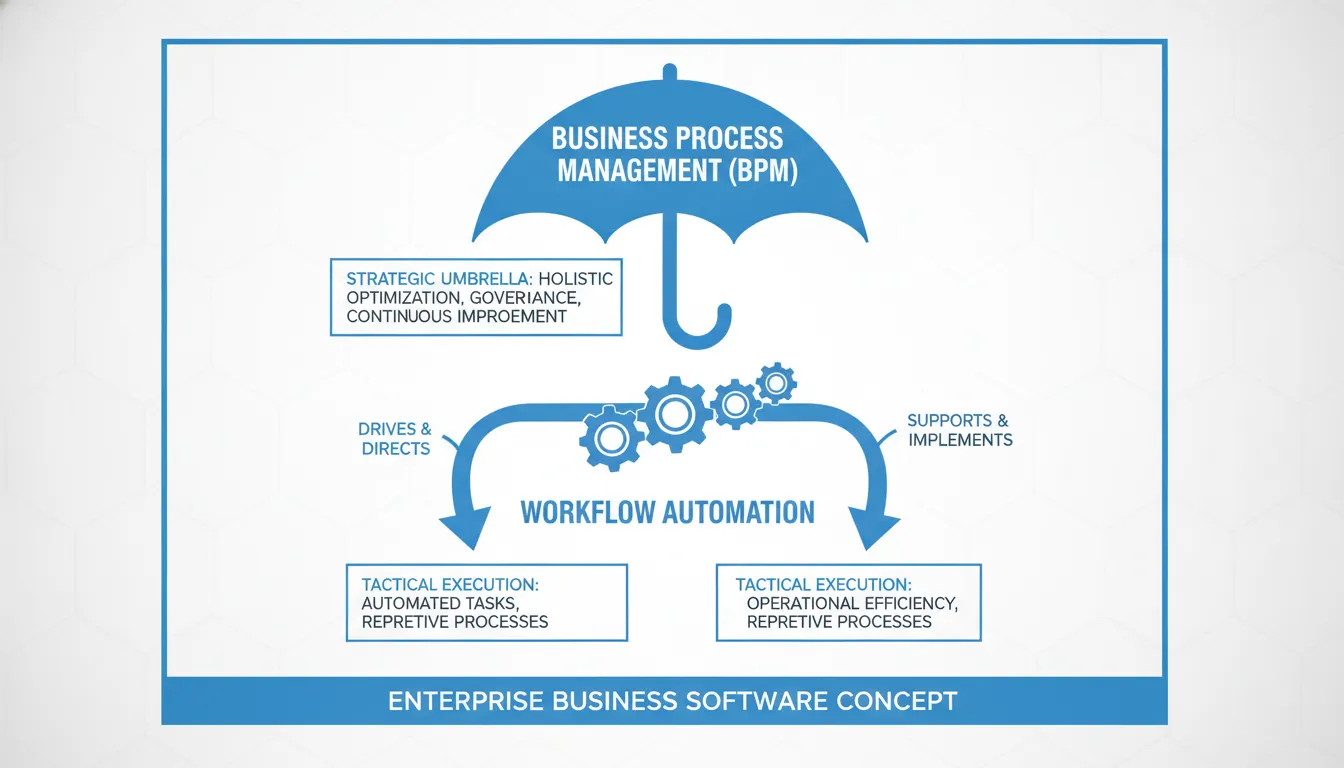
Enterprise processes breaking across three legacy systems cannot be fixed by automating a single email chain. Many software teams confuse quick automation fixes with complete, long-term process design. This mistake leaves deep system bottlenecks untouched.
Understanding business process management vs workflow automation starts with knowing the clear difference between long-term company strategy and daily task execution. According to research from the National Institutes of Health, BPM manages an ongoing cycle of finding, mapping, designing, and tracking how work flows across departments. In contrast, workflow automation focuses on task speed, routing work items and simple alerts to remove slow manual steps. Large companies use BPM to align complex, multi-system operations with their business plans. They use workflow automation to get quick efficiency wins on stable, department-level tasks. Workflow automation helps with single tasks. But a true BPM approach gives you the complete view you need for ongoing business growth and regulatory compliance.
But how do you know which system fits your current company needs? To choose the right path for your software teams and process owners, you must look closely at how each method works. We will start by exploring the strategic side of process design in What Is Business Process Management (BPM)?, where the path begins with
Business Process Management Vs Workflow Automation: What Is Business Process Management (BPM)?
Business process management (BPM) is not a single tool or a quick software fix. Instead, it is a long-term discipline used to guide and run how work flows across a whole company. Many leaders ask about business process management vs workflow automation when they want to improve efficiency. To make the right choice, you must first look at your work from a broad, strategic view.
Processes as Business Assets
A key rule of BPM is that processes are valuable assets. Just like a factory or a patent, a process must be documented, measured, and improved. When you treat processes as assets, you can align daily tasks with the long-term goals of the company.
Many firms run on hidden habits that live only in the minds of their staff. This lack of structure causes errors and makes it hard to scale. By using BPM, workflow architects and process owners can map out every step of their work. This mapping builds clear paths that make work steady, safe, and easy to track.
The Process Lifecycle
BPM is not a one-time project. Instead, it is an ongoing loop that repeats to keep the business agile. Academic studies show that BPM focuses on a holistic cycle of work. According to a study on process change research, this cycle includes process identification, discovery, analysis, design, implementation, and monitoring.
The six stages of this process loop are:
- Identification: Finding which processes need attention or have the biggest impact on the business.
- Discovery: Mapping the current state of the process as it is run today.
- Analysis: Finding delays, waste, or errors in the current workflow.
- Design: Planning a better, faster, and safer way to run the process.
- Implementation: Rolling out the new process using software, visual tools, and training.
- Monitoring: Tracking the live process to see if it meets speed and quality goals.
When a team finishes the monitoring stage, they do not simply stop. Instead, the data they gather flows back into the start of the loop. This constant feedback helps the firm find new ways to cut costs and save time.
Reengineering and Innovation
A common mistake is thinking that BPM only automates existing work. If you automate a bad process, you simply make bad things happen faster. BPM goes deeper than simple automation.
According to scholarly papers on business management, BPM is not confined to automating existing processes. It also includes process reengineering and innovation. This means you can completely rethink how your company operates. Instead of making small tweaks, you can design entirely new workflows to solve big problems. This focus on innovation makes BPM a strategic tool for growth, rather than just a way to save money on daily tasks.
What Is Workflow Automation?
At its core, workflow automation is the tactical set up of task flows. It routes work items, approvals, and alerts from one stage to the next. This tool handles data handoffs between systems to keep work moving. Instead of dealing with company-wide rules, it focuses on specific steps. This is a key point when studying business process management vs workflow automation.
By automating these tasks, teams can save time and reduce manual steps. The system ensures that the right person gets the right file at the right time. This removes the need for workers to send emails back and forth. Instead, the software does the heavy lifting behind the scenes.
Task speed and steady results
Most workflows use simple, linear paths. They do not need complex process changes to start working. Instead, they focus on specific tasks to gain speed and steady results. Teams often use these tools to achieve quick wins with predictable processes. For example, a simple sign-off path for expense reports fits this style. The system sends the form to a manager, sends an alert, and logs the result. This focus on small tasks helps teams work faster every day.
This standard flow is another key benefit. When human steps are automated, the results are always the same. This means fewer mistakes and less rework. It also frees up staff to focus on high-value work instead of basic data entry.
Compliance and process standards
Using automation also helps firms meet strict rules. Teams can use process models to host work steps. This helps them enforce compliance with predefined guidelines and policies. Every action follows a set path. This leaves a clear audit trail for auditors. Because the system controls each step, it reduces human errors. Users do not have to guess what to do next. The software guides them through the set sequence without delay.
Set workflows also make training easier. New hires do not have to learn a complex set of rules. They just follow the automated prompts in the software. This makes the onboarding process much faster and cheaper for the firm.
System and data handoffs
Modern workflow tools also connect other apps together. They pass data between systems without human help. For example, when a sale is closed, the tool can update the billing system and notify support. This ensures that no data gets lost between teams.
This type of link focuses on the technical execution of a single process. It does not try to manage the entire firm. Instead, it solves a specific data problem to keep the business running smoothly.
BPM vs Workflow Automation: The Core Differences
Many process owners confuse these two concepts. But they are not the same thing. To get the best results, you must know how they differ.
Strategic versus tactical focus
At its heart, business process management (BPM) is a broad field. It focuses on the holistic lifecycle of business processes. This lifecycle includes process design, analysis, and monitoring, as shown in academic process research. It does not just look at how tasks are run, but why they are run.
BPM is designed to manage the end-to-end business process from start to finish. It focuses on strategic alignment, agility, and continuous improvement across the entire firm. This approach needs deep support from many teams across your firm. It links directly to your business-wide strategy rather than simple task automation.
Scope and integration differences
On the other hand, workflow automation is a tactical, technology-driven tool. It is a key part of BPM that helps teams set up tasks quickly, as noted in a study on workflow methods. It focuses on the technical execution and routing of work items, often within a single process. It does not try to change how your entire business runs.
This type of automation aims to make everyday tasks much faster and more consistent. These simple tools focus on task efficiency for small groups. In contrast, BPM focuses on process optimization to reach big business goals. One improves a single task, while the other improves the whole firm.
The scale of these tools is also quite different in practice. Workflow automation often involves simple, linear processes that occur daily. These processes are easily digitized and automated without the need for complex changes to your work. They do not need a massive overhaul of your current systems.
A simple workflow tool may be confined to just one department in your office. In contrast, BPM platforms often integrate with many systems to run end-to-end workflows. They help track how work flows across various business groups and third-party tools. This deep integration gives process owners a clear view of overall performance.
Governance and visibility
Governance is another area where these two methods differ. Workflow tools usually handle simple rules and approvals for single teams. But BPM governs complex, cross-departmental policies that affect your entire company. It ensures that every business step aligns with compliance rules and goals.
The two approaches also differ in how they show process data. Simple workflows show task status and completion flags for single items. In contrast, BPM provides full visual dashboards and deep KPI analytics. These reports help process owners track and study overall business performance.
| Dimension | Business Process Management (BPM) | Workflow Automation |
|---|---|---|
| Scope | Enterprise-wide, end-to-end processes | Task-level, single-process workflows |
| Focus | Strategic optimization and alignment | Operational efficiency and speed |
| Time horizon | Continuous improvement cycle | Discrete, linear task execution |
| Governance | Cross-departmental management | Team or function-specific ownership |
| Visibility | Process dashboards and business KPIs | Task status and completion flags |
When Does Workflow Automation Make Sense on Its Own?
When comparing business process management vs workflow automation, you may ask when a narrow tool is enough. Large systems are great for big plans, but some tasks only need quick fixes. Workflow automation is best for small, everyday tasks that repeat in the same way. It is a tactical approach that makes daily work faster and more reliable without the need for a huge management platform.
Simple and Linear Processes
Some work flows in a straight line from start to finish. This is true for simple task chains like approving expense sheets or sending files to other teams. These linear processes do not need a complex design or constant changes to work well.
In these cases, workflow automation helps teams achieve quick wins by setting up predictable paths for work to follow. You can digitize these paths without any need to rebuild the whole process from scratch. This allows your team to save time and focus on more important work.
Automated Compliance and Routing
Workflow tools are also great for enforcing business rules. You can use them to route IT tickets or manage HR onboarding forms. The tool makes sure that every step follows your rules with no errors.
For instance, visual process models can host work procedures that keep operations in compliance with predefined policies. This ensures that every worker completes their tasks in a safe, steady way. It also gives a clear paper trail for audits later on.
A Practical First Step
Many groups are not ready to change their entire business model. They need a small start to see how tools can help them. Using simple workflow automation serves as an effective entry point for teams new to the space.
It lets you learn the basics of digital tools before you move to complex plans. You can fix your worst bottlenecks first, gain trust from your team, and prepare for larger growth in the future. Starting small reduces risk and helps you get value much faster.
When Does Business Process Management Become Necessary?
Many teams use simple tools to automate single tasks. But as a business grows, these tools are not enough. You must understand the choice of business process management vs workflow automation to scale your systems.
Simple tools route work within one department. In contrast, you need business process management when tasks span many groups and software systems. This helps you track the entire path of a task from start to end.
Complex Workflows Across Systems
BPM platforms connect with many systems to guide end-to-end work. Simple tools are often confined to just one department. Simple tools cannot pass data between different programs.
When tools do not talk to each other, team members must type the same facts twice. This slow manual work leads to many errors. It also slows down your entire team.
BPM needs deep team support because it connects to broad business strategy. It is not just about moving a single file. Instead, it aligns your whole team with long-term plans. This makes BPM vital when you must track work across various software tools and groups.
Enterprise architects look for systems that are easy to maintain. They need platforms with deep integration features. These features help connect databases, cloud apps, and local software. A strong BPM platform makes it easy to manage these links from one place.
Compliance and Real-Time Visibility
When you face strict rules, you must know how your business runs at all times. BPM-driven automation provides real-time transparency for complex processes. It aligns your visual process diagrams with your actual code.
This link helps you show compliance with industry rules. You can use efficient process documentation to prove that your team follows the correct steps.
Regulators want to see that your actual work matches your written rules. A BPM system ensures that your team cannot bypass needed steps. It forces every task to follow the set path.
Without a clear view, your company might fail audits because simple tools do not save full audit trails. But a BPM suite tracks who did what and when. This tracking gives you an active log. It keeps your business safe and makes sure you meet legal standards.
Tackling Process Drift and Change
Processes often change over time without your plans. This slow change is called process drift, and it can harm your workflow. Outer events can shock your business.
These sudden events force you to adapt in a fast and radical way. To fix these issues, you must use BPM to manage process change.
When an outer shock occurs, your business needs to change its rules fast. If your rules are hard-coded into old software, you cannot adapt. This delay can cost your business time and money.
When processes drift, teams lose track of standard steps. A BPM tool helps you find these changes quickly. This allows you to fix them before they cause big problems.
It acts as a single source of truth for your business. It allows you to model, test, and improve tasks on the go. This keeps your company agile, even when things change fast.
How Modern Low-Code Platforms Bridge BPM and Workflow Automation
Businesses often debate the merits of business process management vs workflow automation. Some view them as separate paths, but they work best when combined. BPM gives you the high-level plan, while workflow tools handle daily tasks. Knowing how they connect helps you build a better system.
To bridge this gap, teams now turn to an intelligent business process management suite (iBPMS). An enterprise workflow automation platform must support high-volume systems and maintain scalability. This type of tool connects high-level strategy with low-level work. It replaces separate systems with a single platform. This makes it easier for you to manage complex tasks across your whole business.
Intelligent process suites
Modern systems use visual maps to design workflows and engines to run them. A peer-reviewed study shows that workflow automation is a key part of BPM that helps in rapid prototyping of tasks. This link makes sure your process maps align with how tasks run. It keeps work steady and helps teams adapt when processes must change. When both tools work together, you gain full control.
Five steps to bridge the gap
- Model the process. Process owners use a visual map builder to plot out how work flows. They draw the steps and set the rules.
- Execute the tasks. The engine takes the visual map and runs it. It sends tasks to the right people and systems.
- Monitor the results. Low-code BPM platforms allow process owners to monitor output using dashboards and reporting tools. They track delays and find slow steps.
- Integrate your systems. The platform connects to your tools. It works well on any system, but is deeply optimized for .NET systems to support smooth data flow.
- Adapt in real time. Modern systems can dynamically change their plans and versions at runtime based on business rules. This unique feature is called runtime morphing.
A unified process strategy
This dynamic change is where tools like FlowWright excel. In older setups, changing an active process requires you to stop the system or change the code. FlowWright uses runtime morphing to let you spawn and manage sub-workflow runs on the fly. This means your high-level strategy stays intact, but the actual running of tasks can adapt instantly to new business rules. You save time and avoid system downtime when rules change.
When you bring these two forces together, you create a stronger business. You no longer have to choose between big-picture design and daily task management. Instead, you get a single system that handles both. By using a platform that bridges these needs, you can automate your tasks today while building a process that can scale and grow tomorrow. It is the best way to keep your processes smooth and efficient.
Frequently Asked Questions
How do you find out if your business needs a workflow tool or a full business process management suite?
Look at the scope of your problem. If you need to automate a simple, single task sequence like document routing, a basic workflow tool is enough. If you have complex, cross-department processes that need constant improvement, you need a full business process management suite. A study in PMC shows that true business process management governs the entire lifecycle from discovery to active monitoring.
Can business process management and workflow automation coexist in the same organization?
Yes, they can and should coexist. Workflow automation operates as the execution engine that runs specific tasks, while business process management provides the overall strategic framework and oversight. For example, a department might use simple automation to route forms, but a broader management suite connects these tasks to larger business goals and systems. This joint setup helps workflow architects and process owners monitor performance and find bottlenecks across the entire company.
Why does regulatory compliance require business process management instead of just workflow automation?
Compliance demands clear process views and detailed audit trails. Simple workflow tools only track task completion, whereas a business process management system aligns models with technical execution. According to research on PubMed, this model-driven approach improves transparency. This ensures that every process step is documented, secure, and compliant with industry rules, which simple task routing cannot do on its own.
How does runtime morphing help with complex business processes?
Runtime morphing is a key feature of advanced process platforms like FlowWright. It lets workflows change their own paths or spawn new sub-workflows on the fly based on business rules. Instead of forcing you to build new templates for every change, the system adapts quickly to real-time events. This helps workflow architects manage complex, shifting processes without stopping active work.
Ready to Align Your Enterprise Workflows and BPM Strategy?
Every single day that your business delays process management setup, your teams still lose good hours to simple manual tasks and slow administrative work. Starting your new workflow journey today allows you to get a clear view across all key teams and start saving critical time by next week. Linking your daily workflows on one simple low-code platform ensures you can stop costly blocks, connect your tools, and scale your business with ease.
Ready to streamline your processes? Call (781) 883-4179 to Get Demo and talk about your own automation goals. Our expert process teams are ready to help your firm succeed, reduce waste, and build a strong, simple workflow foundation today.
















